Search the Community
Showing results for tags 'modeling'.
-
Hi everyone! I'm new to 3DCoat, and in 3D art in general, and I'm looking for a good workflow. I've already worked several times in Blender, creating very low poly meshes, and I've sculpted high res meshes in ZBrush and I'm now starting with 3DCoat! I can do a blockout for a weapon or a base mesh for a character, and I've found no problems in importing the second in surface sculpt mode, subdiving/voxelizing it and sculpting the details. Ridiculously, I'm having more issues with the hard surface. The most common workflow in the world is creating a basic geometry in Maya/Blender and importing it in ZBrush/3DCoat, subdiving it, and sculpting details on the surface. I do like creating blockouts in Blender - mostly because I can control very, very good every face, vertex, and edge. Being a newbie to the software and having seen some videos around, my questions are: - Which workflow do you reccomend in general, or for a specific task like character/hardsurface and why? Do you use a blockout made in Blender/Maya/Etc or do you sculpt directly with voxels? - Does the voxel sculpt mode some particular cons? How good is the control over an hard shape/surfacem how does it feel? Would you compare it to an absolute, precise control like the one you have when you block out? - Does voxel sculpting give particular problems when it comes to retopology? Most people use a blockout to have a retopology mesh almost ready (never made a retopo before, so sorry for the ignorance about the topic)! Well, that's all for now (I've few other super-nooby questions to be honest, but they'll be for later)! All of this came because I've noticed that in voxel mode you can make crazy details with lightspeed and with great freedom, but also that if I import a blockout mesh and voxelize it, instead of starting with a voxel mesh, it'll create annoying voxely artifacts (apparently, 99% on inclined edges) that I can't make go away with Res+ and I don't know how to polish! I'm also wondering if it makes sense to NOT use voxel mode, considering the great advantages it offers even on a dynamesh... but to know that, I must wait for your response! Thanks to everyone in advantage for the help, I promise I'll annoy you more with silly questions on geometry and sculpting soon!
-
Ethan Hiley discussed the way you should approach building guns for modern AAA games. If you're interested in modeling, texture, animation - you might find some interesting tips here. https://80.lv/articles/production-of-3d-weapons-for-video-games/
-
I am trying to taper an a cylinder in 3D - Coat but I don't know how to do this. Like in the image: But rather than taper the object from the end I want to taper from the center so the center looks more skinny than the ends. Is there a way to do this in 3D - Coat? I am not importing geometry I am using the primitives in the voxel room. I've tried to scale it from the center using the transform tool but I can't seem to get the best results. Thanks!
-
Hi all, I've watched a ton of tutorials and read the manual, but I'm still a bit confused about the best way to do this. I have a base model for my bearded dragon, but would like to lay down some of those little spikes that come off of the head, as in the attached photo. For that matter, I'm not really sure how to do the scales, either, but I figure I'll need to do a bit more investigating for that. Any starting direction someone could provide would be fantastic. Thanks! -Justin
-
 This is part of a serie of tutorials about a Low Poly Scenario I created for a game. Feel free to ask any questions. Thanks for watching!
 -
-
-

-
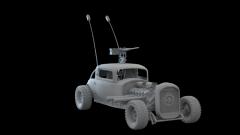
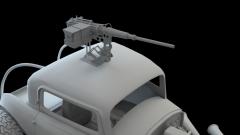
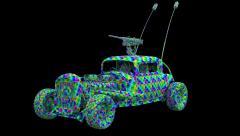
From the album: "Elvis" War Boys Car/Mad Max
Finished modeling portion of "Elvis"© Javis Jones 2016
-
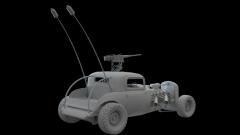
From the album: "Elvis" War Boys Car/Mad Max
Finished modeling portion of "Elvis"© Javis Jones 2016
-
-
 More images here - https://www.artstation.com/artwork/8Rlox Hello, everyone! This is my last personal project which I did in my spare time. Hedgehog modeling and sculpting - 3dCoat Fur and needles - Ornatrix plugin Grass - Forest Pack Render - Octane Hope you liked it! You can buy this model soon... Best regards, Andrew!
- 6 comments
-
- 3
-

-
- ornatrix
- octane render
- (and 8 more)
-
Hello guys! I am really happy to use 3d coat and this is my favorite program for texturing, retoping and UVs, BUT For the competition i need texture atlas and i totally can't understand how to do it. I use UV room a lot, but still not very good in some functions of 3d coat. What i want - for example: i have 4 512 textures. All models have their own UV and they textured in Metallic PBR + AO. (3-5 textures for each one asset). Question - how to create 1 1024 texture for that models? I know only long way - create 1024 texture in Photoshop, past 4 textures and place UV's by hands with 0.5 scale. But I am sure that this is stupid action and there are ways which will be better and faster in 3d coat. Or may be there are another ways . Please, if it possible, link any video or write step by step. I will really appreciate help, thx
-
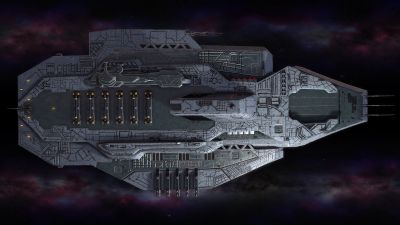
From the album: Polaris Sector game. Human race
Model for Polaris Sector game. Race - Humans. Video presentation here - https://youtu.be/KW5JNs_2NUA 3DCoat - Texturing, Shading and Materials. Marmoset Toolbag 2 - Render Zbrush - Modeling.© artofcharly
-
- 1
-
-
- polarissector
- spaceship
- (and 8 more)
-
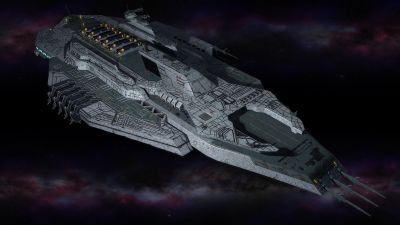
From the album: Polaris Sector game. Human race
Model for Polaris Sector game. Race - Humans. Video presentation here - https://youtu.be/KW5JNs_2NUA 3DCoat - Texturing, Shading and Materials. Marmoset Toolbag 2 - Render Zbrush - Modeling.© artofcharly
-
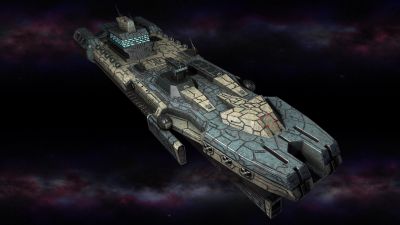
From the album: Polaris Sector game. Human race
Model for Polaris Sector game. Race - Humans. Video presentation here - https://youtu.be/KW5JNs_2NUA 3DCoat - Texturing, Shading and Materials. Marmoset Toolbag 2 - Render Zbrush - Modeling.© Artofcharly
-
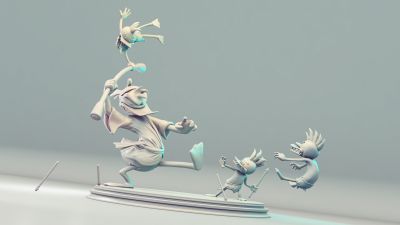
From the album: FanArt
First render for an upcoming project. Hope to show more very soon. Hope you like! -
 You can see 3D Coat used in the Modeling/Sculpting process starting at the 0:15min mark. Pretty interesting process from there. http://www.sciencechannel.com/tv-shows/how-its-made/videos/toy-figurines/ Starting with detailed drawing and computer renderings, casts of toy figurines are either 3D printed or hand carved out of wax. The casts turn out hundreds of textured parts that are assembled and painted. Source
 -
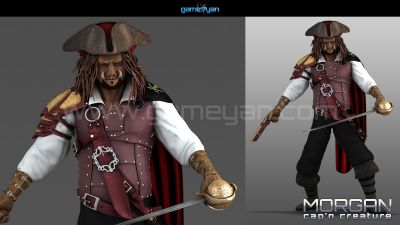
From the album: Character Animation & Modeling
Morgan Mascot Creature Character Modeling by GameYan Studio© GameYan Studio
-
Hello. I discovered 3d-Coat 16 days ago. I tried several software when doing retopology character. But when I started to do retopology in 3d-Coat I thought that this is where the developers really been working hard. Retopologiyu in 3d-Coat is a true delight. Now I am studying other features of 3d-Coat. I must say that the learning process is incredibly easy. This is my character for which I did retopology in 3d-Coat. I want to make my mesh as accurately as possible describes the shape of the body, with a minimum number of polygons. 10014 points of base mesh. WIP
-
Just curious how do you model really thin wins like a lizard, pterodactyl, or dragon might have?
-
Hi all!! i would like to post my second sculpt on 3dcoat, still its been 50/50 3d coat and 3ds max, im still thinking how to sculpt the fur, still need to learn a lot. all C & C are welcome.
-
Hi Everyone, I'm re-releasing all of my videos on Vimeo On Demand (thanks to some pesky new VAT stuff...). The first one is Maneuvering Points Vol I, where I cover all sorts of stuff related to solving poles and While I use Modo for the video, I made this video as program agnostic as possible. 3DC also has all most of the tool equivalents and is capable of reproducing the same results easily. Here's the link (or just click the image): https://vimeo.com/ondemand/maneuveringpoints1