Search the Community
Showing results for tags 'substance painter'.
Found 3 results
-
 Hello and good evening. I discovered this wonderful software called 3D Coat; I love the texturing and uv mapping workflows, but I can't seem to get a handle on the baking phase. I've tried several bakes, but each time the results are the same. Could somebody tell me why my bake looks like that and what I need do? I paid close attention to both the outside and interior cages. I've watched several tutorials, but to no avail. Help, what should I do to fix this?
 -
So, Im trying to figure out what exactly I need to do for the workflow to make this work properly. A model is made in Lightwave, and gets sent to me. Then I open 3dCoat, and I cut the UV model. The thing is, the model has 5 separate 'Paint Objects' and when I export them to Substance Painter 2, it states its one 'object' in the texture set list. What I want is for the 5 Paint Objects to be their own objects still in substance painter 2, as painting them there I'm more familiar with. Any help would be appreciated, Thanks, Hadfield1981
-
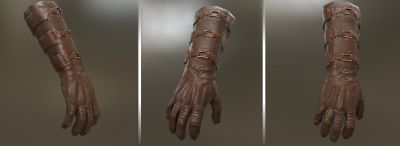
From the album: Smart materials
4 custom PBR collection where used for the creation of the Leather Glove 3D Coat PBR Procedural LEATHER SMART MATERIALS COLLECTIONS 1 & 2 3D Coat PBR Procedural WEATHERING SMART MATERIALS 3D Coat PBR Procedural METAL SMART MATERIALS Gumroad : https://gumroad.com/michaelgdrs 60 seamless custom LEATHER PBR accurate SMART MATERIALS ALL HAND SCANNED / PHOTOGRAPHS (game engines optimized 1024 x 1024 pixels) UNLIMITED COMBINATIONS CAN BE CREATED 4 Texture Channels Each ( 100% PBR Texture ACCURATE ) Base Color Normal Metallic Roughness Compatible with : 3D Coat PBR (WOOD smart materials ) Substance Painter ( Separate Pack, included textures can be used for node / image based procedural WOOD creation ) Toolbag 2 ( Separate Pack , NOT INCLUDED) Unity 5 PBR ( Separate Pack , included textures can be used for standard material creation) Zbrush ( Separate Pack , included textures can be used for texturing ) Unreal PBR ( Separate Pack , included textures can be used for PBR material creation) Substance Designer for texture based nodes ( SBS and SBSAR NOT INCLUDED ) Render Engines Compatibility : Mantra PBR Mantra IPR Renderman Arnold Redshift Vray Indigo Maxwell Octane Furryball Thea and any renderer that supports PBR and or gloss / specular workflow© Michael Bitsakis