Українська
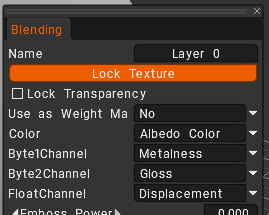
In 3DCoat, Byte1Channel and Byte2Channel are low-bit-depth data allocation formats used when creating custom texture export presets in the Export Constructor. They tell 3DCoat how to compress and structure the grayscale data channels (such as Roughness, Metalness, or Cavity) into texture maps.
Break Down of What They Mean
When exporting textures, you can pack different PBR data channels into image color slots (Red, Green, Blue, or Alpha). [1]
Byte1Channel(8-bit, 1 Channel):- Instructs 3DCoat to export a standard grayscale texture utilizing one byte of data (8 bits, giving 256 levels of gray).
- It is ideally used to output a single grayscale map, such as a Roughness map or a Metalness map on its own. [1]
Byte2Channel(16-bit total, 2 Channels):- Instructs 3DCoat to export a texture utilizing two bytes of data split evenly across two separate channels (often mapping to the R and G channels, or a Gray+Alpha format).
- It is commonly used for specialized packed game-engine workflows where two grayscale maps are bundled together into a single file to save memory (e.g., combining Roughness + Metalness or Normal X + Normal Y).
Where are they used?
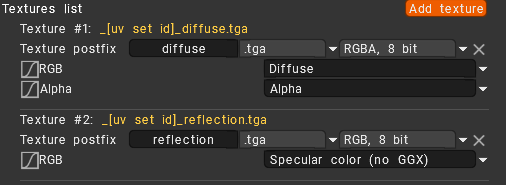
You encounter these terms when navigating to File > Export Objects and Textures and opening the Export Constructor to build a custom preset. When you click to add a texture map, 3DCoat asks you to choose the target image format structure.
When you choose standard color options like RGB or RGBA, you are choosing Byte1Channel or Byte2Channel.
Use it hen you explicitly need grayscale or two-channel packed texture files.