• English
  • 3DCoat Documentation
  • Chapters
    • Introduction to 3DCoat
    • Getting started
    • Interface
    • Brush Components
    • Workspaces Rooms
    • Scripting & Core API
    • Questions/Answers
    • licensing
    • Training Tutorials
  • Pilgway
  • Products
    • 3DCoat
    • 3DCoatTextura
    • 3DCoatPrint
    • PBRLibrary
  • Blog Posts
    • Creating 3D Character Using 3DCoat
  • Store
  • English English
    • Українська Українська
    • Español Español
    • Deutsch Deutsch
    • Français Français
    • 日本語 日本語
    • Русский Русский
    • 한국어 한국어
    • Polski Polski
    • 中文 (中国) 中文 (中国)
    • Português Português
    • Italiano Italiano
    • Suomi Suomi
    • Svenska Svenska
    • 中文 (台灣) 中文 (台灣)
    • Dansk Dansk
    • Slovenčina Slovenčina
    • Türkçe Türkçe
    • Nederlands Nederlands
    • Magyar Magyar
    • ไทย ไทย
    • हिन्दी हिन्दी
    • Ελληνικά Ελληνικά
    • Tiếng Việt Tiếng Việt
    • Lietuviškai Lietuviškai
    • Latviešu valoda Latviešu valoda
    • Eesti Eesti
    • Čeština Čeština
    • Română Română
    • Norsk Bokmål Norsk Bokmål
  • 3DCoat Documentation
  • Chapters
    • Introduction to 3DCoat
    • Getting started
    • Interface
    • Brush Components
    • Workspaces Rooms
    • Scripting & Core API
    • Questions/Answers
    • licensing
    • Training Tutorials
  • Pilgway
  • Products
    • 3DCoat
    • 3DCoatTextura
    • 3DCoatPrint
    • PBRLibrary
  • Blog Posts
    • Creating 3D Character Using 3DCoat
  • Store
  • English English
    • Українська Українська
    • Español Español
    • Deutsch Deutsch
    • Français Français
    • 日本語 日本語
    • Русский Русский
    • 한국어 한국어
    • Polski Polski
    • 中文 (中国) 中文 (中国)
    • Português Português
    • Italiano Italiano
    • Suomi Suomi
    • Svenska Svenska
    • 中文 (台灣) 中文 (台灣)
    • Dansk Dansk
    • Slovenčina Slovenčina
    • Türkçe Türkçe
    • Nederlands Nederlands
    • Magyar Magyar
    • ไทย ไทย
    • हिन्दी हिन्दी
    • Ελληνικά Ελληνικά
    • Tiếng Việt Tiếng Việt
    • Lietuviškai Lietuviškai
    • Latviešu valoda Latviešu valoda
    • Eesti Eesti
    • Čeština Čeština
    • Română Română
    • Norsk Bokmål Norsk Bokmål
Expand All Collapse All
  • Introduction to 3DCoat
  • Getting started
    • System requirements
    • Why 3DCoat is Unique?
    • Activating 3DCoat
    • Startup error
      • Startup error Mac
    • Color management
    • Upgrading permanent license
    • Linux Setup
      • Linux initial setup per-user installation
      • Linux initial setup for system
      • Tablet setup
      • To GTK3 from GTK2
      • Error libicuuc.so.70
    • Folders Structure
      • Custom documents folder
    • Different Forms of “Resolution”
    • Tablet on Window
    • Import and Export
    • Applinks in 3DCoat specifications
      • Blender 4.1 applink
        • Blender with the Applink in Linux
      • Blender 4.2/3/4/5 applink
      • Max Applink
      • Houdini applink
      • Lightwave uplink
  • Navigation
    • Quick Start Menu
    • Navigation Panel
    • Camera and Navigation
      • Customize Navigation as Blender
    • Viewport Navigation Gizmo
    • Left tool panel
    •  Activity Bar
    • Navigation using 3DConnexion devices
      • How to compile Spacenavd on non Ubuntu distro
    • Space Bar Menu
    • Stylus doesn't work in sculpting
    • Hotkeys
  • Interface
    • File
    • Edit
      • Calculate Curvature
      • Calculate Occlusion
      • Light Baking Tool
      • Preferences
    • View
    • Symmetry
    • Textures
    • Calculate
    • Layers
    • Freeze
    • Hide
    • Bake
    • Curves
      • Curves editor
      • Curves Properties RMB
      • Fill with mesh layer
      • Scale of imported curves
    • Windows
      • Tabbed and Popup Panels
      • Controls
    • Scripts
    • Addons
    • Capture
    • Help
    • Room Customization
    • Modify or Create new Room
  • Brush Components
    • Brush Top Bar
    • Brushes general use
      • Create alpha brushes and decals
      • Making alpha from current sculpt
      • Create a Brush from a 3D Object
      • Create brushes based on Curves
      • Load photoshop .abr brushes
    • Strokes
      • Curves Popup Menu
    • Brush Options panel
    • Conditions (Height/Color) Limiter
    • Strips Panel
    • Stencils Panel
    • Smart Materials
      • Add new images or materials
      • Attach a Smart material to a layer
      • Import Quixel Material
    • Presets for Brush alphas
  • Workspaces Rooms
    • Paint
      • Painting Modes
        • Per Pixel Painting
        • Displacement Painting (Micro-Vertex)
        • Ptex Painting
        • Surface Painting (Vertex painting)
      • Importing Into the Painting Room
        • Initial CC subdivision
        • UV Set smoothing
        • Sharp (hard) edge
        • Lock Normals
        • Load new UV layout After Model Changes
        • DAZ Genesis models into 3DCoat
        • ID map
      • Paint Menus
        • Edit menu
        • Textures Menu
          • Texture Baking Tools
        • Hide
        • Bake Paint menu
        • The Color Picker
      • Surface Materials
      • Top Bar for the Painting
      • The Layers Panel
        • The Blending Panel
        • Layer and Clipping Masks
      • Left Tool Panel
      • Opacity & Transparency
      • Tweak tools
        • Tweak Toolset
        • Exporting from the Tweak Room
      • Stencil & Material preview panel
      • Exporting from the Painting Room
    • UV
      • UV Top Bar
      • UV Left tool panel
      • UV Preview Panel
      • UV workflow example
      • Importing Into the UV Room
      • Exporting from the UV Room
    • Retopology
      • Importing into Retopo Room
      • Retopo Mesh Menu
        • Virtual Mirror Mode
      • Bake menu
        • Treat Poly Groups as Paint Objects
        • Baking guide
      • Strokes tool in Retopology
      • Top Bar
        • Select geometry
      • Left tool panel
        • Overall Purpose & Function
        • Add Geometry in the retopology room
        • Tweak Tools
        • UV Tools
        • Commands for Retopology room
      • AUTORETOPO
        • Autopo guide
      • Poly Groups
    • Sculpt
      • Sculpt Layer
      • Sculpt Tree
      • Sculpt Brush options
      • Top Bar
      • Brush engine
      • Geometry menu
      • Right-Click Menu
      • Shader
      • Voxel mode
        • Pure Voxel Sculpting
        • Density and Resolution
        • Clay Engine
        • Voxel Tools
        • Surface tools on Voxels
        • Voxel Adjustment Tools
        • Volumetric Painting
        • Voxel Objects Tools
      • Surface mode
        • Surface tools
        • Surface custom tools
        • Surface Layer
        • Surface adjust tools
        • Surface Painting
        • Surface Objects Tools
        • Multi Level Resolution
          • Multires tools
          • Multires adjust
          • Multires commands
      • Sculpt curves
        • Spline Curves
        • Splines model creation
      • Vector Displacement
      • Transform tools
        • Transform
        • Instancer
        • Move
        • Pose
        • Fit
        • Reproject
        • Surface Array
      • Primitives
      • Live Booleans
      • Commands for Sculpt room
      • Import to Sculpt Room
      • Exporting from the Sculpt Room
    • Render
      • Comparison of different roughness values
      • Render Panel Functions
      • Turntable
      • Fakebake the lighting -non PBR-
    • Factures
      • Workflow
    • Simplest
    • Modeling
      • Mesh Menu
      • Left tool panel
        • Add Geometry
          • Selected
        • Tweak
        • Smart Hybrid
        • UV modpanel
          • UV: Selected and Commands
        • Entire Mesh
      • Loft surface example by Fluffy
      • Blockout by Poeboi
      • Import Zbrush Polygroups for UV mapping
    • Kitbash
      • Create kitbash
      • Left tool panel Kitbash
    • 3DPrint
    • Photogrammetry
      • How to install Reality Capture
      • Reality Capture doesn't show up ?
    • Nurbs
    • Nodes
      • Sculpt shader Nodes Library
  • Scripting & Core API
    • Scripting
    • Core API
    • Python API
    • Extensions and Addons
  • Free 3DCoatPrint

Error libicuuc.so.70

277 views 0

Written by Carlos
March 4, 2026

on Fedora 43 KDE


Grakino said:

Fedora 43 KDE. I’ve go an error for 3DCoat 2026.01:

  • error while loading shared libraries: libicuuc.so.70: cannot open shared object file: No such file or director

I managed to fix this problem. I downloaded the necessary library from pkgs.org and installed all the libraries in LinuxLibs. It worked, and the program is working now.

But there is one thing that bothers me.
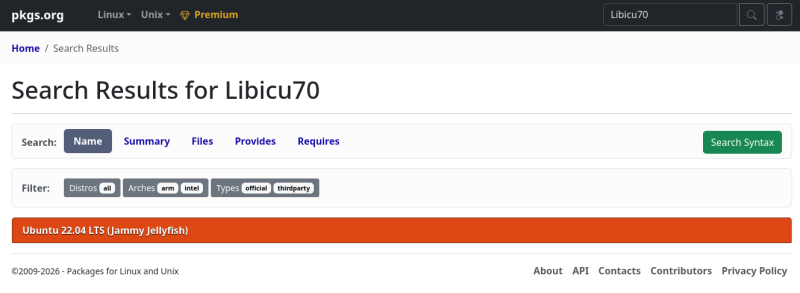
According to pkgs.org, Libicu70 is only available for Ubuntu 22.04 LTS.
I am afraid that owners of the current 24.04.4 LTS may encounter this problem.
On Manjaro XFCE


Lazyghould said:

Same thing on Manjaro XFCE. Did the same, installed the libraries in Linuxlibs folder. Although my Linux knowledge is extremely limited, maybe someone will find something useful from the steps I took:
*********************

1. Install basic build tools (one time). Run these commands in a terminal:
sudo pacman -S –needed base-devel gcc make pkgconf
2.Create a working directory and download the archive:
cd ~/Software
mkdir -p icu70-src
cd icu70-src
wget https://github.com/unicode-org/icu/releases/download/release-70-1/icu4c-70_1-src.tgz

3.Unpack it:
tar xf icu4c-70_1-src.tgz
cd icu/source

4.Configure ICU to install under your home. Install it under ~/Software/icu70-local so it doesn’t touch system /usr:
mkdir -p ~/Software/icu70-local
./configure –prefix=$HOME/Software/icu70-local

5.Build and install ICU 70 locally.This may take a few minutes:
make -j$(nproc)
make install

6. After this, the libraries will be under:
ls $HOME/Software/icu70-local/lib
You should see files like:
libicuuc.so.70
libicui18n.so.70
libicudata.so.70
    (and a few others)

7.Copy required ICU 70 libs into LinuxLibs:
cd ~/Software/3DCoat-2026.01

cp ~/Software/icu70-local/lib/libicuuc.so.70* LinuxLibs/
cp ~/Software/icu70-local/lib/libicui18n.so.70* LinuxLibs/
cp ~/Software/icu70-local/lib/libicudata.so.70* LinuxLibs/

Because LD_LIBRARY_PATH already points to LinuxLibs first, 3DCoat should now find libicuuc.so.70 and continue starting.

*********************

Was this helpful?

Yes  No
Related Articles
  • Extensions and Addons
  • Surface Layer
  • Space Bar Menu
  • Surface Materials
  • Factures
  • ID map
Previously
To GTK3 from GTK2
Up Next
Folders Structure
AI:
Hi! How can I help you?
Attention: This is a beta version of AI chat. Some answers may be wrong. See full version of AI chat