• English
  • 3DCoat Documentation
  • Chapters
    • Introduction to 3DCoat
    • Getting started
    • Interface
    • Brush Components
    • Workspaces Rooms
    • Scripting & Core API
    • Questions/Answers
    • licensing
    • Training Tutorials
  • Pilgway
  • Products
    • 3DCoat
    • 3DCoatTextura
    • 3DCoatPrint
    • PBRLibrary
  • Blog Posts
    • Creating 3D Character Using 3DCoat
  • Store
  • English English
    • ะฃะบั€ะฐั—ะฝััŒะบะฐ ะฃะบั€ะฐั—ะฝััŒะบะฐ
    • Espaรฑol Espaรฑol
    • Deutsch Deutsch
    • Franรงais Franรงais
    • ๆ—ฅๆœฌ่ชž ๆ—ฅๆœฌ่ชž
    • ะ ัƒััะบะธะน ะ ัƒััะบะธะน
    • ํ•œ๊ตญ์–ด ํ•œ๊ตญ์–ด
    • Polski Polski
    • ไธญๆ–‡ (ไธญๅ›ฝ) ไธญๆ–‡ (ไธญๅ›ฝ)
    • Portuguรชs Portuguรชs
    • Italiano Italiano
    • Suomi Suomi
    • Svenska Svenska
    • ไธญๆ–‡ (ๅฐ็ฃ) ไธญๆ–‡ (ๅฐ็ฃ)
    • Dansk Dansk
    • Slovenฤina Slovenฤina
    • Tรผrkรงe Tรผrkรงe
    • Nederlands Nederlands
    • Magyar Magyar
    • เน„เธ—เธข เน„เธ—เธข
    • เคนเคฟเคจเฅเคฆเฅ€ เคนเคฟเคจเฅเคฆเฅ€
    • ฮ•ฮปฮปฮทฮฝฮนฮบฮฌ ฮ•ฮปฮปฮทฮฝฮนฮบฮฌ
    • Tiแบฟng Viแป‡t Tiแบฟng Viแป‡t
    • Lietuviลกkai Lietuviลกkai
    • Latvieลกu valoda Latvieลกu valoda
    • Eesti Eesti
    • ฤŒeลกtina ฤŒeลกtina
    • Romรขnฤƒ Romรขnฤƒ
    • Norsk Bokmรฅl Norsk Bokmรฅl
  • 3DCoat Documentation
  • Chapters
    • Introduction to 3DCoat
    • Getting started
    • Interface
    • Brush Components
    • Workspaces Rooms
    • Scripting & Core API
    • Questions/Answers
    • licensing
    • Training Tutorials
  • Pilgway
  • Products
    • 3DCoat
    • 3DCoatTextura
    • 3DCoatPrint
    • PBRLibrary
  • Blog Posts
    • Creating 3D Character Using 3DCoat
  • Store
  • English English
    • ะฃะบั€ะฐั—ะฝััŒะบะฐ ะฃะบั€ะฐั—ะฝััŒะบะฐ
    • Espaรฑol Espaรฑol
    • Deutsch Deutsch
    • Franรงais Franรงais
    • ๆ—ฅๆœฌ่ชž ๆ—ฅๆœฌ่ชž
    • ะ ัƒััะบะธะน ะ ัƒััะบะธะน
    • ํ•œ๊ตญ์–ด ํ•œ๊ตญ์–ด
    • Polski Polski
    • ไธญๆ–‡ (ไธญๅ›ฝ) ไธญๆ–‡ (ไธญๅ›ฝ)
    • Portuguรชs Portuguรชs
    • Italiano Italiano
    • Suomi Suomi
    • Svenska Svenska
    • ไธญๆ–‡ (ๅฐ็ฃ) ไธญๆ–‡ (ๅฐ็ฃ)
    • Dansk Dansk
    • Slovenฤina Slovenฤina
    • Tรผrkรงe Tรผrkรงe
    • Nederlands Nederlands
    • Magyar Magyar
    • เน„เธ—เธข เน„เธ—เธข
    • เคนเคฟเคจเฅเคฆเฅ€ เคนเคฟเคจเฅเคฆเฅ€
    • ฮ•ฮปฮปฮทฮฝฮนฮบฮฌ ฮ•ฮปฮปฮทฮฝฮนฮบฮฌ
    • Tiแบฟng Viแป‡t Tiแบฟng Viแป‡t
    • Lietuviลกkai Lietuviลกkai
    • Latvieลกu valoda Latvieลกu valoda
    • Eesti Eesti
    • ฤŒeลกtina ฤŒeลกtina
    • Romรขnฤƒ Romรขnฤƒ
    • Norsk Bokmรฅl Norsk Bokmรฅl
Expand All Collapse All
  • Introduction to 3DCoat
  • Getting started
    • System requirements
    • Why 3DCoat is Unique?
    • Activating 3DCoat
    • Startup error
      • Startup error Mac
    • Color management
    • Upgrading permanent license
    • Linux Setup
      • Linux initial setup per-user installation
      • Linux initial setup for system
      • Tablet setup
      • To GTK3 from GTK2
      • Error libicuuc.so.70
    • Folders Structure
      • Custom documents folder
    • Different Forms of โ€œResolutionโ€
    • Tablet on Window
    • Import and Export
    • Applinks in 3DCoat
      • Blender 4.1 applink
        • Blender with the Applink in Linux
      • Blender 4.2/3/4/5 applink
      • Max Applink
      • Houdini applink
      • Lightwave uplink
  • Navigation
    • Quick Start Menu
    • Navigation Panel
    • Camera and Navigation
      • Customize Navigation as Blender
    • Viewport Navigation Gizmo
    • Left tool panel
    • ย Activity Bar
    • Navigation using 3DConnexion devices
      • How to compile Spacenavd on non Ubuntu distro
    • Space Bar Menu
    • Stylus doesn't work in sculpting
    • Hotkeys
  • Interface
    • File
    • Edit
      • Calculate Curvature
      • Calculate Occlusion
      • Light Baking Tool
      • Preferences
    • View
    • Symmetry
    • Textures
    • Calculate
    • Layers
    • Freeze
    • Hide
    • Bake
    • Curves
      • Curves editor
      • Curves Properties RMB
      • Fill with mesh layer
      • Scale of imported curves
    • Windows
      • Tabbed and Popup Panels
      • Controls
    • Scripts
    • Addons
    • Capture
    • Help
    • Room Customization
    • Modify or Create new Room
  • Brush Components
    • Brush Top Bar
    • Brushes general use
      • Create alpha brushes and decals
      • Making alpha from current sculpt
      • Create a Brush from a 3D Object
      • Create brushes based on Curves
      • Load photoshop .abr brushes
    • Strokes
      • Curves Popup Menu
    • Brush Options panel
    • Conditions (Height/Color) Limiter
    • Strips Panel
    • Stencils Panel
    • Smart Materials
      • Add new images or materials
      • Attach a Smart material to a layer
      • Import Quixel Material
    • Presets for Brush alphas
  • Workspaces Rooms
    • Paint
      • Painting Modes
        • Per Pixel Painting
        • Displacement Painting (Micro-Vertex)
        • Ptex Painting
        • Surface Painting (Vertex painting)
      • Importing Into the Painting Room
        • Initial CC subdivision
        • UV Set smoothing
        • Sharp (hard) edge
        • Lock Normals
        • Load new UV layout After Model Changes
        • DAZ Genesis models into 3DCoat
        • ID map
      • Paint Menus
        • Edit menu
        • Textures Menu
          • Texture Baking Tools
        • Hide
        • Bake Paint menu
        • The Color Picker
      • Surface Materials
      • Top Bar for the Painting
      • The Layers Panel
        • The Blending Panel
        • Layer and Clipping Masks
      • Left Tool Panel
      • Opacity & Transparency
      • Tweak tools
        • Tweak Toolset
        • Exporting from the Tweak Room
      • Stencil & Material preview panel
      • Exporting from the Painting Room
    • UV
      • UV Top Bar
      • UV Left tool panel
      • UV Preview Panel
      • UV workflow example
      • Importing Into the UV Room
      • Exporting from the UV Room
    • Retopology
      • Importing into Retopo Room
      • Retopo Mesh Menu
        • Virtual Mirror Mode
      • Bake menu
        • Treat Poly Groups as Paint Objects
        • Baking guide
      • Strokes tool in Retopology
      • Top Bar
        • Select geometry
      • Left tool panel
        • Overall Purpose & Function
        • Add Geometry in the retopology room
        • Tweak Tools
        • UV Tools
        • Commands for Retopology room
      • AUTORETOPO
        • Autopo guide
      • Poly Groups
    • Sculpt
      • Sculpt Layer
      • Sculpt Tree
      • Sculpt Brush options
      • Top Bar
      • Brush engine
      • Geometry menu
      • Right-Click Menu
      • Shader
      • Voxel mode
        • Pure Voxel Sculpting
        • Density and Resolution
        • Clay Engine
        • Voxel Tools
        • Surface tools on Voxels
        • Voxel Adjustment Tools
        • Volumetric Painting
        • Voxel Objects Tools
      • Surface mode
        • Surface tools
        • Surface custom tools
        • Surface adjust tools
        • Surface Painting
        • Surface Objects Tools
        • Multi Level Resolution
          • Multires tools
          • Multires adjust
          • Multires commands
      • Sculpt curves
        • Spline Curves
        • Splines model creation
      • Vector Displacement
      • Transform tools
        • Transform
        • Instancer
        • Move
        • Pose
        • Fit
        • Reproject
        • Surface Array
      • Primitives
      • Live Booleans
      • Commands for Sculpt room
      • Import to Sculpt Room
      • Exporting from the Sculpt Room
    • Render
      • Comparison of different roughness values
      • Render Panel Functions
      • Turntable
      • Fakebake the lighting -non PBR-
    • Factures
      • Workflow
    • Simplest
    • Modeling
      • Mesh Menu
      • Left tool panel
        • Add Geometry
          • Selected
        • Tweak
        • Smart Hybrid
        • UV modpanel
          • UV: Selected and Commands
        • Entire Mesh
      • Loft surface example by Fluffy
      • Blockout by Poeboi
      • Import Zbrush Polygroups for UV mapping
    • Kitbash
      • Create kitbash
      • Left tool panel Kitbash
    • 3DPrint
    • Photogrammetry
      • How to install Reality Capture
      • Reality Capture doesn't show up ?
    • Nurbs
    • Nodes
      • Sculpt shader Nodes Library
  • Scripting & Core API
    • Scripting
    • Core API
    • Python API
  • Free 3DCoatPrint

Nodes

524 views 0

Written by Carlos
March 21, 2025

On current development step nodes will only work with sculpted objects.
By example you can use the node system to create voxel displacement by utilizing the “Nodes” workspace.

Node source codes are on UserPrefs/Scripts/GPUNodes folder

New features found on version 2026+:

  • the node system has been updated to prevent links between incompatible properties.
  • The material preview renderer has been updated.
  • A button for inverting input channels has been added.
  • Required maps, such as Ambient Occlusion and Curvature, are now automatically calculated.
  • The ability to use input channel correction curves in the node source code has been added.

Here are the steps


  • Switch to the “Nodes” workspace.
  • Create a new node graph.
  • Add a “Voxel Displacement” node to your graph.
  • Connect the necessary input nodes, such as texture maps or procedural textures, to define the displacement pattern.
  • Adjust the parameters of the “Voxel Displacement” node to control the intensity and direction of the displacement.
  • Apply the node graph to your voxel object to see the displacement effect.

This process allows you to create complex displacement patterns using a visual node-based approach.
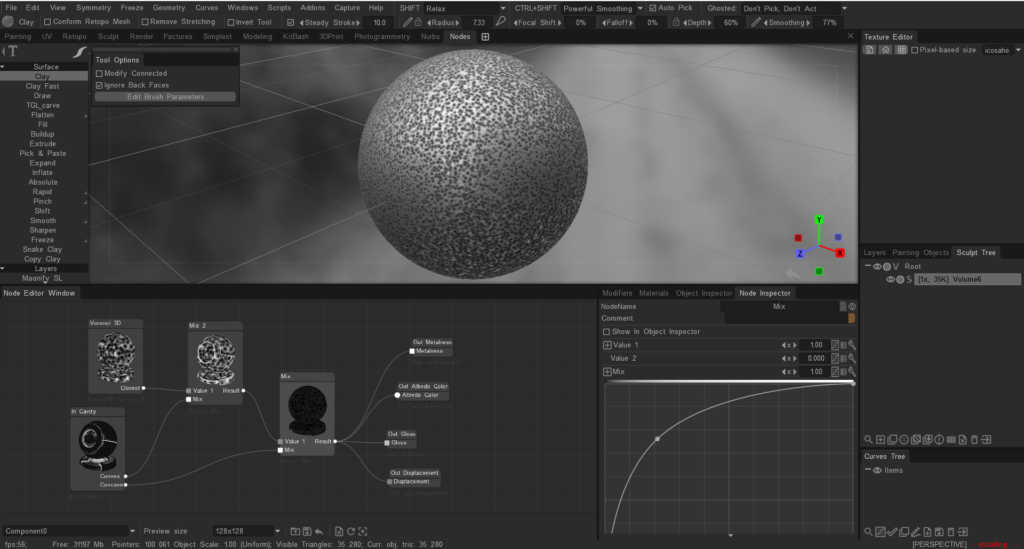
Node system for painting


The node system for painting is not directly available as it is primarily used for creating shaders and procedural textures.

Painting in 3DCoat is typically done using the tools and features available in the Paint Room, such as brushes, layers, and smart materials.

If you are looking to create complex textures or effects, you can use the existing painting tools and techniques, but the node system is not used for painting directly.

We plan to post a build with a node system for per-pixel texturing on the forum, but it will be a separate .exe file of the beta version, since this is a very big change and it will need to be tested separately.

Was this helpful?

Yes  No
Related Articles
  • Error libicuuc.so.70
  • Space Bar Menu
  • Surface Materials
  • Factures
  • ID map
  • Surface Array
Previously
Nurbs
Up Next
Sculpt shader Nodes Library
AI:
Hi! How can I help you?
Attention: This is a beta version of AI chat. Some answers may be wrong. See full version of AI chat