 Čeština
The 3DCoat Node System is a non-destructive, procedural engine that lets artists build complex materials, masks, and shaders by visually linking mathematical operations, procedural noises, and geometry in a graph. Instead of drawing pixels destructively, the software dynamically compiles these node graphs into highly optimized GPU shader.
Nodes let you to generate textures from procedural patterns within node-based graphics.
Is Non-destructive texturing (Node-Based Workflow) No more limitations of classic pixel painting!
Now you can create materials, masks, and effects using a visual editor (Node Editor).
Any element — rust intensity, base color, glossiness, or scratches — remains editable at any stage of work. Change parameters and instantly observe the result on the 3D model in real time.
How It Works Under the Hood
Each node functions as an input, output, or operation. You connect nodes together in the Node Editor, and 3DCoat uses NodeGraph Language (NGL)—an extension of GLSL—to execute the math directly on your graphics card. This means the materials you create are resolution-independent and will automatically adapt to your 3D model’s curvature, ambient occlusion, and physical spac
– High-performance GPU nodes (NGL) Under the hood of the new system, dynamic compilation of nodes into optimized shaders based on NodeGraph Language (NGL) is working. All procedural magic, mathematical operations, and noise generators are calculated directly on the graphics card (GPU).
– A new generation of smart materials, masks, and other presets:
- NGMaterials: Procedural smart materials that perfectly adapt to the curvature, shading (Ambient Occlusion), and other properties of your model.
- NGMasks: Procedural “smart” masks for generating realistic wear, dirt, scratches, etc.
- NGModifiers and NGFilters: Powerful tools for geometry deformation and procedural post-processing of current layers.
– These materials support approximately 30 channels; you can read more about them in the documentation, in the PBM Channels section.
– You can find more detailed documentation on these features in the Node System and GPU Texturing sections; the documentation will be updated.
Core Node Categories
3DCoat provides a robust library of GPU nodes to control how your textures and materials behave
In & Out: Primary data sources (inputs) and nodes that define the final routing into PBR channels like Albedo, Metalness, or Gloss (outputs).
Material: High-level nodes used to assemble, mix, or break apart full PBR materials.
Patterns & Pattern3D: Generators for 2D noises/geometric shapes and true volumetric 3D noise that flow seamlessly across UV seams.
GeometryIn: Nodes that extract fundamental spatial data from the mesh, such as world position and surface normals.
Color & Vector: Nodes dedicated to color correction and basic mathematical operations (e.g., Add, Subtract, Multiply) that act as the logic glue between nodes.
Texture: Utilities for sampling external bitmaps, handling standard UV mapping, and triplanar projection.
Practical Uses
You can access the node graph editor directly from your Sculpt Layers or the Material IO tab. With it, artists can easily:
- Generate resolution-independent Smart Materials.
- Drive procedural surface effects (e.g., rust, wear, or dirt) based on model geometry.
- Add detailed surface relief or displacement without altering base geometry.
Updated User Interface New windows have been added for convenient work
Node Editor (the main space for building logic), Node Inspector, and Object Inspector.
You can pin any node parameters (using the “eye” icon) in the general object or layer parameters and easily change them via the Object Inspector.
This allows for configuring complex materials with convenient sliders without constantly diving into the node graph.
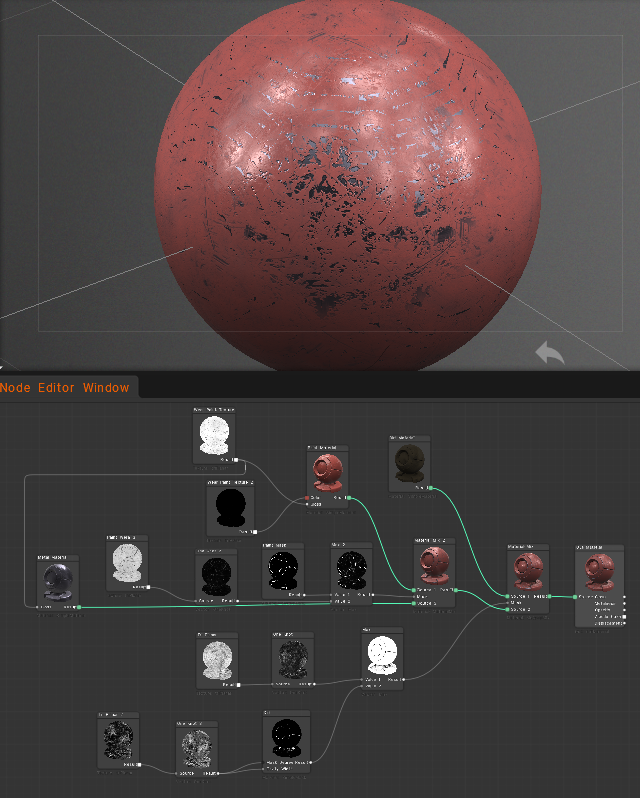
On v2025 nodes will only work with sculpted objects. On v2026 work on Sculpted and Painted Objects.
New features found on version 2026+:
- the node system has been updated to prevent links between incompatible properties.
- The material preview renderer has been updated.
- A button for inverting input channels has been added.
- Required maps, such as Ambient Occlusion and Curvature, are now automatically calculated.
- The ability to use input channel correction curves in the node source code has been added.
Here are the steps
- Switch to the “Nodes” workspace.
- Create a new node graph.
- Add a “Voxel Displacement” node to your graph.
- Connect the necessary input nodes, such as texture maps or procedural textures, to define the displacement pattern.
- Adjust the parameters of the “Voxel Displacement” node to control the intensity and direction of the displacement.
- Apply the node graph to your voxel object to see the displacement effect.
This process allows you to create complex displacement patterns using a visual node-based approach.
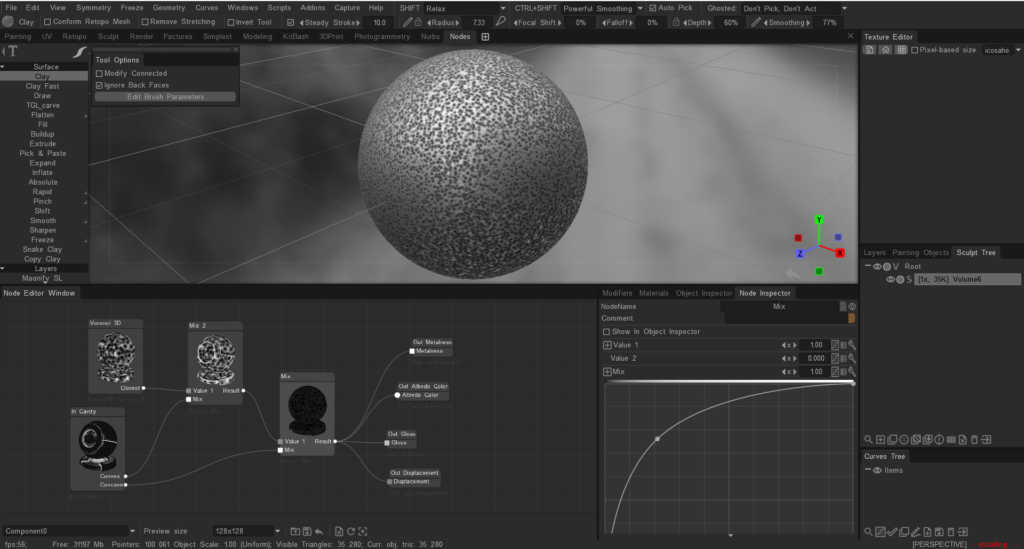
Node system for painting
The node system for painting is available an v2026 as it is primarily used for creating shaders and procedural textures for Materials.
Painting in 3DCoat is typically done using the tools and features available in the Paint Room, such as brushes, layers, and smart materials.
If you are looking to create complex textures or effects, you can use the existing painting tools and techniques, but the node system is not used for painting directly.
Tutorials
3DCoat 2026 GPU version Intro: A short video demonstrating the main functions.
3DCoat Nodal Network Introduction (for Sculpt Objects): This video is a very brief introduction to the Nodal Network, first available for dense Voxel or High Poly objects within the Sculpt workspace, using shaders as the base.
Once the user is satisfied with the results, they can later bake those shaders to a material.
In the 2026 Release, this nodal network will be available for the Paint workspace (via PPP/Per Pixel Painting mode), offering an unprecedented combination of powerful Texture Painting tools and Nodal Material creation.