• Slovenčina
  • Dokumentácia 3DCoat
  • Chapters
    • Úvod do 3DCoat
    • Začíname
    • Rozhranie a navigácia
    • Komponenty Brush
    • Pracovné priestory Miestnosti
    • Scripting a Core API
    • Otázky/Odpovede
    • licensing
    • Školenia
  • Pilgway
  • Products
    • 3DCoat
    • 3DCoatTextura
    • 3DCoatPrint
    • PBRLibrary
  • Blog Posts
  • Store
  • Slovenčina Slovenčina
    • English English
    • Українська Українська
    • Español Español
    • Deutsch Deutsch
    • Français Français
    • 日本語 日本語
    • Русский Русский
    • 한국어 한국어
    • Polski Polski
    • 中文 (中国) 中文 (中国)
    • Português Português
    • Italiano Italiano
    • Suomi Suomi
    • Svenska Svenska
    • 中文 (台灣) 中文 (台灣)
    • Dansk Dansk
    • Türkçe Türkçe
    • Nederlands Nederlands
    • Magyar Magyar
    • ไทย ไทย
    • हिन्दी हिन्दी
    • Ελληνικά Ελληνικά
    • Tiếng Việt Tiếng Việt
    • Lietuviškai Lietuviškai
    • Latviešu valoda Latviešu valoda
    • Eesti Eesti
    • Čeština Čeština
    • Română Română
    • Norsk Bokmål Norsk Bokmål
  • Creating 3D Character Using 3DCoat
  • Dokumentácia 3DCoat
  • Chapters
    • Úvod do 3DCoat
    • Začíname
    • Rozhranie a navigácia
    • Komponenty Brush
    • Pracovné priestory Miestnosti
    • Scripting a Core API
    • Otázky/Odpovede
    • licensing
    • Školenia
  • Pilgway
  • Products
    • 3DCoat
    • 3DCoatTextura
    • 3DCoatPrint
    • PBRLibrary
  • Blog Posts
  • Store
  • Slovenčina Slovenčina
    • English English
    • Українська Українська
    • Español Español
    • Deutsch Deutsch
    • Français Français
    • 日本語 日本語
    • Русский Русский
    • 한국어 한국어
    • Polski Polski
    • 中文 (中国) 中文 (中国)
    • Português Português
    • Italiano Italiano
    • Suomi Suomi
    • Svenska Svenska
    • 中文 (台灣) 中文 (台灣)
    • Dansk Dansk
    • Türkçe Türkçe
    • Nederlands Nederlands
    • Magyar Magyar
    • ไทย ไทย
    • हिन्दी हिन्दी
    • Ελληνικά Ελληνικά
    • Tiếng Việt Tiếng Việt
    • Lietuviškai Lietuviškai
    • Latviešu valoda Latviešu valoda
    • Eesti Eesti
    • Čeština Čeština
    • Română Română
    • Norsk Bokmål Norsk Bokmål
  • Creating 3D Character Using 3DCoat
Expand All Collapse All
  • Úvod do 3DCoat
  • Začíname
    • System requirements
    • Why 3DCoat is Unique?
    • Aktivácia 3DCoat
    • Chyba pri spustení
      • Startup error Mac
    • Color management
    • Upgrading permanent license
    • Linux Setup
      • Linux initial setup per-user installation
      • Linux initial setup for system
      • Tablet setup
      • To GTK3 from GTK2
    • Štruktúra priečinkov
      • Custom documents folder
    • Rôzne formy „rozlíšenia“
    • Tablet on Window
    • Import & Export
    • Applinks v 3DCoat
      • Odkaz na aplikáciu Blender
        • Blender with the Applink in Linux
      • Blender 4.2/3/4/5 applink
      • Max Applink
      • Houdini applink
      • Lightwave uplink
  • Navigation
    • Otvorenie dialógového okna (ponuka rýchleho spustenia)
    • Navigačný panel
    • Fotoaparát a navigácia
      • Customize Navigation as Blender
    • Viewport Navigation Gizmo
    • Left tool panel
    •  Activity Bar
    • Navigácia pomocou zariadení 3DConnexion
      • How to compile Spacenavd on non Ubuntu distro
    • Stylus doesn’t work in sculpting
    • Klávesové skratky
  • Rozhranie a navigácia
    • Ponuka Súbor
    • Menu Upraviť
      • Calculate Curvature
      • Calculate Occlusion
      • Light Baking Tool
      • Predvoľby
    • Zobraziť menu
    • Symetria
    • Textures
    • Calculate
    • Menu Vrstvy
    • Menu zmrazenia
    • Hide
    • Bake
    • Krivky 2022
      • Menu Krivky
      • Curves Properties RMB
      • Vyplňte sieťovou vrstvou
      • Scale of imported curves
    • Menu systému Windows
      • Vyskakovacie panely systému Windows s kartami
      • Posúvače
    • Scripts
    • Addons
    • Capture
    • Ponuka Pomoc
    • Prispôsobenie
    • Upravte alebo vytvorte novú miestnosť
  • Komponenty Brush
    • Vrchná lišta Brush
    • Štetce na všeobecné použitie
      • Vytvárajte štetce a nálepky
      • Vytváranie alfy zo súčasného sochárstva
      • Vytvorte Brush z 3D objektu
      • Create brushes based on Curves
      • Load photoshop .abr brushes
    • Ťahy
      • Vyskakovacie menu Krivky
    • Možnosti Brush
    • Obmedzovač podmienok
    • Panel pásov
    • Panel šablón
    • Inteligentné materiály
      • Pridajte nové obrázky alebo materiály
      • Pripojte inteligentný materiál k vrstve
      • Import Quixel Material
    • Ako vytvoriť predvoľby pre Brush
  • Pracovné priestory Miestnosti
    • Painting
      • Painting textúr a režimy
        • Painting na Per-Pixel
        • Displacement Painting (Micro-Vertex)
        • Ptex Painting
        • Povrchové Painting (Polypainting)
      • Import do Painting
        • Initial CC subdivision
        • UV Set smoothing
        • Sharp (hard) edge
        • Zamknúť Normály
        • Načítať nové rozloženie UV po zmenách modelu
        • DAZ Genesis models into 3DCoat
        • ID map
      • Ponuky pracovného priestoru Painting
        • Edit menu
        • Menu textúry
          • Nástroje na Baking textúr
        • Skryť
        • Menu pre Bake Paint
        • Výber farieb
      • Horná lišta pre Painting
      • Panel Vrstvy
        • Panel miešania
        • Layer and Clipping Masks
      • Nástroje na Painting
      • Nepriehľadnosť – transparentnosť
      • Vylaďte pracovný priestor
        • Súprava nástrojov Tweak
        • Export z Tweak Room
      • Panel náhľadu masky/materiálu
      • Export z miestnosti na Painting
    • Pracovný priestor UV
      • Horná UV lišta
      • UV Ľavý panel nástrojov
      • Panel náhľadu UV
      • Príklad pracovného postupu UV
      • Import do UV miestnosti
      • Vývoz z UV miestnosti
    • Retopológia
      • Import do miestnosti Retopo
      • Menu Retopo Mesh a Menu pečenia
        • Režim virtuálneho zrkadla
      • Bake menu
        • Treat Poly Groups as Paint Objects
        • Baking guide
      • Horná lišta
        • Vyberte geometriu
      • Ľavý panel nástrojov v miestnosti retopológie
        • Celkový účel a funkcia
        • Pridať geometriu
          • Nástroj ťahy v Retopológii
        • Retopo Tweak Tools
        • UV nástroje
        • Príkazy pre miestnosť retopológie
      • AUTORETOPO
        • Autopo guide
      • Poly skupiny
    • Sculpt
      • Sculpt Layer
      • Vyrezávať strom
      • Možnosti Sculpt Brush
      • Top Bar
      • Motor Brush
      • Podmenu Geometria
      • Vystrihnite ponuku „Kliknite pravým tlačidlom myši“.
      • Shaders
      • Voxel režim
        • Čisté vyrezávanie Voxel
        • Hustota a rozlíšenie
        • Hlinený motor
        • Nástroje Voxel
        • Povrchové nástroje na voxeloch
        • Nástroje na úpravu Voxel
        • Objemové Painting
        • Nástroje Voxel objektov
      • Povrchový režim
        • Povrchové nástroje
        • Vlastné nástroje pre povrch
        • Nástroje na úpravu povrchu
        • Povrchové Painting
        • Nástroje povrchových objektov
        • Viacúrovňové rozlíšenie
          • Multires tools
          • Multires adjust
          • Multires commands
      • Vytvarujte krivky
        • Spline krivky
        • Splines model creation
      • Vektorové posunutie
      • Nástroje na transformáciu povrchu
        • Nástroje na transformáciu Voxel
        • Instancer
        • Move
        • Pose
        • Fit
        • Reproject
        • Surface Array
      • Voxel Primitives & Import Tools
      • Živé boolovské hodnoty
      • Príkazy pre miestnosť Sculpt
      • Import do Sculpt Room
      • Export z miestnosti Sculpt Room
    • Vykresliť
      • Comparison of different roughness values
      • Funkcie panela vykresľovania
      • Gramofón
      • Falošné osvetlenie - bez PBR-
    • Factures
      • Pracovný tok
    • Najjednoduchšie
    • Modelovanie
      • Mesh Menu
      • Ľavý panel nástrojov v Modelárni
        • Pridať geometriu
          • Vybraný
        • Tweak
        • Smart Hybrid
        • UV
          • Príkazy
        • Celá sieťovina
      • Príklad loftového povrchu od Fluffy
      • Blockout od Poeboi
      • Import Zbrush Polygroups for UV mapping
    • Kitbash - Rýchla tvorba 3D modelov
      • Create kitbash
      • Left tool panel Kitbash
    • 3DPrint
    • Photogrammetry
      • How to install Reality Capture
      • Reality Capture doesn’t show up ?
    • Sieťka do miestnosti NURBS
    • Nodes
      • Sculpt shaders Nodes Library
  • Scripting a Core API
    • Scripting
    • Core API
    • Python API
  • Bezplatná 3DCoatPrint

Nodes

468 views 0

Written by Carlos
March 21, 2025

On current development step nodes will only work with sculpted objects.

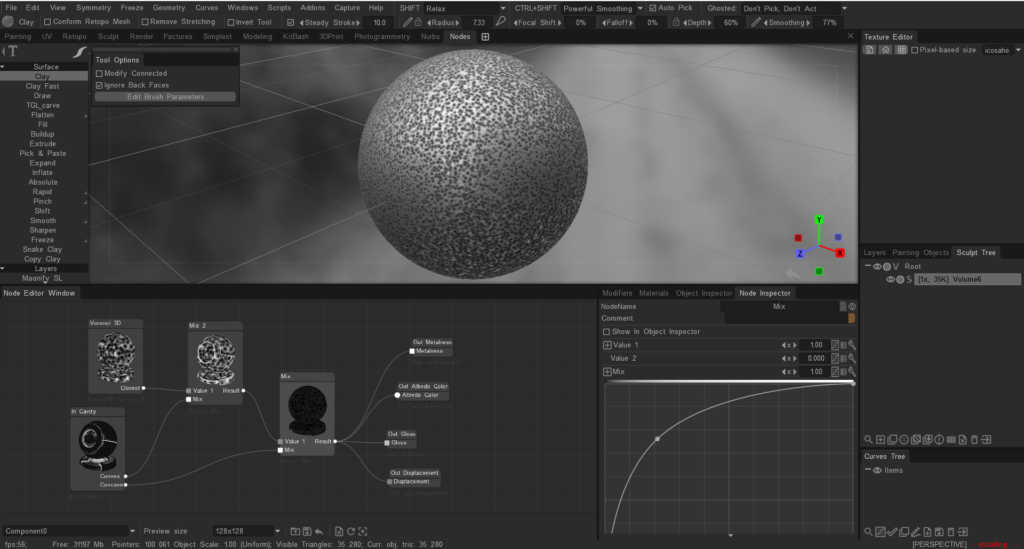
You can use the node system to create voxel displacement (by example) by utilizing the “Nodes” workspace.

Here are the steps:

  • Switch to the “Nodes” workspace.
  • Create a new node graph.
  • Add a “Voxel Displacement” node to your graph.
  • Connect the necessary input nodes, such as texture maps or procedural textures, to define the displacement pattern.
  • Adjust the parameters of the “Voxel Displacement” node to control the intensity and direction of the displacement.
  • Apply the node graph to your voxel object to see the displacement effect. This process allows you to create complex displacement patterns using a visual node-based approach.
The node system for painting is not directly available as it is primarily used for creating shaders and procedural textures.

Painting in 3DCoat is typically done using the tools and features available in the Paint Room, such as brushes, layers, and smart materials.

If you are looking to create complex textures or effects, you can use the existing painting tools and techniques, but the node system is not used for painting directly.

We plan to post a build with a node system for per-pixel texturing on the forum, but it will be a separate .exe file of the beta version, since this is a very big change and it will need to be tested separately.

Was this helpful?

Yes  No
Related Articles
  • Factures
  • ID map
  • Surface Array
  • Top Bar
  • Curves Properties RMB
  • Left tool panel Kitbash
Previously
Sieťka do miestnosti NURBS
Up Next
Sculpt shaders Nodes Library
AI:
Hi! How can I help you?
Attention: This is a beta version of AI chat. Some answers may be wrong. See full version of AI chat