• 中文 (中国)
  • 3DCoat文档
  • Chapters
    • 3DCoat简介
    • 入门
    • 界面和导航
    • Brush组件
    • 工作区房间
    • Scripting和Core API
    • 问题和答案
    • licensing
    • 培训教程
  • Pilgway
  • Products
    • 3DCoat
    • 3DCoatTextura
    • 3DCoatPrint
    • PBRLibrary
  • Blog Posts
  • Store
  • 中文 (中国) 中文 (中国)
    • English English
    • Українська Українська
    • Español Español
    • Deutsch Deutsch
    • Français Français
    • 日本語 日本語
    • Русский Русский
    • 한국어 한국어
    • Polski Polski
    • Português Português
    • Italiano Italiano
    • Suomi Suomi
    • Svenska Svenska
    • 中文 (台灣) 中文 (台灣)
    • Dansk Dansk
    • Slovenčina Slovenčina
    • Türkçe Türkçe
    • Nederlands Nederlands
    • Magyar Magyar
    • ไทย ไทย
    • हिन्दी हिन्दी
    • Ελληνικά Ελληνικά
    • Tiếng Việt Tiếng Việt
    • Lietuviškai Lietuviškai
    • Latviešu valoda Latviešu valoda
    • Eesti Eesti
    • Čeština Čeština
    • Română Română
    • Norsk Bokmål Norsk Bokmål
  • Creating 3D Character Using 3DCoat
  • 3DCoat文档
  • Chapters
    • 3DCoat简介
    • 入门
    • 界面和导航
    • Brush组件
    • 工作区房间
    • Scripting和Core API
    • 问题和答案
    • licensing
    • 培训教程
  • Pilgway
  • Products
    • 3DCoat
    • 3DCoatTextura
    • 3DCoatPrint
    • PBRLibrary
  • Blog Posts
  • Store
  • 中文 (中国) 中文 (中国)
    • English English
    • Українська Українська
    • Español Español
    • Deutsch Deutsch
    • Français Français
    • 日本語 日本語
    • Русский Русский
    • 한국어 한국어
    • Polski Polski
    • Português Português
    • Italiano Italiano
    • Suomi Suomi
    • Svenska Svenska
    • 中文 (台灣) 中文 (台灣)
    • Dansk Dansk
    • Slovenčina Slovenčina
    • Türkçe Türkçe
    • Nederlands Nederlands
    • Magyar Magyar
    • ไทย ไทย
    • हिन्दी हिन्दी
    • Ελληνικά Ελληνικά
    • Tiếng Việt Tiếng Việt
    • Lietuviškai Lietuviškai
    • Latviešu valoda Latviešu valoda
    • Eesti Eesti
    • Čeština Čeština
    • Română Română
    • Norsk Bokmål Norsk Bokmål
  • Creating 3D Character Using 3DCoat
Expand All Collapse All
  • 3DCoat简介
  • 入门
    • System requirements
    • Why 3DCoat is Unique?
    • 激活3DCoat
    • 启动错误
      • Startup error Mac
    • Color management
    • Upgrading permanent license
    • Linux Setup
      • Linux initial setup per-user installation
      • Linux initial setup for system
      • Tablet setup
      • To GTK3 from GTK2
    • 文件夹结构
      • Custom documents folder
    • 不同形式的“决议”
    • Tablet on Window
    • Import_
    • 3DCoat中的Applinks
      • Blender应用程序链接
        • Blender with the Applink in Linux
      • Blender 4.2/3/4/5 applink
      • Max Applink
      • Houdini applink
      • Lightwave uplink
  • Navigation
    • 打开对话框(快速启动菜单)
    • 导航面板
    • 相机和导航
      • Customize Navigation as Blender
    • Viewport Navigation Gizmo
    • Left tool panel
    •  Activity Bar
    • 使用 3DConnexion 设备导航
      • How to compile Spacenavd on non Ubuntu distro
    • Stylus doesn’t work in sculpting
    • 热键
  • 界面和导航
    • 文件菜单
    • 编辑菜单
      • Calculate Curvature
      • Calculate Occlusion
      • Light Baking Tool
      • 优先
    • 查看菜单
    • 对称
    • Textures
    • Calculate
    • 图层菜单
    • 冻结菜单
    • Hide
    • Bake
    • 曲线 2022
      • 曲线菜单
      • Curves Properties RMB
      • 填充网格层
      • Scale of imported curves
    • 窗口菜单
      • 选项卡式 Windows 弹出式面板
      • 滑块
    • Scripts
    • Addons
    • Capture
    • 帮助菜单
    • 客制化
    • 修改或创建新房间
  • Brush组件
    • Brush顶栏
    • 刷子一般用途
      • 创建画笔和贴花
      • 从当前造型制作 alpha
      • 从 3D 对象创建Brush
      • Create brushes based on Curves
      • Load photoshop .abr brushes
    • 笔画
      • 曲线弹出菜单
    • Brush选项
    • 条件限制器
    • 条面板
    • 模板面板
    • 智能材料
      • 添加新图像或材料
      • 将智能材质附加到图层
      • Import Quixel Material
    • 如何为Brush创建预设
  • 工作区房间
    • Painting
      • 纹理Painting和模式
        • Per-PixelPainting
        • 位移Painting(微顶点)
        • PtexPainting
        • 表面Painting(Polypainting)
      • 导入Painting室
        • Initial CC subdivision
        • UV Set smoothing
        • Sharp (hard) edge
        • 锁定法线
        • 模型更改后加载新的UV布局
        • DAZ Genesis models into 3DCoat
      • Painting工作区的菜单
        • Edit menu
        • 纹理菜单
          • 纹理Baking工具
        • 隐藏
        • Bake Paint菜单
        • 拾色器
      • Painting的顶栏
      • 图层面板
        • 混合面板
        • Layer and Clipping Masks
      • Painting室工具
      • 不透明度 - 透明度
      • 调整工作区
        • 调整工具集
        • 从调整室导出
      • 蒙版/材质预览面板
      • 从Painting室导出
    • UV工作区
      • UV顶栏
      • UV左工具面板
      • UV预览面板
      • UV工作流程示例
      • 导入UV室
      • 从UV室导出
    • 重新拓扑
      • 导入Retopo Room
      • Retopo Mesh 菜单和 Bake 菜单
        • 虚拟镜像模式
      • Bake menu
        • Treat Poly Groups as Paint Objects
        • Baking guide
      • 顶栏
        • 选择几何体
      • Retopology 房间的左侧工具面板
        • 总体目的和功能
        • 添加几何
          • Retopology 中的笔触工具
        • Retopo工具
        • UV工具
        • 拓扑室命令
      • 自动拓扑
        • Autopo guide
      • 保利集团
    • 塑造
      • Sculpt Layer
      • 造型树
      • 雕刻Brush选项
      • Top Bar
      • Brush引擎
      • 几何子菜单
      • 雕刻“右键单击”菜单
      • 着色器
      • Voxel模式
        • 纯Voxel雕刻
        • 密度和分辨率
        • 黏土引擎
        • Voxel工具
        • 体素上的表面工具
        • Voxel调整工具
        • 立体Painting
        • Voxel对象工具
      • 表面模式
        • 表面工具
        • 表面定制工具
        • 表面调整工具
        • 表面Painting
        • 表面对象工具
        • 多级分辨率
          • Multires tools
          • Multires adjust
          • Multires commands
      • 雕刻曲线
        • 样条曲线
        • Splines model creation
      • 矢量位移
      • 表面变换工具
        • Voxel变换工具
        • Instancer
        • Move
        • Pose
        • Fit
        • Reproject
        • Surface Array
      • Voxel基元和Import工具
      • 实时布尔值
      • 雕刻室的命令
      • Import到造型室
      • 从 Sculpt Room 导出
    • 使成为
      • Comparison of different roughness values
      • 渲染面板功能
      • 转盘
      • 伪造光照 - 非PBR-
    • Factures
      • 工作流程
    • 最简单的
    • 造型
      • Mesh Menu
      • 建模室中的左侧工具面板
        • 添加几何图形
          • 已选择
        • 调整
        • Smart Hybrid
        • UV
          • 命令
        • 整个网格
      • Fluffy 的阁楼表面示例
      • Poeboi 封锁
      • Import Zbrush Polygroups for UV mapping
    • Kitbash - 快速创建 3D 模型
      • Create kitbash
      • Left tool panel Kitbash
    • 3DPrint
    • Photogrammetry
      • How to install Reality Capture
      • Reality Capture doesn’t show up ?
    • 网格到 NURBS 房间
    • Nodes
      • 雕刻着色器节点库
  • Scripting和Core API
    • Scripting
    • Core API
    • Python API
  • 免费3DCoatPrint

Sharp (hard) edge

1329 views 0

Written by Carlos
November 17, 2023

In order to successfully perform a normal bake as intended, there seems to be a trick to the UV development method and smoothing settings.

3DCoat preserves import/export of smoothing groups via normals.
Normals signal that some edge is sharp or smooth.

Smoothing groups are supported via OBJ format. But you need to export normals also from your 3D-model app.
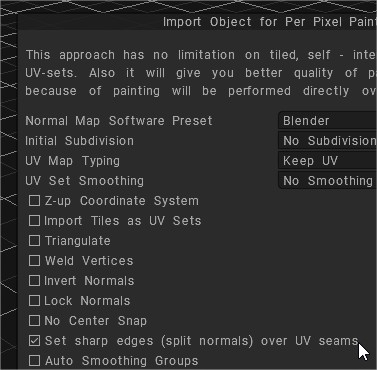
Set sharp edges: Whit this option you can set sharp edges (split normals) over UV seams.

3DCoat uses normals in OBJ file to recover smoothing groups.

It is better to avoid sharp angles between faces (like in example, retopo mesh between A and B), even angle a little less 90 degrees are not recommended, it will lead to problems if you are using 3DCoat’s method for calculating normals (Edit ->Preferences -> Normals calculation).

Maya normals calculation method will work correctly in this case, so if you need sharp angles, use Maya normals calculation in Preferences.

This is related to method of calculation. 3DCoat calculates normals as  weighted average of neighbor faces, weight is proportional to face square. It allows to display bevel between faces correctly.

But if there is sharp angle between big and small faces then vertex normal will be negative to small face normal and baking on that face will fail.
Maya’s method calculates vertex normal as arithmetical average of neighbor faces normals. It is more appropriate for baking, but not good to display meshes without normal map.

Generally we recommend to add bevel between sharp edges.

What does the “angle” in the automatic smoothing setting mean?


Each software has a setting item for automatically applying smoothness. Smoothing is applied to angles that are less than the specified value. So, if you want to avoid applying smoothness to a 90° corner, you will need to set a value smaller than 90°, such as “89°”, or if you want it to be more precise, you should set it to “89.9°”.

There are two main points necessary for normal baking.


Separate UVs with hard edges in UV expansion

On the low-poly side, decide “edges you want to have sharp edges” (hard edges) and “edges you want smoothed” (soft edges).

Avoid smoothing hard edges when baking

Set the value of “Setting items for automatic smoothing” of each software to “89.5°” etc. so that smoothing will not be applied to edges where the angle is 90° or more.

3DCoat can highlight hard edges during UV development

3DCoat has a function that helps you add seams to hard edges during UV development. *In 3DCOAT, “hard edge” is treated as “sharp edge” .

Settings required when importing a model for UV unfolding


In order to highlight hard edges in the “UV” room, you need to pay attention to the following settings when importing the model:

Set sharp edges (normal division) on UV seams: If checked, all “edges with seams” will be set to “also be highlighted as sharp edges” and imported. (This is added when importing a model that has already been UV-developed or to the UV-developed results using “auto mapping “, but I can’t think of a use for it at the moment.)
Auto smoothing group/max angle: The edges highlighted by “Show sharp edges” introduced below are set based on this value. A good value would be “89.5”.
Show Sharp edges: When checked, parts corresponding to sharp edges will be highlighted in red in the viewport. 
SharpSeams: When you use this tool, edges with angles greater than the value specified in “Fold Angle” will be judged as sharp edges, and if you press “OK”, a seam will be added automatically.

Tags:sharp eedge

Was this helpful?

Yes  1 No
Related Articles
  • Surface Array
  • Top Bar
  • Curves Properties RMB
  • Left tool panel Kitbash
  • Create kitbash
  • Color management
Previously
UV Set smoothing
Up Next
锁定法线
AI:
Hi! How can I help you?
Attention: This is a beta version of AI chat. Some answers may be wrong. See full version of AI chat