• Ελληνικά
  • Τεκμηρίωση 3DCoat
  • Chapters
    • Εισαγωγή στο 3DCoat
    • Ξεκινώντας
    • Διασύνδεση & Πλοήγηση
    • Εξαρτήματα Brush
    • Χώροι εργασίας Δωμάτια
    • Scripting & Core API
    • Ερωτήσεις και απαντήσεις
    • licensing
    • Εκπαιδευτικά Φροντιστήρια
  • Pilgway
  • Products
    • 3DCoat
    • 3DCoatTextura
    • 3DCoatPrint
    • PBRLibrary
  • Blog Posts
  • Store
  • Ελληνικά Ελληνικά
    • English English
    • Українська Українська
    • Español Español
    • Deutsch Deutsch
    • Français Français
    • 日本語 日本語
    • Русский Русский
    • 한국어 한국어
    • Polski Polski
    • 中文 (中国) 中文 (中国)
    • Português Português
    • Italiano Italiano
    • Suomi Suomi
    • Svenska Svenska
    • 中文 (台灣) 中文 (台灣)
    • Dansk Dansk
    • Slovenčina Slovenčina
    • Türkçe Türkçe
    • Nederlands Nederlands
    • Magyar Magyar
    • ไทย ไทย
    • हिन्दी हिन्दी
    • Tiếng Việt Tiếng Việt
    • Lietuviškai Lietuviškai
    • Latviešu valoda Latviešu valoda
    • Eesti Eesti
    • Čeština Čeština
    • Română Română
    • Norsk Bokmål Norsk Bokmål
  • Creating 3D Character Using 3DCoat
  • Τεκμηρίωση 3DCoat
  • Chapters
    • Εισαγωγή στο 3DCoat
    • Ξεκινώντας
    • Διασύνδεση & Πλοήγηση
    • Εξαρτήματα Brush
    • Χώροι εργασίας Δωμάτια
    • Scripting & Core API
    • Ερωτήσεις και απαντήσεις
    • licensing
    • Εκπαιδευτικά Φροντιστήρια
  • Pilgway
  • Products
    • 3DCoat
    • 3DCoatTextura
    • 3DCoatPrint
    • PBRLibrary
  • Blog Posts
  • Store
  • Ελληνικά Ελληνικά
    • English English
    • Українська Українська
    • Español Español
    • Deutsch Deutsch
    • Français Français
    • 日本語 日本語
    • Русский Русский
    • 한국어 한국어
    • Polski Polski
    • 中文 (中国) 中文 (中国)
    • Português Português
    • Italiano Italiano
    • Suomi Suomi
    • Svenska Svenska
    • 中文 (台灣) 中文 (台灣)
    • Dansk Dansk
    • Slovenčina Slovenčina
    • Türkçe Türkçe
    • Nederlands Nederlands
    • Magyar Magyar
    • ไทย ไทย
    • हिन्दी हिन्दी
    • Tiếng Việt Tiếng Việt
    • Lietuviškai Lietuviškai
    • Latviešu valoda Latviešu valoda
    • Eesti Eesti
    • Čeština Čeština
    • Română Română
    • Norsk Bokmål Norsk Bokmål
  • Creating 3D Character Using 3DCoat
Expand All Collapse All
  • Εισαγωγή στο 3DCoat
  • Ξεκινώντας
    • System requirements
    • Why 3DCoat is Unique?
    • Ενεργοποίηση 3DCoat
    • Σφάλμα εκκίνησης
      • Startup error Mac
    • Color management
    • Upgrading permanent license
    • Linux Setup
      • Linux initial setup per-user installation
      • Linux initial setup for system
      • Tablet setup
      • To GTK3 from GTK2
    • Δομή φακέλων
      • Custom documents folder
    • Διαφορετικές μορφές «επίλυσης»
    • Tablet on Window
    • Import & Export
    • Applinks σε 3DCoat
      • Σύνδεσμος εφαρμογής Blender
        • Blender with the Applink in Linux
      • Blender 4.2/3/4/5 applink
      • Max Applink
      • Houdini applink
      • Lightwave uplink
  • Navigation
    • Άνοιγμα διαλόγου (Μενού γρήγορης έναρξης)
    • Πίνακας πλοήγησης
    • Κάμερα και Πλοήγηση
      • Customize Navigation as Blender
    • Viewport Navigation Gizmo
    • Left tool panel
    •  Activity Bar
    • Πλοήγηση με χρήση συσκευών 3DConnexion
      • How to compile Spacenavd on non Ubuntu distro
    • Stylus doesn’t work in sculpting
    • Πλήκτρα συντόμευσης
  • Διασύνδεση & Πλοήγηση
    • Μενού Αρχείο
    • Επεξεργασία μενού
      • Calculate Curvature
      • Calculate Occlusion
      • Light Baking Tool
      • Προτιμήσεις
    • Προβολή μενού
    • Συμμετρία
    • Textures
    • Calculate
    • Μενού επιπέδων
    • Μενού παγώματος
    • Hide
    • Bake
    • Καμπύλες 2022
      • Μενού Curves
      • Curves Properties RMB
      • Γεμίστε με διχτυωτό στρώμα
      • Scale of imported curves
    • Μενού των Windows
      • Αναδυόμενοι πίνακες των Windows με καρτέλες
      • Ρυθμιστικά
    • Scripts
    • Addons
    • Capture
    • Μενού βοήθειας
    • Προσαρμογή
    • Τροποποίηση ή Δημιουργία νέου δωματίου
  • Εξαρτήματα Brush
    • Brush Top Bar
    • Βούρτσες γενικής χρήσης
      • Δημιουργήστε πινέλα και χαλκομανίες
      • Κατασκευή άλφα από την τρέχουσα γλυπτική
      • Δημιουργήστε ένα Brush από ένα τρισδιάστατο αντικείμενο
      • Create brushes based on Curves
      • Load photoshop .abr brushes
    • Εγκεφαλικά επεισόδια
      • Αναδυόμενο μενού Curves
    • Επιλογές Brush
    • Περιοριστής συνθηκών
    • Πάνελ λωρίδων
    • Στένσιλ Πάνελ
    • Έξυπνα Υλικά
      • Προσθέστε νέες εικόνες ή υλικά
      • Συνδέστε ένα έξυπνο υλικό σε ένα στρώμα
      • Import Quixel Material
    • Πώς να δημιουργήσετε προεπιλογές για το Brush
  • Χώροι εργασίας Δωμάτια
    • Painting
      • Painting υφής & τρόποι λειτουργίας
        • Painting Per-Pixel
        • Painting με μετατόπιση (Micro-Vertex)
        • Painting Ptex
        • Painting Επιφανειών (Πολυβαψίματος)
      • Εισαγωγή στην αίθουσα Painting
        • Initial CC subdivision
        • UV Set smoothing
        • Sharp (hard) edge
        • Κλείδωμα Κανονικά
        • Φόρτωση νέας διάταξης UV μετά από αλλαγές μοντέλου
        • DAZ Genesis models into 3DCoat
      • Μενού του Χώρου Εργασίας Painting
        • Edit menu
        • Μενού Υφές
          • Εργαλεία Baking υφής
        • Κρύβω
        • Μενού για το Bake Paint
        • Ο Επιλογέας Χρώματος
      • Top Bar για τη Painting
      • Ο πίνακας στρωμάτων
        • Ο πίνακας ανάμειξης
        • Layer and Clipping Masks
      • Εργαλεία δωματίου Painting
      • Αδιαφάνεια – Διαφάνεια
      • Προσαρμόστε τον χώρο εργασίας
        • Tweak Toolset
        • Εξαγωγή από το Tweak Room
      • Πίνακας προεπισκόπησης μάσκας/υλικού
      • Εξαγωγή από το Painting Room
    • Χώρος εργασίας UV
      • UV Top Bar
      • UV Αριστερός πίνακας εργαλείων
      • Πίνακας προεπισκόπησης UV
      • Παράδειγμα ροής εργασίας UV
      • Εισαγωγή στο δωμάτιο UV
      • Εξαγωγή από το δωμάτιο UV
    • Ρετοπολογία
      • Εισαγωγή στο Retopo Room
      • Μενού Retopo Mesh και Bake Menu
        • Λειτουργία εικονικού καθρέφτη
      • Bake menu
        • Treat Poly Groups as Paint Objects
        • Baking guide
      • Top Bar
        • Επιλέξτε γεωμετρία
      • Αριστερός πίνακας εργαλείων στην αίθουσα ρετοπολογίας
        • Συνολικός Σκοπός & Λειτουργία
        • Προσθήκη γεωμετρίας
          • Εργαλείο Strokes στη Ρετοπολογία
        • Retopo Tweak Tools
        • Εργαλεία UV
        • Εντολές για αίθουσα ρετοπολογίας
      • AUTORETOPO
        • Autopo guide
      • Poly Groups
    • Γλυπτική
      • Sculpt Layer
      • Sculpt Tree
      • Επιλογές Sculpt Brush
      • Top Bar
      • Κινητήρας Brush
      • Υπομενού Γεωμετρία
      • Σμιλέψτε το μενού "Δεξί κλικ".
      • Shaders
      • Λειτουργία Voxel
        • Pure Voxel Sculpting
        • Πυκνότητα και Ανάλυση
        • Πήλινη μηχανή
        • Voxel Tools
        • Εργαλεία επιφάνειας σε Voxels
        • Εργαλεία προσαρμογής Voxel
        • Ογκομετρική Painting
        • Εργαλεία αντικειμένων Voxel
      • Επιφανειακή λειτουργία
        • Επιφανειακά εργαλεία
        • Προσαρμοσμένα εργαλεία επιφάνειας
        • Εργαλεία ρύθμισης επιφάνειας
        • Επιφανειακή Painting
        • Εργαλεία αντικειμένων επιφάνειας
        • Ανάλυση πολλαπλών επιπέδων
          • Multires tools
          • Multires adjust
          • Multires commands
      • Σμιλεύει καμπύλες
        • Καμπύλες Spline
        • Splines model creation
      • Διανυσματική μετατόπιση
      • Εργαλεία μετασχηματισμού επιφάνειας
        • Voxel Transform Tools
        • Instancer
        • Move
        • Pose
        • Fit
        • Reproject
        • Surface Array
      • Voxel Primitives & Import Tools
      • Ζωντανά booleans
      • Εντολές για το δωμάτιο Sculpt
      • Import στο Sculpt Room
      • Εξαγωγή από το Sculpt Room
    • Καθιστώ
      • Comparison of different roughness values
      • Λειτουργίες πίνακα απόδοσης
      • Περιστροφική πλάκα
      • Fakebake the lighting - non PBR-
    • Factures
      • Ροή εργασιών
    • Το πιο απλό
    • Πρίπλασμα
      • Mesh Menu
      • Αριστερός πίνακας εργαλείων στην αίθουσα μοντελοποίησης
        • Προσθήκη γεωμετρίας
          • Επιλεγμένο
        • Μικροδιόρθωση
        • Smart Hybrid
        • UV
          • Εντολές
        • Ολόκληρο πλέγμα
      • Παράδειγμα επιφάνειας σοφίτας από τον Fluffy
      • Blockout από τον Poeboi
      • Import Zbrush Polygroups for UV mapping
    • Kitbash - Γρήγορη δημιουργία τρισδιάστατων μοντέλων
      • Create kitbash
      • Left tool panel Kitbash
    • 3DPrint
    • Photogrammetry
      • How to install Reality Capture
      • Reality Capture doesn’t show up ?
    • Διχτυωτό στο δωμάτιο NURBS
    • Nodes
      • Sculpt shaders Nodes Library
  • Scripting & Core API
    • Scripting
    • Core API
    • Python API
  • Δωρεάν 3DCoatPrint

Comparison of different roughness values

539 views 0

Written by Carlos
November 14, 2024

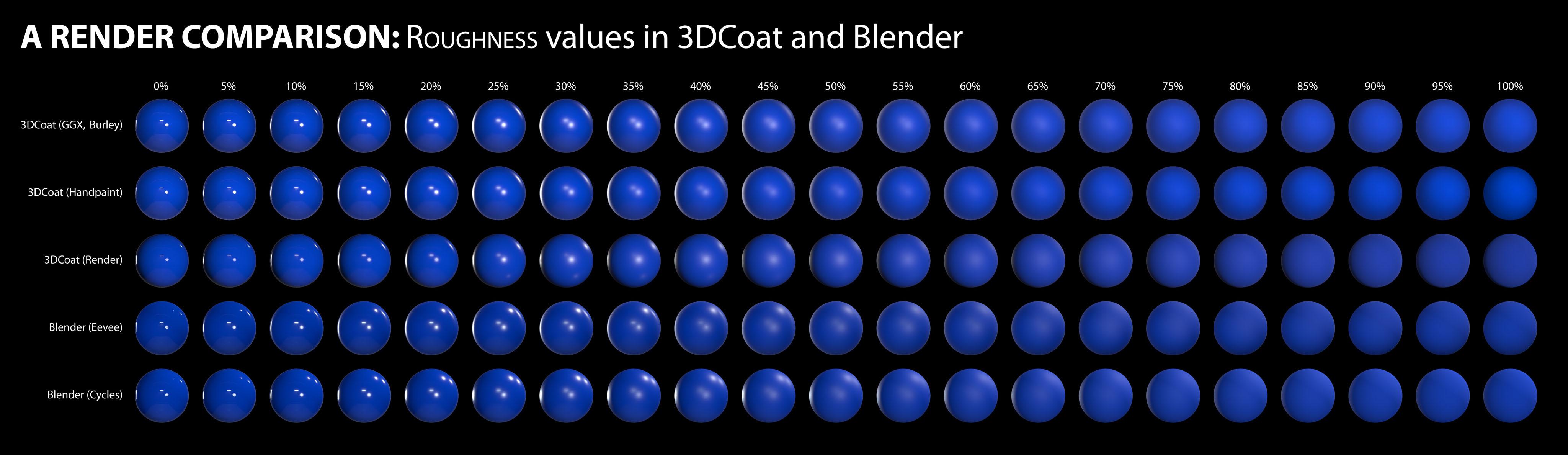
A render comparison of different roughness values in 3DCoat and Blender by DMG

I was going between 3DC and Blender a bit trying to hit the sweet spot I wanted for something, and I noticed differences between the two renders, especially caused by varying roughness values.

I decided to get a bit scientific about it, so here’s the results of my tinkering.  I used the studio.exr panorama from Blender in both programs for a fair comparison. The 3DCoat environment settings were left at default, but the light was deactivated. The HDRI was normalized when I imported it. The HDRI strength was left at default value in Blender too.

A simple sphere, identical color value in all renders. 

I’m making no judgement as to which renderer is ‘better’. This is just purely for comparison, to see how roughness values appear in each in order to make texturing a bit more predictable.

I did notice that in the HDRI there is a tiny but bright spotlight high up adjacent to the other light, but for some reason this isn’t picked up in the 3DCoat renders. Perhaps it’s just a tiny pinprick and too small to be picked up. I don’t know. There also appears to be a light down low, right of center, but only on the renders for 25% to 40% roughness in the 3DCoat renders. I don’t know where that’s coming from. It isn’t apparent in any of the others.

The rows are: 3DCoat’s GGX, Handpaint, Render; then Blender’s Eevee, Cycles.

* I think the Handpaint render (compared to the GGX one) has slightly lower intensity in the bright highlights, as well as ever so slightly more diffuse reflections when the roughness reached mid-levels. And compared to the 3DCoat render, the bright highlights in the Handpaint render are a touch more intense, and as with the GGX ones, much more defined.

Looking at the Handpaint renders and the Blender Cycles renders, they’re actually very similar. This is excellent.
I feel that if I use the Handpaint preview, I will be seeing a very close approximation of what I’ll get in Blender. So my chart is now redundant, based on the reason I created it in the first place, but it has nevertheless been very useful.
RenderComparisonChart.jpg

The most noticeable differences is that the reflections in the 3DCoat Paint Room preview are a touch more intense than both of Blender’s renders, but the same reflections are a bit feinter in 3DCoat’s Renderer.

Also, at around 35-40% roughness, the 3DCoat Renderer has greater blur on the main reflections near the center, which has almost become a single bright patch, whereas all the others still have two distinct light sources.

Like I said, this isn’t about picking a ‘winner’ or ‘favorite’.  It’s just to help me predict how my textured objects will appear and render in Blender to save time to-ing and fro-ing making adjustments.

Tags:roughness

Was this helpful?

Yes  No
Related Articles
  • Surface Array
  • Top Bar
  • Curves Properties RMB
  • Left tool panel Kitbash
  • Create kitbash
  • Color management
Previously
Καθιστώ
Up Next
Λειτουργίες πίνακα απόδοσης
AI:
Hi! How can I help you?
Attention: This is a beta version of AI chat. Some answers may be wrong. See full version of AI chat