 Ελληνικά
Welcome to the extended official guide on using the Node System and GPUPPP (GPU Per Pixel Painting) technology in 3DCoat. This document is specifically created for 3D artists, designers, and texture artists to help you master not only basic but also the most advanced procedural painting techniques.
The modern approach to texturing and sculpting is gradually moving away from destructive pixel editing in favor of fully procedural, non-destructive methods. In newer versions of 3DCoat, you have received a full-fledged Node System and a specialized workspace, the Node Room. Instead of layering dozens of “heavy” layers one on top of the other, you can build super-complex photorealistic or stylized materials using intuitive visual blocks—nodes.
This guide is created specifically for 3D artists. There is no code or complex mathematical formulas here—only practical tools for your creative process.
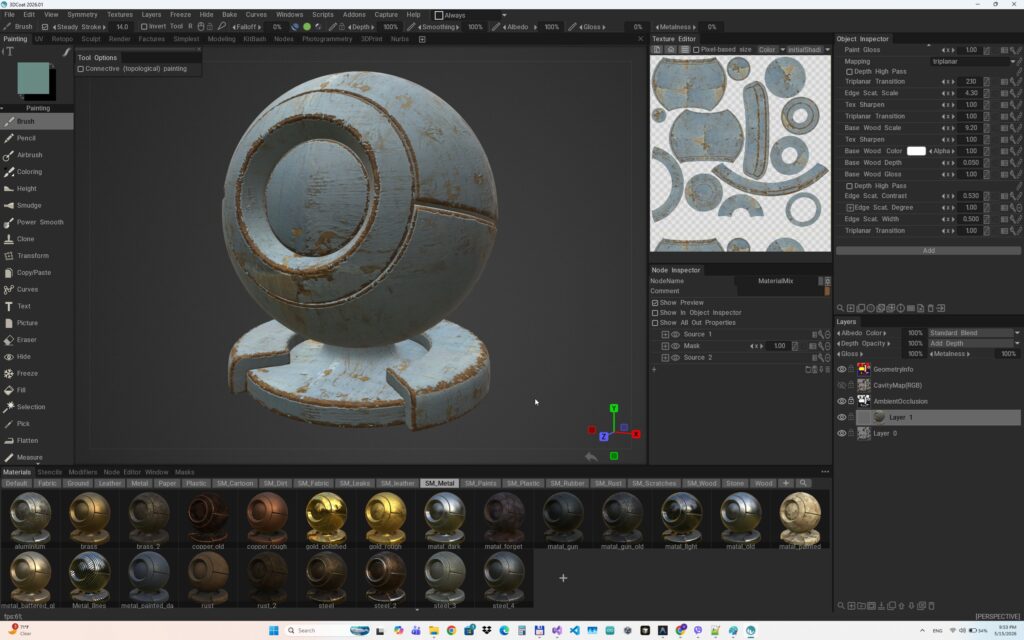
1. GPU PPP Architecture: What it Means for the Artist
In 3DCoat, you may often encounter the term GPU PPP (GPU-accelerated Per-Pixel Painting). While this is a technical term, for you as an artist, it means one very practical thing: real-time feedback.
Previously, per-pixel painting relied primarily on the Central Processing Unit (CPU). Now, all the heaviest calculations—procedural noise generation, complex mask calculation, channel blending, and surface deformations—have been transferred to your graphics card (GPU).
What advantages does this give you in your work:
- Huge textures without lag: You can work with 8K or 16K resolution; updating procedural maps or blending layers will not “slow down.”
- Vector Displacement: All fine surface details (skin pores, scales, mechanical recesses) are calculated by the GPU as vector displacement directly during texturing. This allows you to use a light, optimized polygonal mesh to control the silhouette, while all macro-details are generated procedurally via nodes.
2. Node Architecture in the Paint Workspace
The biggest problem with CPU texturing is the destructiveness of materials on adjust layers. With the new approach using the node system and the GPU painting engine, all materials and Adjust effects are generated non-destructively, on the fly, in real time during layer blending. This allows you to change them at any time and instantly see the result of the change. They support many more PBR channels, and they can also interact with the brush during painting, allowing the brush to influence the materials.
3. Non-Destructive Texturing and Node System in 3DCoat
Introduction
Non-destructive texturing in 3DCoat provides unprecedented control over the entire material creation process. Instead of classic destructive pixel painting, this workflow allows you to create procedural materials, filters, and masks using visual blocks (nodes). You can return to material properties such as color, rust or dirt intensity, gloss, or metalness at any stage and instantly see the changes in real-time.
This flexibility is made possible by the new ultra-fast GPUPPP (GPU Per Pixel Painting) technology, which performs all per-pixel layer calculations directly on the graphics card. Each node is driven by the NGL (NodeGraph Language) and dynamically compiled into a highly optimized shader. This ensures that procedural materials remain resolution-independent and do not lose quality or become pixelated.
Basics of Working with Nodes
In the Node Editor, material creation happens through visual programming.
- Assigning nodes: Nodes are assigned directly to paint layers. The node graph can be applied either to an individual current Layer or globally to the entire Object.
- Creation and connection: To create a node, simply right-click in the Node Editor and choose the desired one from the extensive list. Outputs of one node are connected to inputs of another by dragging lines.
PBR Texturing Workflow
The 3DCoat rendering system is built on the PBR (Physically Based Rendering) standard, so when painting, you simultaneously modify multiple channels: Albedo (color), Depth (displacement/bump), Glossiness (roughness), and Metalness.
Step-by-step process of creating a base material:
- Base material: Create a
Simple materialnode, which will serve as the foundation (e.g., metal or paint). - Loading textures: Add a versatile
UVW texturenode. It allows you to load both color and grayscale maps, such as a scratch or dirt map. - Connecting: Connect the texture output to the corresponding inputs in the
Simple material(e.g., color or gloss channels). - Preview: 3DCoat has a special preview button that temporarily fills the layer with the result of the node graph, so you can evaluate the material’s look on the entire model without permanently applying it. You can also hold the Ctrl key and hover the cursor over any node input or output — this will instantly display an isolated micro-preview of that specific graph stage directly on the model.
Creating Wear Effects and Masks
To create realistic surfaces, it is necessary to properly blend materials (e.g., base metal and peeling paint).
- Masking: Use the
Simple masknode to control the degree of paint wear on the edges of the object where the metal should show through. - Realistic edges: To prevent wear edges from looking too artificial, apply the
Degree mapparameter in the mask settings. By loading a scratch texture there and slightly increasing the influence, you will get a complex, natural wear effect with noise.
These approaches are the foundation of Smart Materials, which dynamically adapt to the model’s geometry (edges, cavities, etc.). Converted old smart materials and new node presets can be found in the materials window. If you open them in the editor, you will see a pre-configured graph with loaded textures in the color, depth, gloss, and metal slots.
Working with Parameter Inspectors
Two panels are used for convenient material adjustment:
- Node Inspector: Detailedly displays the properties of a single selected node, allowing you to tweak colors, vectors, curves, and load textures. Here you can also change the “Visibility Level” of parameters using the eye icon.
- Object Inspector: By increasing the visibility level of a parameter in the Node Inspector, you “publish” it to the global Object Inspector. This forms a convenient “control panel” for the entire material, where only the most important settings are gathered. These settings are saved as local variables (LocalVars), making each material unique.
Applying Materials to the Model
Once the material is configured, turn off the preview button. You can apply node materials to an object in several ways:
- Mask: Use a NodeGraph, procedural mask to automatically apply the material to the desired areas.
- Fill: Using the
Fill entire layertool to instantly cover the whole object. - Brush: For manual application of the material to local areas.
- Stencils: For adding specific details using projection.
Using the node system turns the texturing process into a flexible, controllable, and completely non-destructive process that meets the highest standards of PBR asset creation