 Ελληνικά
OpenPBR is an open-source, standardized “uber-shader” specification developed by Adobe and Autodesk, designed to provide a unified physically-based rendering (PBR) material model across different DCC (Digital Content Creation) tools and renderers.
Overview
Designed as an über-shader, it aims to be capable of accurately modeling the vast majority of CG Materials used in practical visual effects and feature animation productions.
It is heavily based on MaterialX, acting as a high-fidelity shading model intended to merge the capabilities of Autodesk Standard Surface and Adobe Standard Material.

It is hosted by the Academy Software Foundation (ASWF) and organized as a subproject of MaterialX.
More information about the history and design can be found on this page detailing the OpenPBR Surface specification.
Key Components & Libraries
- OpenPBR Surface (Core Specification): The fundamental model, defining parameters for surface layering such as base, coat, thin film, and fuzz.
- MaterialX Implementation: OpenPBR is primarily defined and used via MaterialX node definitions (
.mtlx), allowing for consistent appearance between Arnold, USD, and real-time engines. - NVIDIA SimReady Materials: The PhysicalAI-SimReady-Materials GitHub repository contains USD/MaterialX-based materials utilizing OpenPBR v1.1.
- OpenPBR Shader Playground: A GitHub project by DigitalProductionExampleLibrary containing MaterialX files and USD examples demonstrating the shader’s capabilities.
- Reference BSDF: A reference implementation for the OpenPBR BSDF (Bidirectional Scattering Distribution Function) exists on GitHub for developers
Key Features of OpenPBR Nodes
- Layering System: Uses a “slab” model (base, coat, fuzz, emission).
- Fuzz Layer: Replaces traditional sheen to represent microfiber reflections.
- Advanced Thin Film: Offers micrometer-based thickness for better iridescent effects.
- Metalness: Uses Specular Weight to control metal reflectivity.
- Uniformity: It is designed to be cross-platform, making it ideal for USD-based workflows
The OpenPBR material is made up of several layers.
- Base: The base layer sits at the bottom and can be configured to simulate many material types. It can represent a dielectric or metallic material and is responsible for the primary reflection layer. This is controlled by the Metalness parameter found in the Base parameters group. Normally materials are either fully metallic (Metalness 1) or fully dielectric (Metalness 0) but the OpenPBR material also supports a mixture when Metalness values fall between 0 and 1.
- Metallic: When Metalness is used, reflections take on the Base Color and the Specular Color controls the color seen at glancing angles. Primary parameter groups are Base and Specular.
- Dielectric: When a material is non-metallic it can be set up to represent the three main conditions covered below, but blending between them is possible by adjusting their relevant weights.
- Glossy-diffuse: An opaque dielectric material that’s good for many common materials that don’t exhibit significant light scattering or transmission like wood and stone. Primary parameter groups are Base and Specular.
- Subsurface: An opaque dielectric material that heavily scatters light internally like skin, plastic, marble, and wax. Primary parameter groups are Base, Specular, and Subsurface.
- Translucent: A dielectric material that transmits and refracts a significant amount of light and one that is more transparent than a subsurface material. Primary parameter groups are Base, Specular, and Transmission.
- Thin-Film: A very thin dielectric layer, measured in micrometers, between the base and coat layer used to represent the colorful effects as seen with soap bubbles, insects, and oil mixing with water.
- Emission: A light emitting layer that sits above the base layer but below the coat and fuzz layers. The emissive layer is tinted by the coat and fuzz, making it easy to represent emissive surfaces like a TV screen — using the coat for the reflective glass and the fuzz for dust on top.
- Coat: An optional dielectric layer that adds a secondary reflection layer over the base layer, great for clear coats and varnish.
- Fuzz: An optional layer that sits on top of everything that can be used to simulate dust or the velvety sheen of cloth.
The main difference between the V-Ray material model and OpenPBR is the layers’ structure. See the diagram for information on how OpenPBR’s layers are calculated.
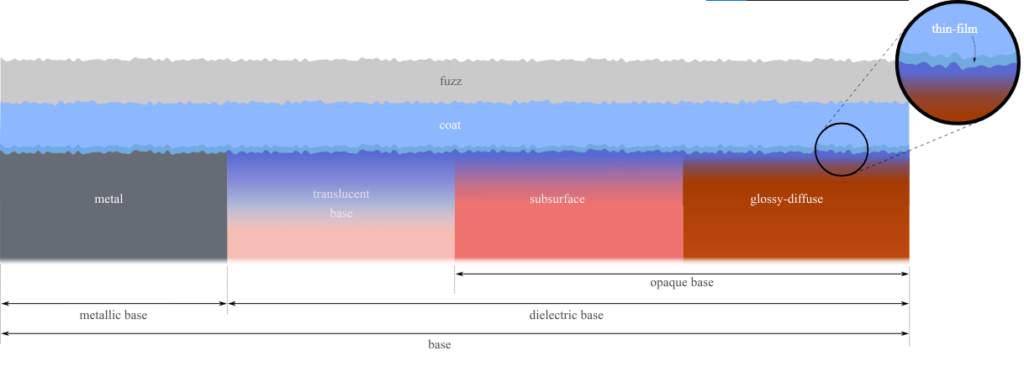
Unlike previous models such as Autodesk Standard Surface, ASWF define the model by describing the physical structure as unambiguously as possible, rather than by specifying a particular form of implementation.
At the level of computer graphics, the model is completely physically specified if the BSDF (Bidirectional Scattering Distribution Function) of each slab interface, and the volumetric properties of each slab ,edium, are specified.
The ground truth appearance of the model is then defined to be given by the BSDF obtained by physical light transport through the whole structure of component slabs.
Tutorials
Unlock Seamless Material Interchange for Virtual Worlds with OpenUSD, MaterialX, and OpenPBR: NVIDIA, and the Alliance for OpenUSD (AOUSD) announced the AOUSD Materials Working Group, an initiative for standardizing the interchange of materials in Universal Scene Description, known as OpenUSD.