• Svenska
  • 3DCoat dokumentation
  • Chapters
    • Introduktion till 3DCoat
    • Komma igång
    • Gränssnitt & navigering
    • Brush
    • Arbetsytor Rum
    • Scripting & Core API
    • Frågor
    • licensing
    • Utbildningshandledningar
  • Pilgway
  • Products
    • 3DCoat
    • 3DCoatTextura
    • 3DCoatPrint
    • PBRLibrary
  • Blog Posts
    • Creating 3D Character Using 3DCoat
  • Store
  • Svenska Svenska
    • English English
    • Українська Українська
    • Español Español
    • Deutsch Deutsch
    • Français Français
    • 日本語 日本語
    • Русский Русский
    • 한국어 한국어
    • Polski Polski
    • 中文 (中国) 中文 (中国)
    • Português Português
    • Italiano Italiano
    • Suomi Suomi
    • 中文 (台灣) 中文 (台灣)
    • Dansk Dansk
    • Slovenčina Slovenčina
    • Türkçe Türkçe
    • Nederlands Nederlands
    • Magyar Magyar
    • ไทย ไทย
    • हिन्दी हिन्दी
    • Ελληνικά Ελληνικά
    • Tiếng Việt Tiếng Việt
    • Lietuviškai Lietuviškai
    • Latviešu valoda Latviešu valoda
    • Eesti Eesti
    • Čeština Čeština
    • Română Română
    • Norsk Bokmål Norsk Bokmål
  • 3DCoat dokumentation
  • Chapters
    • Introduktion till 3DCoat
    • Komma igång
    • Gränssnitt & navigering
    • Brush
    • Arbetsytor Rum
    • Scripting & Core API
    • Frågor
    • licensing
    • Utbildningshandledningar
  • Pilgway
  • Products
    • 3DCoat
    • 3DCoatTextura
    • 3DCoatPrint
    • PBRLibrary
  • Blog Posts
    • Creating 3D Character Using 3DCoat
  • Store
  • Svenska Svenska
    • English English
    • Українська Українська
    • Español Español
    • Deutsch Deutsch
    • Français Français
    • 日本語 日本語
    • Русский Русский
    • 한국어 한국어
    • Polski Polski
    • 中文 (中国) 中文 (中国)
    • Português Português
    • Italiano Italiano
    • Suomi Suomi
    • 中文 (台灣) 中文 (台灣)
    • Dansk Dansk
    • Slovenčina Slovenčina
    • Türkçe Türkçe
    • Nederlands Nederlands
    • Magyar Magyar
    • ไทย ไทย
    • हिन्दी हिन्दी
    • Ελληνικά Ελληνικά
    • Tiếng Việt Tiếng Việt
    • Lietuviškai Lietuviškai
    • Latviešu valoda Latviešu valoda
    • Eesti Eesti
    • Čeština Čeština
    • Română Română
    • Norsk Bokmål Norsk Bokmål
Expand All Collapse All
  • Introduktion till 3DCoat
  • Komma igång
    • System requirements
    • Why 3DCoat is Unique?
    • Aktiverar 3DCoat
    • Startfel
      • Startup error Mac
    • Color management
    • Upgrading permanent license
    • Linux Setup
      • Linux initial setup per-user installation
      • Linux initial setup for system
      • Tablet setup
      • To GTK3 from GTK2
      • Error libicuuc.so.70
    • Mappstruktur
      • Custom documents folder
    • Olika former av "upplösning"
    • Tablet on Window
    • Import & Export
    • Applinks i 3DCoat
      • Blender applänk
        • Blender with the Applink in Linux
      • Blender 4.2/3/4/5 applink
      • Max Applink
      • Houdini applink
      • Lightwave uplink
  • Navigation
    • Öppningsdialogruta (snabbstartsmeny)
    • Navigationspanel
    • Kamera och navigering
      • Customize Navigation as Blender
    • Viewport Navigation Gizmo
    • Left tool panel
    •  Activity Bar
    • Navigering med 3DConnexion-enheter
      • How to compile Spacenavd on non Ubuntu distro
    • Space Bar Menu
    • Stylus doesn’t work in sculpting
    • Snabbtangenter
  • Gränssnitt & navigering
    • Arkiv-menyn
    • Redigera meny
      • Calculate Curvature
      • Calculate Occlusion
      • Light Baking Tool
      • Inställningar
    • Visa menyn
    • Symmetri
    • Textures
    • Calculate
    • Menyn Lager
    • Frys meny
    • Hide
    • Bake
    • Kurvor 2022
      • Kurvor Meny
      • Curves Properties RMB
      • Fyll med nätskikt
      • Scale of imported curves
    • Windows-menyn
      • Windows popup-paneler med flikar
      • Reglage
    • Scripts
    • Addons
    • Capture
    • Hjälpmeny
    • Anpassning
    • Ändra eller skapa nytt rum
  • Brush
    • Brush Top Bar
    • Borstar allmänt bruk
      • Skapa penslar och dekaler
      • Att göra alfa från nuvarande sculpt
      • Skapa en Brush från ett 3D-objekt
      • Create brushes based on Curves
      • Load photoshop .abr brushes
    • Strokes
      • Kurvor popupmeny
    • Brush
    • Villkorsbegränsare
    • Strips Panel
    • Schabloner panel
    • Smarta material
      • Lägg till nya bilder eller material
      • Fäst ett Smart material på ett lager
      • Import Quixel Megascans
    • Hur man skapar förinställningar för Brush
  • Arbetsytor Rum
    • Painting
      • Painting och lägen
        • Per-Pixel Painting
        • Painting (Micro-Vertex)
        • Ptex Painting
        • Painting (polymålning)
      • Importera till Painting
        • Initial CC subdivision
        • UV Set smoothing
        • Sharp (hard) edge
        • Lås Normals
        • Ladda ny UV layout efter modellbyten
        • DAZ Genesis models into 3DCoat
        • ID map
      • Menyer för Painting
        • Edit menu
        • Texturer meny
          • Verktyg för Baking
        • Dölj
        • Meny för Bake Paint
        • Färgväljaren
      • Surface Materials
      • Top Bar för Painting
      • Panelen Lager
        • Blandningspanelen
        • Layer and Clipping Masks
      • Painting
      • Opacitet - Transparens
      • Tweak arbetsyta
        • Tweak Toolset
        • Exporterar från Tweak Room
      • Förhandsgranskningspanel för mask/material
      • Exporterar från Painting
    • UV arbetsyta
      • UV Top Bar
      • UV Vänster verktygspanel
      • UV förhandsgranskningspanel
      • Exempel på UV arbetsflöde
      • Importera till UV -rummet
      • Exporterar från UV -rummet
    • Retopologi
      • Importerar till Retopo -rummet
      • Retopo Mesh Menu och Bake Menu
        • Virtuellt spegelläge
      • Bake menu
        • Treat Poly Groups as Paint Objects
        • Baking guide
      • Strokes verktyg i Retopologi
      • Top Bar
        • Välj geometri
      • Vänster verktygspanel i Retopologirummet
        • Övergripande syfte och funktion
        • Lägg till geometri
        • Retopo Tweak Tools
        • UV verktyg
        • Kommandon för Retopologirummet
      • AUTORETOPO
        • Autopo guide
      • Polygrupper
    • Skulptera
      • Sculpt Layer
      • Skulptera träd
      • Sculpt Brush alternativ
      • Top Bar
      • Brush motor
      • Geometri Undermeny
      • Skulptera "Högerklicka"-menyn
      • Shaders
      • Voxel
        • Ren Voxel Sculpting
        • Densitet och upplösning
        • Lera motor
        • Voxel verktyg
        • Ytverktyg på Voxels
        • Voxel
        • Volumetrisk Painting
        • Voxel Objects Tools
      • Ytläge
        • Ytverktyg
        • Ytan anpassade verktyg
        • Surface Layer
        • Ytjusteringsverktyg
        • Painting
        • Verktyg för ytobjekt
        • Flernivåupplösning
          • Multires tools
          • Multires adjust
          • Multires commands
      • Skulptera kurvor
        • Splinekurvor
        • Splines model creation
      • Vektorförskjutning
      • Yttransformeringsverktyg
        • Voxel Transform Tools
        • Instancer
        • Move
        • Pose
        • Fit
        • Reproject
        • Surface Array
      • Voxel Primitives & Import Tools
      • Levande booleaner
      • Kommandon för Sculpt room
      • Import till Sculpt Room
      • Exporterar från Sculpt Room
    • Framställa
      • Comparison of different roughness values
      • Rendera panelfunktioner
      • Skivspelare
      • Fakebake the lighting -icke PBR-
    • Factures
      • Arbetsflöde
    • Enklast
    • Modellering
      • Mesh Menu
      • Vänster verktygspanel i modelleringsrummet
        • Lägg till geometri
          • Vald
        • Modifiera
        • Smart Hybrid
        • UV
          • Kommandon
        • Hela Mesh
      • Loftyteexempel av Fluffy
      • Blockout av Poeboi
      • Import Zbrush Polygroups for UV mapping
    • Kitbash - Snabbt skapande av 3D-modeller
      • Create kitbash
      • Left tool panel Kitbash
    • 3DPrint
    • Photogrammetry
      • How to install Reality Capture
      • Reality Capture doesn’t show up ?
    • Nät till NURBS-rummet
    • Nodes
      • Sculpt shaders Nodes Library
      • Open PBR
  • Scripting & Core API
    • Scripting
    • Core API
    • Python API
    • Extensions and Addons
  • Gratis 3DCoatPrint

Open PBR

35 views 0

Written by Carlos
May 1, 2026

OpenPBR is an open-source, standardized “uber-shader” specification developed by Adobe and Autodesk, designed to provide a unified physically-based rendering (PBR) material model across different DCC (Digital Content Creation) tools and renderers.

Overview


Designed as an über-shader, it aims to be capable of accurately modeling the vast majority of CG Materials used in practical visual effects and feature animation productions.
It is heavily based on MaterialX, acting as a high-fidelity shading model intended to merge the capabilities of Autodesk Standard Surface and Adobe Standard Material.
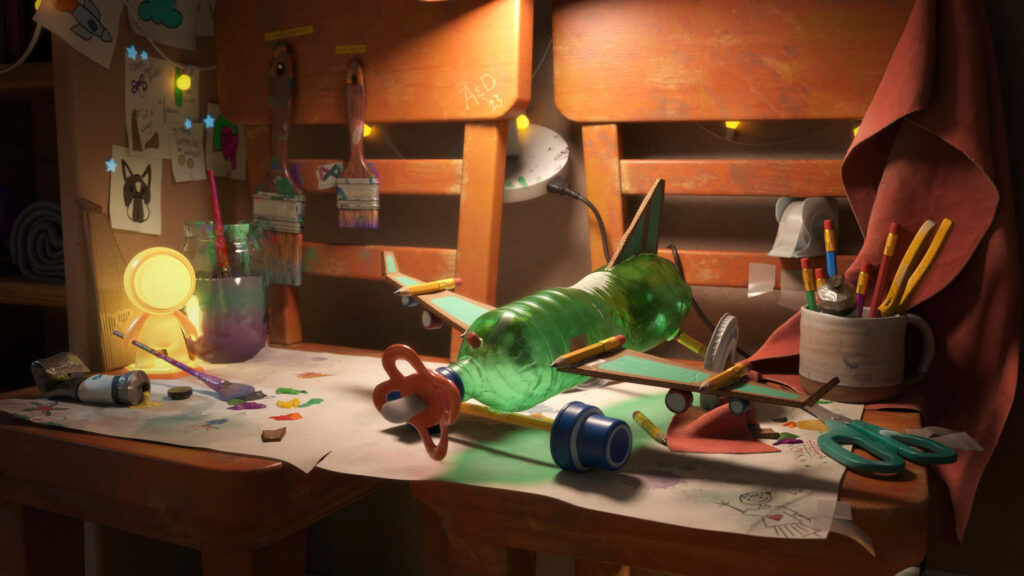
It is hosted by the Academy Software Foundation (ASWF) and organized as a subproject of MaterialX.
More information about the history and design can be found on this page detailing the OpenPBR Surface specification.

Key Components & Libraries

  • OpenPBR Surface (Core Specification): The fundamental model, defining parameters for surface layering such as base, coat, thin film, and fuzz.
  • MaterialX Implementation: OpenPBR is primarily defined and used via MaterialX node definitions (.mtlx), allowing for consistent appearance between Arnold, USD, and real-time engines.
  • NVIDIA SimReady Materials: The PhysicalAI-SimReady-Materials GitHub repository contains USD/MaterialX-based materials utilizing OpenPBR v1.1.
  • OpenPBR Shader Playground: A GitHub project by DigitalProductionExampleLibrary containing MaterialX files and USD examples demonstrating the shader’s capabilities.
  • Reference BSDF: A reference implementation for the OpenPBR BSDF (Bidirectional Scattering Distribution Function) exists on GitHub for developers

Key Features of OpenPBR Nodes

  • Layering System: Uses a “slab” model (base, coat, fuzz, emission).
  • Fuzz Layer: Replaces traditional sheen to represent microfiber reflections.
  • Advanced Thin Film: Offers micrometer-based thickness for better iridescent effects.
  • Metalness: Uses Specular Weight to control metal reflectivity.
  • Uniformity: It is designed to be cross-platform, making it ideal for USD-based workflows

The OpenPBR material is made up of several layers.

  • Base: The base layer sits at the bottom and can be configured to simulate many material types. It can represent a dielectric or metallic material and is responsible for the primary reflection layer. This is controlled by the Metalness parameter found in the Base parameters group. Normally materials are either fully metallic (Metalness 1) or fully dielectric (Metalness 0) but the OpenPBR material also supports a mixture when Metalness values fall between 0 and 1.
    • Metallic: When Metalness is used, reflections take on the Base Color and the Specular Color controls the color seen at glancing angles. Primary parameter groups are Base and Specular.
    • Dielectric: When a material is non-metallic it can be set up to represent the three main conditions covered below, but blending between them is possible by adjusting their relevant weights.
      • Glossy-diffuse: An opaque dielectric material that’s good for many common materials that don’t exhibit significant light scattering or transmission like wood and stone. Primary parameter groups are Base and Specular.
      • Subsurface: An opaque dielectric material that heavily scatters light internally like skin, plastic, marble, and wax. Primary parameter groups are Base, Specular, and Subsurface.
      • Translucent: A dielectric material that transmits and refracts a significant amount of light and one that is more transparent than a subsurface material. Primary parameter groups are Base, Specular, and Transmission.
  • Thin-Film: A very thin dielectric layer, measured in micrometers, between the base and coat layer used to represent the colorful effects as seen with soap bubbles, insects, and oil mixing with water.
  • Emission: A light emitting layer that sits above the base layer but below the coat and fuzz layers. The emissive layer is tinted by the coat and fuzz, making it easy to represent emissive surfaces like a TV screen — using the coat for the reflective glass and the fuzz for dust on top.
  • Coat: An optional dielectric layer that adds a secondary reflection layer over the base layer, great for clear coats and varnish.
  • Fuzz: An optional layer that sits on top of everything that can be used to simulate dust or the velvety sheen of cloth.

The main difference between the V-Ray material model and OpenPBR is the layers’ structure. See the diagram for information on how OpenPBR’s layers are calculated.
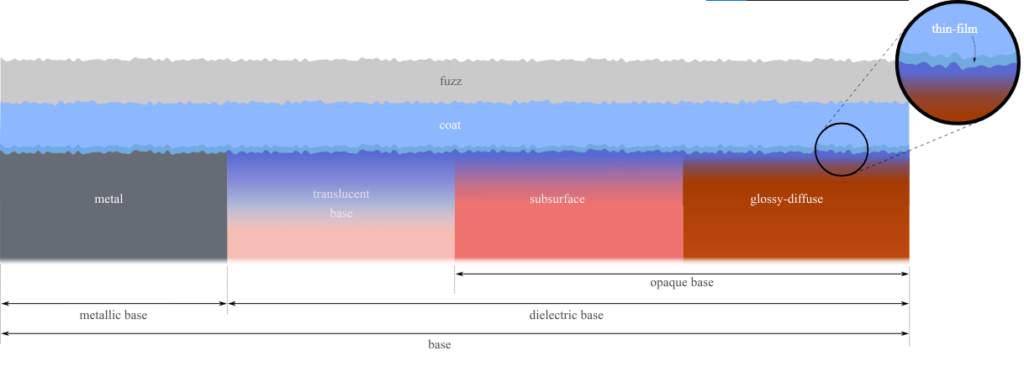
Schematic illustration of the idealized physical material that our shader models. Horizontal stacking of slabs represents statistical mixture and vertical stacking represents layering.

Unlike previous models such as Autodesk Standard Surface, ASWF define the model by describing the physical structure as unambiguously as possible, rather than by specifying a particular form of implementation.
At the level of computer graphics, the model is completely physically specified if the BSDF (Bidirectional Scattering Distribution Function) of each slab interface, and the volumetric properties of each slab ,edium, are specified.
The ground truth appearance of the model is then defined to be given by the BSDF obtained by physical light transport through the whole structure of component slabs.

Tutorials


Unlock Seamless Material Interchange for Virtual Worlds with OpenUSD, MaterialX, and OpenPBR: NVIDIA, and the Alliance for OpenUSD (AOUSD) announced the AOUSD Materials Working Group, an initiative for standardizing the interchange of materials in Universal Scene Description, known as OpenUSD.

Was this helpful?

Yes  No
Related Articles
  • Extensions and Addons
  • Surface Layer
  • Error libicuuc.so.70
  • Space Bar Menu
  • Surface Materials
  • Factures
Previously
Sculpt shaders Nodes Library
Up Next
Scripting & Core API
AI:
Hi! How can I help you?
Attention: This is a beta version of AI chat. Some answers may be wrong. See full version of AI chat