• 日本語
  • 3DCoatドキュメント
  • Chapters
    • 3DCoatの紹介
    • 入門
    • インターフェイスとナビゲーション
    • Brushコンポーネント
    • Node System
    • GPU Texturing
    • ワークスペース ルーム
    • ScriptingとCore API
    • 質問と回答
    • licensing
    • トレーニング チュートリアル
    • New Library
  • New Library
    • Getting Started
    • Painting
    • Sculpt
    • Modeling
    • Retopology
    • UV
    • Smart Materials
    • Nodes
    • Print
    • Photogrammetry
    • Render
  • Blog Posts
    • Creating 3D Character Using 3DCoat
    • DAZ Genesis models into 3DCoat
    • Cavity and Curvature maps
    • Types of normal maps
    • Texture painting pipeline
    • Load new UV layout After Model Changes
    • Import Zbrush Polygroups for UV mapping
  • Products
    • 3DCoat
    • 3DCoatTextura
    • 3DCoatPrint
    • PBRLibrary
  • Store
  • Pilgway
  • 日本語 日本語
    • English English
    • Українська Українська
    • Español Español
    • Deutsch Deutsch
    • Français Français
    • Русский Русский
    • 한국어 한국어
    • Polski Polski
    • 中文 (中国) 中文 (中国)
    • Português Português
    • Italiano Italiano
    • Suomi Suomi
    • Svenska Svenska
    • 中文 (台灣) 中文 (台灣)
    • Dansk Dansk
    • Slovenčina Slovenčina
    • Türkçe Türkçe
    • Nederlands Nederlands
    • Magyar Magyar
    • ไทย ไทย
    • हिन्दी हिन्दी
    • Ελληνικά Ελληνικά
    • Tiếng Việt Tiếng Việt
    • Lietuviškai Lietuviškai
    • Latviešu valoda Latviešu valoda
    • Eesti Eesti
    • Čeština Čeština
    • Română Română
    • Norsk Bokmål Norsk Bokmål
  • 3DCoatドキュメント
  • Chapters
    • 3DCoatの紹介
    • 入門
    • インターフェイスとナビゲーション
    • Brushコンポーネント
    • Node System
    • GPU Texturing
    • ワークスペース ルーム
    • ScriptingとCore API
    • 質問と回答
    • licensing
    • トレーニング チュートリアル
    • New Library
  • New Library
    • Getting Started
    • Painting
    • Sculpt
    • Modeling
    • Retopology
    • UV
    • Smart Materials
    • Nodes
    • Print
    • Photogrammetry
    • Render
  • Blog Posts
    • Creating 3D Character Using 3DCoat
    • DAZ Genesis models into 3DCoat
    • Cavity and Curvature maps
    • Types of normal maps
    • Texture painting pipeline
    • Load new UV layout After Model Changes
    • Import Zbrush Polygroups for UV mapping
  • Products
    • 3DCoat
    • 3DCoatTextura
    • 3DCoatPrint
    • PBRLibrary
  • Store
  • Pilgway
  • 日本語 日本語
    • English English
    • Українська Українська
    • Español Español
    • Deutsch Deutsch
    • Français Français
    • Русский Русский
    • 한국어 한국어
    • Polski Polski
    • 中文 (中国) 中文 (中国)
    • Português Português
    • Italiano Italiano
    • Suomi Suomi
    • Svenska Svenska
    • 中文 (台灣) 中文 (台灣)
    • Dansk Dansk
    • Slovenčina Slovenčina
    • Türkçe Türkçe
    • Nederlands Nederlands
    • Magyar Magyar
    • ไทย ไทย
    • हिन्दी हिन्दी
    • Ελληνικά Ελληνικά
    • Tiếng Việt Tiếng Việt
    • Lietuviškai Lietuviškai
    • Latviešu valoda Latviešu valoda
    • Eesti Eesti
    • Čeština Čeština
    • Română Română
    • Norsk Bokmål Norsk Bokmål
Expand All Collapse All
  • 3DCoatの紹介
  • 入門
    • System requirements
    • Why 3DCoat is Unique?
    • 3DCoatの有効化
    • 起動エラー
      • Startup error Mac
    • Color management
    • Upgrading permanent license
    • Linux Setup
      • Linux initial setup per-user installation
      • Linux initial setup for system
      • Tablet setup
      • To GTK3 from GTK2
      • Error libicuuc.so.70
    • フォルダ構造
      • Custom documents folder
    • さまざまな形の「解決」
    • Tablet on Window
    • Import&Export
    • 3DCoatのApplinks
      • Blenderアプリリンク
        • Blender with the Applink in Linux
      • Blender 4.2/3/4/5 applink
      • Max Applink
      • Houdini applink
      • Lightwave uplink
  • Node System
    • Node Editor
    • Node & Object Inspectors
    • Node Graph
    • NodeGraph Language (NGL)
    • GPU Nodes
      • Color
      • GeometryIn
      • In
      • Layer
      • Material
      • Out
      • Pattern
      • Pattern3D
      • ShaderToy
      • Shape
      • Texture
      • Tilable
      • UV
      • Vector
    • Filters
    • Masks
    • Materials
    • Modifiers
    • Volumes
  • GPU Texturing
    • PBM Channels
    • Per-Pixel Painting
  • Navigation
    • オープニングダイアログ(クイックスタートメニュー)
    • ナビゲーションパネル
    • カメラとナビゲーション
      • Customize Navigation as Blender
    • Viewport Navigation Gizmo
    • Left tool panel
    •  Activity Bar
    • 3DConnexion デバイスを使用したナビゲーション
      • How to compile Spacenavd on non Ubuntu distro
    • Space Bar Menu
    • Stylus doesn’t work in sculpting
    • ホットキー
  • インターフェイスとナビゲーション
    • ファイルメニュー
    • 編集メニュー
      • Calculate Curvature
      • Calculate Occlusion
      • Light Baking Tool
      • 環境設定
    • メニューを見る
    • 対称
    • Textures
    • Calculate
    • レイヤーメニュー
    • フリーズメニュー
    • Hide
    • Bake
    • カーブス 2022
      • 曲線メニュー
      • Curves Properties RMB
      • メッシュレイヤーで塗りつぶす
      • Scale of imported curves
    • ウィンドウ メニュー
      • タブ付き Windows ポップアップ パネル
      • スライダー
    • Scripts
    • Addons
    • Capture
    • ヘルプメニュー
    • カスタマイズ
    • ルームの変更または新規作成
  • Brushコンポーネント
    • Brushトップバー
    • ブラシの一般的な使用
      • ブラシとデカールを作成する
      • 現在のスカルプトからアルファを作成する
      • 3D オブジェクトからBrushを作成する
      • Create brushes based on Curves
      • Load photoshop .abr brushes
    • ストローク
      • 曲線ポップアップメニュー
    • Brushオプション
    • 条件リミッター
    • ストリップパネル
    • ステンシル パネル
    • スマートマテリアル
      • 新しい画像や素材を追加する
      • スマートマテリアルをレイヤーにアタッチする
      • Import Quixel Megascans
    • Brushのプリセットを作成する方法
  • ワークスペース ルーム
    • Painting
      • テクスチャPaintingとモード
        • Per-PixelのPainting
        • ディスプレイスメントPainting(マイクロ頂点)
        • PtexPainting
        • 表面Painting(ポリペイント)
      • Paintingルームにインポートする
        • Initial CC subdivision
        • UV Set smoothing
        • Sharp (hard) edge
        • 法線をロックする
        • モデル変更後に新しいUVレイアウトをロードする
        • DAZ Genesis models into 3DCoat
        • ID map
      • Paintingワークスペースのメニュー
        • Edit menu
        • テクスチャメニュー
          • テクスチャBakingツール
        • 隠れる
        • Bake Paintのメニュー
        • カラーピッカー
      • Surface Materials
      • Paintingのトップバー
      • レイヤーパネル
        • ブレンディングパネル
        • Layer and Clipping Masks
      • Painting室ツール
      • 不透明度 - 透明度
      • ワークスペースを調整する
        • 微調整ツールセット
        • Tweak Room からのエクスポート
      • マスク/マテリアル プレビュー パネル
      • Paintingルームからのエクスポート
    • UVワークスペース
      • UVトップバー
      • UV左ツール パネル
      • UVプレビュー パネル
      • UVワークフローの例
      • UVルームへのインポート
      • UVルームからのエクスポート
    • リトポロジー
      • Retopoへのインポート
      • Retopo Mesh メニューと Bake メニュー
        • 仮想ミラーモード
      • Bake menu
        • Treat Poly Groups as Paint Objects
        • Baking guide
      • リトポロジーのストローク ツール
      • トップバー
        • ジオメトリを選択
      • リトポロジー ルームの左ツール パネル
        • 全体的な目的と機能
        • ジオメトリを追加
        • Retopo微調整ツール
        • UVツール
        • リトポロジ ルームのコマンド
      • オートレトポ
        • Autopo guide
      • ポリ グループ
    • スカルプ
      • Sculpt Layer
      • スカルプト ツリー
      • スカルプトBrushのオプション
      • Top Bar
      • Brushエンジン
      • 形状サブメニュー
      • スカルプトの「右クリック」メニュー
      • シェーダー
      • Voxelモード
        • ピュアVoxelスカルプティング
        • 密度と解像度
        • クレイエンジン
        • Voxelツール
        • ボクセルのサーフェス ツール
        • Voxel調整ツール
        • ボリュメトリックPainting
        • Voxelオブジェクト ツール
      • 表面モード
        • サーフェスツール
        • サーフェス カスタム ツール
        • Surface Layer
        • 表面調整ツール
        • 表面Painting
        • サーフェス オブジェクト ツール
        • マルチレベル解像度
          • Multires tools
          • Multires adjust
          • Multires commands
      • スカルプト カーブ
        • スプライン曲線
        • Splines model creation
      • ベクトル変位
      • サーフェス変換ツール
        • Voxel変換ツール
        • Instancer
        • Move
        • Pose
        • Fit
        • Reproject
        • Surface Array
      • VoxelプリミティブとImportツール
      • ライブブール値
      • スカルプト ルームのコマンド
      • スカルプト ルームにImport
      • スカルプト ルームからのエクスポート
    • 与える
      • Comparison of different roughness values
      • レンダリング パネル関数
      • ターンテーブル
      • ライティングをフェイクベイクする -non PBR-
    • Factures
      • ワークフロー
    • 最も単純な
    • モデリング
      • Mesh Menu
      • モデリング ルームの左ツール パネル
        • ジオメトリの追加
          • 選択済み
        • 微調整
        • Smart Hybrid
        • UV
          • コマンド
        • メッシュ全体
      • Fluffyによるロフト面の例
      • ポエボイによるブロックアウト
      • Import Zbrush Polygroups for UV mapping
    • Kitbash - クイック 3D モデル作成
      • Create kitbash
      • Left tool panel Kitbash
    • 3DPrint
    • Photogrammetry
      • How to install Reality Capture
      • Reality Capture doesn’t show up ?
    • NURBS ルームへのメッシュ
    • Nodes
      • スカルプト シェーダ ノード ライブラリ
      • Open PBR
  • ScriptingとCore API
    • Core API
    • Python API
    • Extensions and Addons
  • 無料の3DCoatPrint

Node System

657 views 0

Written by Volodymyr Makovetskyi
May 14, 2026

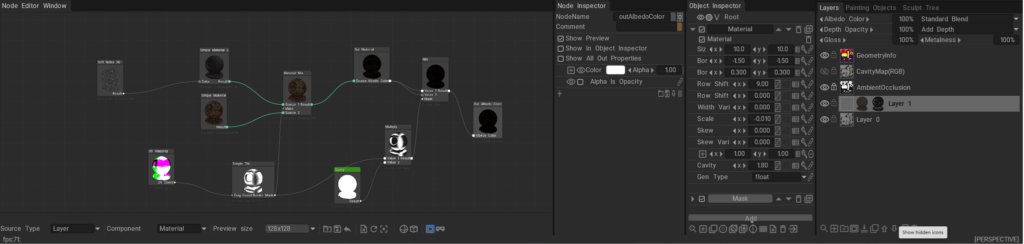
What is the Node System?

The 3DCoat Node System is a powerful, non-destructive procedural engine designed to create complex materials, masks, geometry deformers, and visual effects without relying on static bitmap textures.

Instead of drawing pixels destructively, you connect mathematical operations, procedural noises, and geometry inputs (nodes) together in a visual graph. Under the hood, these node graphs are dynamically compiled into highly optimized GPU shaders (using NGL – NodeGraph Language), allowing for real-time calculation and rendering. This results in resolution-independent assets that can automatically adapt to the curvature, ambient occlusion, and physical space of your 3D models.
Documentation Index

This directory (docs/) serves as the central repository for all documentation related to the 3DCoat Node System. Below is a guide to what you will find in each file and sub-directory.

Core User Guides

These guides explain the fundamental concepts, interface, and workflows of the Node System.

  • Node System User Guide: The foundational manuals for artists. They explain how to use the Node Editor, connect nodes, work with procedural materials, and understand the overall procedural workflow.
  • Node Editor Documentation: A detailed breakdown of the Node Editor interface itself, including navigation, node management, connection logic, and UI features.
  • Inspectors & Properties Documentation: Explains how to interact with the Node Inspector and Object Inspector. It covers how properties (like 1D curves, color pickers, and sliders) are exposed from the node graph to the user interface for quick artist tweaking.
  • PBM Channels Documentation: Documentation on Physically Based Material channels within the node system, explaining how procedural data flows into Albedo, Gloss, Metalness, and other PBR specific rendering targets.

Node References & Languages

Deep dives into the specific building blocks and the shader language that powers them.

  • GPU Nodes Overview: An introduction to what GPU Nodes are, how they interact with the GPU, and a high-level summary of node categories.

Preset Libraries

Guides on how complete, ready-to-use node graphs are categorized, stored, and applied in the software.

  • NGPresets: Contains documentation for the five main preset windows in 3DCoat that utilize node graphs:
    • NGMasks: Procedural, resolution-independent smart masks.
    • NGMaterials: Full procedural Smart Materials.
    • NGModifiers: Geometry deformers and displacement map generators.
    • NGFilters: Procedural post-processing filters for modifying existing layers.
    • NGVolumes: True 3D volumetric textures (like solid wood or marble) that evaluate in 3D space and ignore UV seams entirely.

Was this helpful?

Yes  No
Related Articles
  • GPU Texturing
  • Vector
  • Volumes
  • Modifiers
  • Materials
  • Masks
Previously
Lightwave uplink
Up Next
Node Editor
AI:
Hi! How can I help you?
Attention: This is a beta version of AI chat. Some answers may be wrong. See full version of AI chat