• Русский
  • Документация 3DCoat
  • Chapters
    • Введение в 3DCoat
    • Начиная
    • Интерфейс и навигация
    • Компоненты Brush
    • Node System
    • GPU Texturing
    • Рабочие помещения
    • Scripting и Core API
    • Вопросы и Ответы
    • Licensing
  • Learn
    • Getting Started
    • Painting
    • Sculpt
    • Modeling
    • Retopology
    • UV
    • Smart Materials
    • Nodes
    • Photogrammetry
    • Render
    • Print
    • Learning
    • Учебные пособия
  • Blog
    • Creating 3D Character Using 3DCoat
    • DAZ Genesis models into 3DCoat
    • Cavity and Curvature maps
    • Types of normal maps
    • Texture painting pipeline
    • Load new UV layout After Model Changes
    • Import Zbrush Polygroups for UV mapping
  • Products
    • 3DCoat
    • 3DCoatTextura
    • 3DCoatPrint
    • PBRLibrary
  • Store
  • Pilgway
  • Русский Русский
    • English English
    • Українська Українська
    • Español Español
    • Deutsch Deutsch
    • Français Français
    • 日本語 日本語
    • 한국어 한국어
    • Polski Polski
    • 中文 (中国) 中文 (中国)
    • Português Português
    • Italiano Italiano
    • Suomi Suomi
    • Svenska Svenska
    • 中文 (台灣) 中文 (台灣)
    • Dansk Dansk
    • Slovenčina Slovenčina
    • Türkçe Türkçe
    • Nederlands Nederlands
    • Magyar Magyar
    • ไทย ไทย
    • हिन्दी हिन्दी
    • Ελληνικά Ελληνικά
    • Tiếng Việt Tiếng Việt
    • Lietuviškai Lietuviškai
    • Latviešu valoda Latviešu valoda
    • Eesti Eesti
    • Čeština Čeština
    • Română Română
    • Norsk Bokmål Norsk Bokmål
  • Документация 3DCoat
  • Chapters
    • Введение в 3DCoat
    • Начиная
    • Интерфейс и навигация
    • Компоненты Brush
    • Node System
    • GPU Texturing
    • Рабочие помещения
    • Scripting и Core API
    • Вопросы и Ответы
    • Licensing
  • Learn
    • Getting Started
    • Painting
    • Sculpt
    • Modeling
    • Retopology
    • UV
    • Smart Materials
    • Nodes
    • Photogrammetry
    • Render
    • Print
    • Learning
    • Учебные пособия
  • Blog
    • Creating 3D Character Using 3DCoat
    • DAZ Genesis models into 3DCoat
    • Cavity and Curvature maps
    • Types of normal maps
    • Texture painting pipeline
    • Load new UV layout After Model Changes
    • Import Zbrush Polygroups for UV mapping
  • Products
    • 3DCoat
    • 3DCoatTextura
    • 3DCoatPrint
    • PBRLibrary
  • Store
  • Pilgway
  • Русский Русский
    • English English
    • Українська Українська
    • Español Español
    • Deutsch Deutsch
    • Français Français
    • 日本語 日本語
    • 한국어 한국어
    • Polski Polski
    • 中文 (中国) 中文 (中国)
    • Português Português
    • Italiano Italiano
    • Suomi Suomi
    • Svenska Svenska
    • 中文 (台灣) 中文 (台灣)
    • Dansk Dansk
    • Slovenčina Slovenčina
    • Türkçe Türkçe
    • Nederlands Nederlands
    • Magyar Magyar
    • ไทย ไทย
    • हिन्दी हिन्दी
    • Ελληνικά Ελληνικά
    • Tiếng Việt Tiếng Việt
    • Lietuviškai Lietuviškai
    • Latviešu valoda Latviešu valoda
    • Eesti Eesti
    • Čeština Čeština
    • Română Română
    • Norsk Bokmål Norsk Bokmål
Expand All Collapse All
  • Введение в 3DCoat
  • Начиная
    • System requirements
    • Why 3DCoat is Unique?
    • Активация 3DCoat
    • Ошибка запуска
      • Startup error Mac
    • Color management
    • Upgrading permanent license
    • Linux Setup
      • Linux initial setup per-user installation
      • Linux initial setup for system
      • Tablet setup
      • To GTK3 from GTK2
      • Error libicuuc.so.70
    • Структура папок
      • Custom documents folder
    • Различные формы «резолюции»
    • Tablet on Window
    • Import и Export
    • Applinks в 3DCoat
      • Ссылка на приложение Blender
        • Blender with the Applink in Linux
      • Blender 4.2/3/4/5 applink
      • Max Applink
      • Houdini applink
      • Lightwave uplink
  • Navigation
    • Открытие диалогового окна (меню быстрого запуска)
    • Панель навигации
    • Камера и навигация
      • Customize Navigation as Blender
    • Viewport Navigation Gizmo
    • Left tool panel
    •  Activity Bar
    • Навигация с использованием устройств 3DConnexion
      • How to compile Spacenavd on non Ubuntu distro
    • Space Bar Menu
    • Stylus doesn’t work in sculpting
    • Горячие клавиши
  • Интерфейс и навигация
    • Меню «Файл»
    • Меню редактирования
      • Calculate Curvature
      • Calculate Occlusion
      • Light Baking Tool
      • Настройки
    • Меню просмотра
    • Симметрия
    • Textures
    • Calculate
    • Меню слоев
    • Меню стоп-кадра
    • Hide
    • Bake
    • Кривые 2022
      • Меню кривых
      • Curves Properties RMB
      • Заполнить слоем сетки
      • Scale of imported curves
    • Меню Windows
      • Всплывающие панели Windows с вкладками
      • Слайдеры
    • Scripts
    • Addons
    • Capture
    • Меню справки
    • Настройка
    • Изменить или создать новую комнату
  • Компоненты Brush
    • Верхняя панель Brush
    • Кисти общего назначения
      • Создание кистей и декалей
      • Делаем альфу из текущего скульпта
      • Создайте Brush из 3D-объекта
      • Create brushes based on Curves
      • Load photoshop .abr brushes
    • Удары
      • Всплывающее меню кривых
    • Параметры Brush
    • Условия Ограничитель
    • Панель полос
    • Панель трафаретов
    • Умные материалы
      • Добавляйте новые изображения или материалы
      • Прикрепите смарт-материал к слою
      • Import Quixel Megascans
    • Как создать пресеты для Brush
  • Node System
    • Node Editor
    • Node & Object Inspectors
    • Node Graph
    • NodeGraph Language (NGL)
    • GPU Nodes
      • Color
      • GeometryIn
      • In
      • Layer
      • Material
      • Out
      • Pattern
      • Pattern3D
      • ShaderToy
      • Shape
      • Texture
      • Tilable
      • UV
      • Vector
    • Filters
    • Masks
    • Materials
    • Modifiers
    • Volumes
  • Бесплатный 3DCoatPrint
  • GPU Texturing
    • PBM Channels
    • Per-Pixel Painting
  • Рабочие помещения
    • Painting
      • Painting текстур и режимы
        • Per-Pixel Painting
        • Painting смещения (Micro-Vertex)
        • Ptex Painting
        • Painting поверхности (полиокраска)
      • Импорт в комнату Painting
        • Initial CC subdivision
        • UV Set smoothing
        • Sharp (hard) edge
        • Блокировка нормалей
        • Загрузить новый UV макет после изменения модели
        • DAZ Genesis models into 3DCoat
        • ID map
      • Меню рабочей области Painting
        • Edit menu
        • Меню текстур
          • Инструменты для Baking текстуры
        • Скрывать
        • Меню для Bake Paint
        • Выбор цвета
      • Surface Materials
      • Верхняя планка для Painting
      • Панель слоев
        • Панель смешивания
        • Layer and Clipping Masks
      • Инструменты для Painting
      • Непрозрачность - Прозрачность
      • Настройка рабочего пространства
        • Набор инструментов настройки
        • Экспорт из Tweak Room
      • Панель предварительного просмотра маски/материала
      • Экспорт из студии Painting
    • UV рабочее пространство
      • UV верхняя полоса
      • UV Левая панель инструментов
      • Панель предварительного просмотра UV
      • Пример рабочего процесса UV
      • Импорт в UV комнату
      • Экспорт из UV комнаты
    • Ретопология
      • Импорт в комнату Retopo
      • Сетчатое меню Retopo и меню выпечки
        • Режим виртуального зеркала
      • Bake menu
        • Treat Poly Groups as Paint Objects
        • Baking guide
      • Инструмент «Штрихи» в ретопологии
      • Верхняя панель
        • Выберите геометрию
      • Левая панель инструментов в комнате ретопологии
        • Общая цель и функция
        • Добавить геометрию
        • Инструменты настройки Retopo
        • UV инструменты
        • Команды для комнаты ретопологии
      • АВТОРЕТОПО
        • Autopo guide
      • Полигруппы
    • Лепить
      • Sculpt Layer
      • Скульптурное дерево
      • Параметры скульптурной Brush
      • Top Bar
      • Brush двигатель
      • Подменю геометрии
      • Скульптурное меню «Правый клик»
      • Шейдеры
      • Voxel режим
        • Чистая Voxel скульптура
        • Плотность и разрешение
        • Глиняный двигатель
        • Voxel инструменты
        • Поверхностные инструменты на вокселах
        • Инструменты настройки Voxel
        • Объемная Painting
        • Инструменты Voxel объектов
      • Поверхностный режим
        • Инструменты поверхности
        • Пользовательские инструменты поверхности
        • Surface Layer
        • Инструменты настройки поверхности
        • Painting поверхности
        • Многоуровневое разрешение
          • Multires tools
          • Multires adjust
          • Multires commands
      • Скульптурные кривые
        • Сплайн-кривые
        • Splines model creation
      • Смещение вектора
      • Инструменты преобразования поверхности
        • Инструменты преобразования Voxel
        • Instancer
        • Move
        • Pose
        • Fit
        • Reproject
        • Surface Array
      • Voxel примитивы и инструменты Import
        • Cardboard Box
      • Живые логические значения
      • Команды для скульптурной комнаты
      • Import в Sculpt Room
      • Экспорт из Sculpt Room
    • Оказывать
      • Comparison of different roughness values
      • Функции панели рендеринга
      • Проигрыватель
      • Поддельное освещение - без PBR-
    • Factures
      • Рабочий процесс
    • Самый простой
    • Моделирование
      • Mesh Menu
      • Левая панель инструментов в комнате моделирования
        • Добавить геометрию
          • Выбрано
        • Твик
        • Smart Hybrid
        • UV
          • Команды
        • Вся сетка
      • Пример лофтовой поверхности от Fluffy
      • Блокаут от Poeboi
      • Import Zbrush Polygroups for UV mapping
    • Kitbash - Быстрое создание 3D моделей
      • Create kitbash
      • Left tool panel Kitbash
    • 3DPrint
    • Photogrammetry
      • How to install Reality Capture
      • Reality Capture doesn’t show up ?
    • Сетка для комнаты NURBS
    • Nodes
      • Библиотека узлов скульпт-шейдеров
      • Open PBR
  • Scripting и Core API
    • Core API
    • API Python
    • Extensions and Addons

Node System

800 views 2

Written by Volodymyr Makovetskyi
May 14, 2026

What is the Node System?

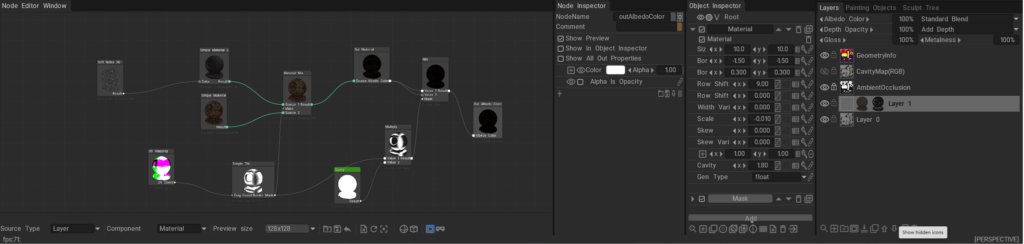
The 3DCoat Node System is a powerful, non-destructive procedural engine designed to create complex materials, masks, geometry deformers, and visual effects without relying on static bitmap textures.

Instead of drawing pixels destructively, you connect mathematical operations, procedural noises, and geometry inputs (nodes) together in a visual graph. Under the hood, these node graphs are dynamically compiled into highly optimized GPU shaders (using NGL – NodeGraph Language), allowing for real-time calculation and rendering. This results in resolution-independent assets that can automatically adapt to the curvature, ambient occlusion, and physical space of your 3D models.

Documentation Index

This directory (docs/) serves as the central repository for all documentation related to the 3DCoat Node System. Below is a guide to what you will find in each file and sub-directory.


Core User Guides

These guides explain the fundamental concepts, interface, and workflows of the Node System.

  • Node System User Guide: The foundational manuals for artists. They explain how to use the Node Editor, connect nodes, work with procedural materials, and understand the overall procedural workflow.
  • Node Editor Documentation: A detailed breakdown of the Node Editor interface itself, including navigation, node management, connection logic, and UI features.
  • Inspectors & Properties Documentation: Explains how to interact with the Node Inspector and Object Inspector. It covers how properties (like 1D curves, color pickers, and sliders) are exposed from the node graph to the user interface for quick artist tweaking.
  • PBM Channels Documentation: Documentation on Physically Based Material channels within the node system, explaining how procedural data flows into Albedo, Gloss, Metalness, and other PBR specific rendering targets.

Node References & Languages

Deep dives into the specific building blocks and the shader language that powers them.

  • GPU Nodes Overview: An introduction to what GPU Nodes are, how they interact with the GPU, and a high-level summary of node categories.

Preset Libraries

Guides on how complete, ready-to-use node graphs are categorized, stored, and applied in the software.

  • NGPresets: Contains documentation for the five main preset windows in 3DCoat that utilize node graphs:
    • NGMasks: Procedural, resolution-independent smart masks.
    • NGMaterials: Full procedural Smart Materials.
    • NGModifiers: Geometry deformers and displacement map generators.
    • NGFilters: Procedural post-processing filters for modifying existing layers.
    • NGVolumes: True 3D volumetric textures (like solid wood or marble) that evaluate in 3D space and ignore UV seams entirely.

Was this helpful?

2 Yes  No
Related Articles
  • Cardboard Box
  • GPU Texturing
  • Vector
  • Volumes
  • Modifiers
  • Materials
Previously
Как создать пресеты для Brush
Up Next
Node Editor
AI:
Hi! How can I help you?
Attention: This is a beta version of AI chat. Some answers may be wrong. See full version of AI chat