• हिन्दी
  • 3DCoat प्रलेखन
  • Chapters
    • 3DCoat का परिचय
    • शुरू करना
    • इंटरफ़ेस और नेविगेशन
    • Brush अवयव
    • कार्यक्षेत्र के कमरे
    • Scripting और Core API
    • प्रश्न और उत्तर
    • licensing
    • प्रशिक्षण ट्यूटोरियल
  • Pilgway
  • Products
    • 3DCoat
    • 3DCoatTextura
    • 3DCoatPrint
    • PBRLibrary
  • Blog Posts
  • Store
  • हिन्दी हिन्दी
    • English English
    • Українська Українська
    • Español Español
    • Deutsch Deutsch
    • Français Français
    • 日本語 日本語
    • Русский Русский
    • 한국어 한국어
    • Polski Polski
    • 中文 (中国) 中文 (中国)
    • Português Português
    • Italiano Italiano
    • Suomi Suomi
    • Svenska Svenska
    • 中文 (台灣) 中文 (台灣)
    • Dansk Dansk
    • Slovenčina Slovenčina
    • Türkçe Türkçe
    • Nederlands Nederlands
    • Magyar Magyar
    • ไทย ไทย
    • Ελληνικά Ελληνικά
    • Tiếng Việt Tiếng Việt
    • Lietuviškai Lietuviškai
    • Latviešu valoda Latviešu valoda
    • Eesti Eesti
    • Čeština Čeština
    • Română Română
    • Norsk Bokmål Norsk Bokmål
  • Creating 3D Character Using 3DCoat
  • 3DCoat प्रलेखन
  • Chapters
    • 3DCoat का परिचय
    • शुरू करना
    • इंटरफ़ेस और नेविगेशन
    • Brush अवयव
    • कार्यक्षेत्र के कमरे
    • Scripting और Core API
    • प्रश्न और उत्तर
    • licensing
    • प्रशिक्षण ट्यूटोरियल
  • Pilgway
  • Products
    • 3DCoat
    • 3DCoatTextura
    • 3DCoatPrint
    • PBRLibrary
  • Blog Posts
  • Store
  • हिन्दी हिन्दी
    • English English
    • Українська Українська
    • Español Español
    • Deutsch Deutsch
    • Français Français
    • 日本語 日本語
    • Русский Русский
    • 한국어 한국어
    • Polski Polski
    • 中文 (中国) 中文 (中国)
    • Português Português
    • Italiano Italiano
    • Suomi Suomi
    • Svenska Svenska
    • 中文 (台灣) 中文 (台灣)
    • Dansk Dansk
    • Slovenčina Slovenčina
    • Türkçe Türkçe
    • Nederlands Nederlands
    • Magyar Magyar
    • ไทย ไทย
    • Ελληνικά Ελληνικά
    • Tiếng Việt Tiếng Việt
    • Lietuviškai Lietuviškai
    • Latviešu valoda Latviešu valoda
    • Eesti Eesti
    • Čeština Čeština
    • Română Română
    • Norsk Bokmål Norsk Bokmål
  • Creating 3D Character Using 3DCoat
Expand All Collapse All
  • 3DCoat का परिचय
  • शुरू करना
    • System requirements
    • Why 3DCoat is Unique?
    • 3DCoat सक्रिय कर रहा है
    • स्टार्टअप त्रुटि
      • Startup error Mac
    • Color management
    • Upgrading permanent license
    • Linux Setup
      • Linux initial setup per-user installation
      • Linux initial setup for system
      • Tablet setup
      • To GTK3 from GTK2
    • फ़ोल्डर संरचना
      • Custom documents folder
    • "संकल्प" के विभिन्न रूप
    • Tablet on Window
    • Import और Export
    • 3DCoat में Applinks
      • Blender ऐपलिंक
        • Blender with the Applink in Linux
      • Blender 4.2/3/4/5 applink
      • Max Applink
      • Houdini applink
      • Lightwave uplink
  • Navigation
    • ओपनिंग डायलॉग (क्विक स्टार्ट मेन्यू)
    • नेविगेशन पैनल
    • कैमरा और नेविगेशन
      • Customize Navigation as Blender
    • Viewport Navigation Gizmo
    • Left tool panel
    •  Activity Bar
    • 3DConnection उपकरणों का उपयोग करके नेविगेशन
      • How to compile Spacenavd on non Ubuntu distro
    • Stylus doesn’t work in sculpting
    • हॉटकी
  • इंटरफ़ेस और नेविगेशन
    • फ़ाइल मेनू
    • संपादन मेनू
      • Calculate Curvature
      • Calculate Occlusion
      • Light Baking Tool
      • पसंद
    • मेनू देखें
    • समरूपता
    • Textures
    • Calculate
    • परत मेनू
    • फ्रीज मेनू
    • Hide
    • Bake
    • कर्व्स 2022
      • घटता मेनू
      • Curves Properties RMB
      • जालीदार परत से भरें
      • Scale of imported curves
    • विंडोज मेनू
      • टैब्ड विंडोज पॉपअप पैनल
      • स्लाइडर्स
    • Scripts
    • Addons
    • Capture
    • सहायता मेनू
    • अनुकूलन
    • संशोधित करें या नया कक्ष बनाएँ
  • Brush अवयव
    • Brush टॉप बार
    • ब्रश सामान्य उपयोग
      • ब्रश और डीकैल बनाएं
      • वर्तमान मूर्तिकला से अल्फा बनाना
      • 3डी ऑब्जेक्ट से Brush बनाएं
      • Create brushes based on Curves
      • Load photoshop .abr brushes
    • स्ट्रोक्स
      • वक्र पॉपअप मेनू
    • Brush विकल्प
    • शर्तें सीमक
    • स्ट्रिप्स पैनल
    • स्टेंसिल पैनल
    • स्मार्ट सामग्री
      • नई छवियां या सामग्रियां जोड़ें
      • एक परत में स्मार्ट सामग्री संलग्न करें
      • Import Quixel Material
    • Brush के लिए प्रीसेट कैसे बनाएं
  • कार्यक्षेत्र के कमरे
    • Painting
      • बनावट Painting और मोड
        • Per-Pixel Painting
        • विस्थापन Painting (माइक्रो-वर्टेक्स)
        • Ptex Painting
        • भूतल Painting (पॉलीपेंटिंग)
      • Painting कक्ष में आयात करना
        • Initial CC subdivision
        • UV Set smoothing
        • Sharp (hard) edge
        • सामान्य लॉक करें
        • मॉडल परिवर्तन के बाद नया UV लेआउट लोड करें
        • DAZ Genesis models into 3DCoat
      • Painting कार्यक्षेत्र का मेनू
        • Edit menu
        • बनावट मेनू
          • बनावट Baking उपकरण
        • छिपाना
        • Bake Paint के लिए मेनू
        • रंग बीनने वाला
      • Painting के लिए टॉप बार
      • परत पैनल
        • सम्मिश्रण पैनल
        • Layer and Clipping Masks
      • Painting कक्ष उपकरण
      • अपारदर्शिता - पारदर्शिता
      • कार्यक्षेत्र को ट्वीक करें
        • ट्वीक टूलसेट
        • ट्वीक रूम से निर्यात
      • मास्क/सामग्री पूर्वावलोकन पैनल
      • Painting कक्ष से निर्यात
    • UV कार्यक्षेत्र
      • UV टॉप बार
      • UV लेफ्ट टूल पैनल
      • UV पूर्वावलोकन पैनल
      • UV वर्कफ़्लो उदाहरण
      • UV कक्ष में आयात करना
      • UV रूम से निर्यात करना
    • रेटोपोलॉजी
      • Retopo कक्ष में आयात करना
      • Retopo मेश मेनू और बेक मेनू
        • वर्चुअल मिरर मोड
      • Bake menu
        • Treat Poly Groups as Paint Objects
        • Baking guide
      • शीश पट्टी
        • ज्यामिति का चयन करें
      • रेटोपोलॉजी रूम में लेफ्ट टूल पैनल
        • समग्र उद्देश्य और कार्य
        • ज्यामिति जोड़ें
          • रेटोपोलॉजी में स्ट्रोक टूल
        • Retopo ट्वीक टूल्स
        • UV उपकरण
        • रेटोपोलॉजी रूम के लिए कमांड
      • ऑटोरेटोपो
        • Autopo guide
      • पाली समूह
    • नकाशी
      • Sculpt Layer
      • मूर्ति वृक्ष
      • मूर्तिकला Brush विकल्प
      • Top Bar
      • Brush इंजन
      • ज्यामिति सबमेनू
      • मूर्तिकला "राइट-क्लिक" मेनू
      • शेडर्स
      • Voxel मोड
        • प्योर Voxel स्कल्प्टिंग
        • घनत्व और संकल्प
        • मिट्टी का इंजन
        • Voxel टूल्स
        • वोक्सल्स पर भूतल उपकरण
        • Voxel समायोजन उपकरण
        • वॉल्यूमेट्रिक Painting
        • Voxel ऑब्जेक्ट्स टूल्स
      • भूतल मोड
        • भूतल उपकरण
        • भूतल कस्टम उपकरण
        • भूतल समायोजन उपकरण
        • भूतल Painting
        • भूतल वस्तु उपकरण
        • बहुस्तरीय संकल्प
          • Multires tools
          • Multires adjust
          • Multires commands
      • मूर्तिकला वक्र
        • तख़्ता घटता है
        • Splines model creation
      • वेक्टर विस्थापन
      • भूतल रूपांतरण उपकरण
        • Voxel ट्रांसफ़ॉर्म टूल
        • Instancer
        • Move
        • Pose
        • Fit
        • Reproject
        • Surface Array
      • Voxel आदिम और Import उपकरण
      • लाइव बूलियन्स
      • मूर्तिकला कक्ष के लिए आदेश
      • मूर्तिकला कक्ष में Import
      • मूर्तिकला कक्ष से निर्यात
    • प्रदान करना
      • Comparison of different roughness values
      • रेंडर पैनल फ़ंक्शंस
      • टर्नटेबल
      • लाइटिंग को नकली बनाना - गैर PBR-
    • Factures
      • कार्यप्रवाह
    • सरल
    • मोडलिंग
      • Mesh Menu
      • मॉडलिंग रूम में लेफ्ट टूल पैनल
        • ज्यामिति जोड़ें
          • चयनित
        • सुधार
        • Smart Hybrid
        • UV
          • आदेश
        • संपूर्ण जाल
      • फ्लफी द्वारा मचान सतह का उदाहरण
      • पोएबोई द्वारा ब्लॉकआउट
      • Import Zbrush Polygroups for UV mapping
    • Kitbash - त्वरित 3D मॉडल निर्माण
      • Create kitbash
      • Left tool panel Kitbash
    • 3DPrint
    • Photogrammetry
      • How to install Reality Capture
      • Reality Capture doesn’t show up ?
    • NURBS कक्ष में जाली
    • Nodes
      • मूर्तिकला शेडर्स नोड्स लाइब्रेरी
  • Scripting और Core API
    • Scripting
    • Core API
    • पायथन एपीआई
  • नि:शुल्क 3DCoatPrint

Initial CC subdivision

784 views 0

Written by Carlos
May 27, 2024

Initial subdivision


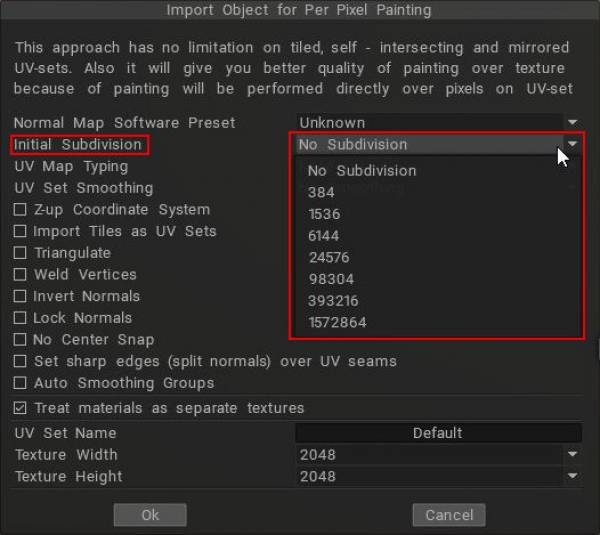
When you import “model for pixel painting” with 3DCoat, you can select initial subdivision.
(text below by lunarbor).

Software used

    • 3DCoat
    • Blender

In 3DCoat, when you “import a model for pixel painting”, you can select “Initial subdivision (number of polygons)” in the import settings screen, which seems to correspond to the subdivision ratio when using Catmull-Clark subdivision (CC).

In other software, the division level is specified as the number of polygons, so it is hard to tell which one to choose at a glance.
Verification


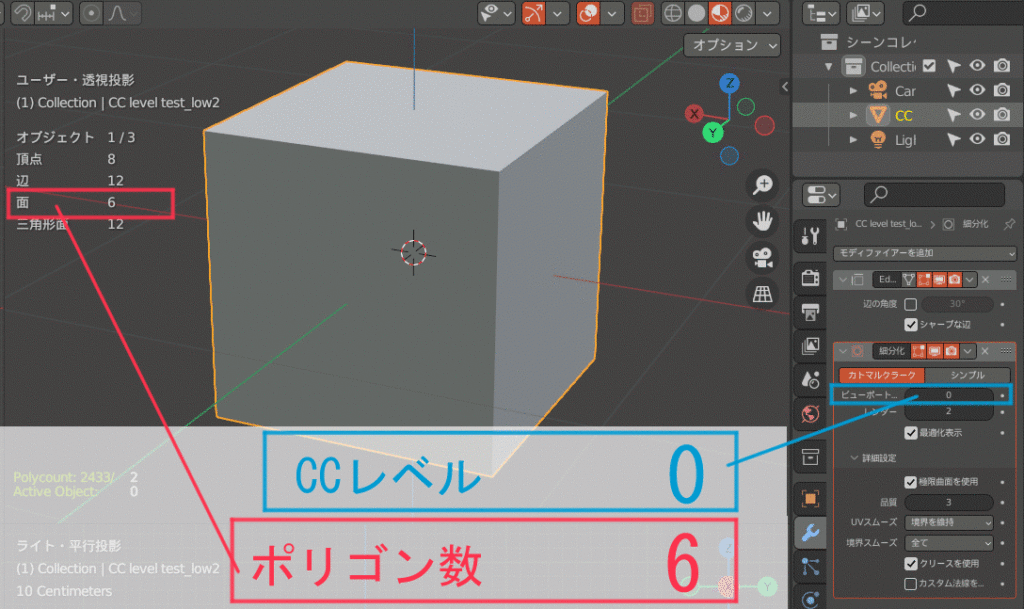
Create a primitive cube in Blender. The number of polygons is “6,” of course.
The cube is subdivided by applying CC, but the number of polygons that can be counted is still “6”. (red frame)
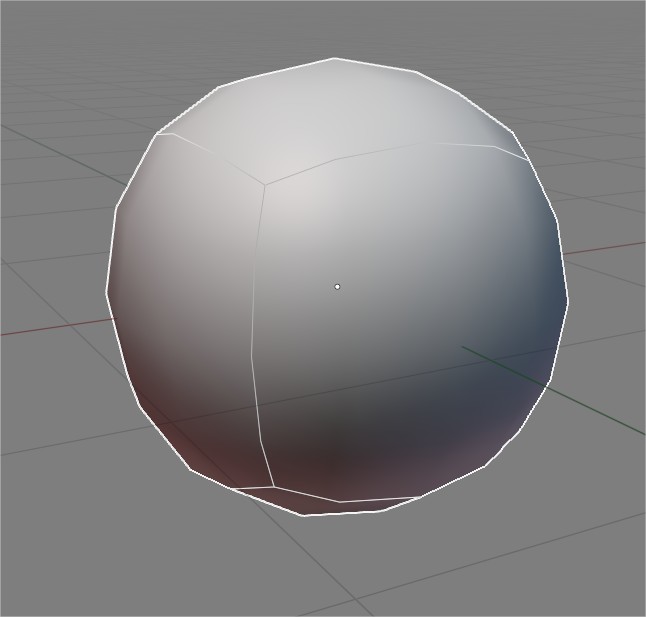

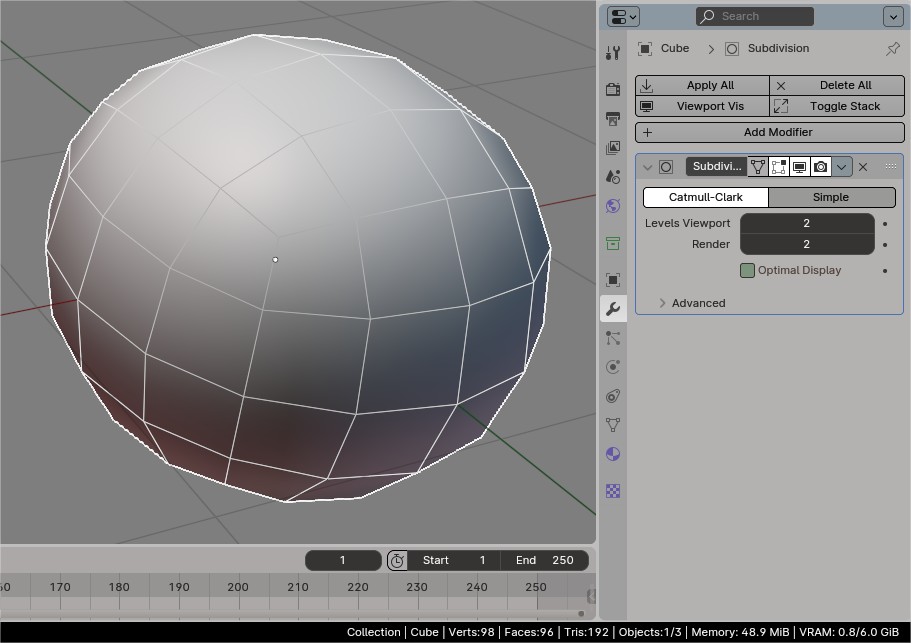
Then, press the “Modifiers > Apply” button to finalize the subdivision.

Then the division is fixed with CC applied, and the polygon count of this object is counted. In this case, we used CC division level 2. The polygon count is “96”.

Do this for each CC division level and check the polygon count according to the level.
And I made an animated gif to make the results easier to understand.
The polygon count matches the number in the 3DCoat panel pasted at the beginning of this article. Therefore, that number seems correct for the number of polygons subdivided by each division level of CC. Simply remember it is level 1, 2, 3~ from the top.
That clears things up.
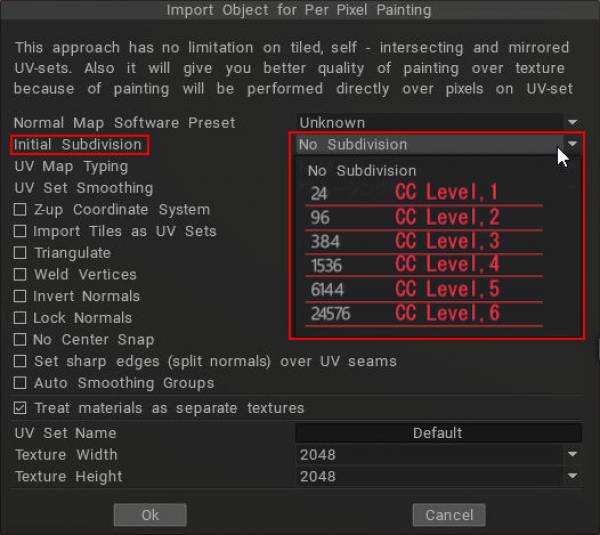
This panel is displayed when the same cube model used in the verification is imported into 3DCoat as a “model for pixel painting”.

This value varies depending on the object to be imported, so if you do not understand this, you will not know which one to choose.

3DCoat has setting items here and there with only numerical values like this.

Tags:Initial subdivision

Was this helpful?

Yes  No
Related Articles
  • Surface Array
  • Top Bar
  • Curves Properties RMB
  • Left tool panel Kitbash
  • Create kitbash
  • Color management
Previously
Painting कक्ष में आयात करना
Up Next
UV Set smoothing
AI:
Hi! How can I help you?
Attention: This is a beta version of AI chat. Some answers may be wrong. See full version of AI chat