• हिन्दी
  • 3DCoat प्रलेखन
  • Chapters
    • 3DCoat का परिचय
    • शुरू करना
    • इंटरफ़ेस और नेविगेशन
    • Brush अवयव
    • Node System
    • GPU Texturing
    • कार्यक्षेत्र के कमरे
    • Scripting और Core API
    • प्रश्न और उत्तर
    • Licensing
  • Learn
    • Getting Started
    • Painting
    • Sculpt
    • Modeling
    • Retopology
    • UV
    • Smart Materials
    • Nodes
    • Photogrammetry
    • Render
    • Print
    • Learning
    • प्रशिक्षण ट्यूटोरियल
  • Blog
    • 2026 Key Features and Improvements
    • Texturing with nodes
    • Shader Nodes VS. a Material Nodes
    • Multiple UV Tiles/UDIMs to one single UV set ?
    • I want to create geometry only with displacement to be manufactured with a CNC machine
    • Creating 3D Character Using 3DCoat
    • DAZ Genesis models into 3DCoat
    • Cavity and Curvature maps
    • Types of normal maps
    • Texture painting pipeline
    • Load new UV layout After Model Changes
    • Import Zbrush Polygroups for UV mapping
  • Products
    • 3DCoat
    • 3DCoatTextura
    • 3DCoatPrint
    • PBRLibrary
  • Store
  • Pilgway
  • हिन्दी हिन्दी
    • English English
    • Українська Українська
    • Español Español
    • Deutsch Deutsch
    • Français Français
    • 日本語 日本語
    • Русский Русский
    • 한국어 한국어
    • Polski Polski
    • 中文 (中国) 中文 (中国)
    • Português Português
    • Italiano Italiano
    • Suomi Suomi
    • Svenska Svenska
    • 中文 (台灣) 中文 (台灣)
    • Dansk Dansk
    • Slovenčina Slovenčina
    • Türkçe Türkçe
    • Nederlands Nederlands
    • Magyar Magyar
    • ไทย ไทย
    • Ελληνικά Ελληνικά
    • Tiếng Việt Tiếng Việt
    • Lietuviškai Lietuviškai
    • Latviešu valoda Latviešu valoda
    • Eesti Eesti
    • Čeština Čeština
    • Română Română
    • Norsk Bokmål Norsk Bokmål
  • 3DCoat प्रलेखन
  • Chapters
    • 3DCoat का परिचय
    • शुरू करना
    • इंटरफ़ेस और नेविगेशन
    • Brush अवयव
    • Node System
    • GPU Texturing
    • कार्यक्षेत्र के कमरे
    • Scripting और Core API
    • प्रश्न और उत्तर
    • Licensing
  • Learn
    • Getting Started
    • Painting
    • Sculpt
    • Modeling
    • Retopology
    • UV
    • Smart Materials
    • Nodes
    • Photogrammetry
    • Render
    • Print
    • Learning
    • प्रशिक्षण ट्यूटोरियल
  • Blog
    • 2026 Key Features and Improvements
    • Texturing with nodes
    • Shader Nodes VS. a Material Nodes
    • Multiple UV Tiles/UDIMs to one single UV set ?
    • I want to create geometry only with displacement to be manufactured with a CNC machine
    • Creating 3D Character Using 3DCoat
    • DAZ Genesis models into 3DCoat
    • Cavity and Curvature maps
    • Types of normal maps
    • Texture painting pipeline
    • Load new UV layout After Model Changes
    • Import Zbrush Polygroups for UV mapping
  • Products
    • 3DCoat
    • 3DCoatTextura
    • 3DCoatPrint
    • PBRLibrary
  • Store
  • Pilgway
  • हिन्दी हिन्दी
    • English English
    • Українська Українська
    • Español Español
    • Deutsch Deutsch
    • Français Français
    • 日本語 日本語
    • Русский Русский
    • 한국어 한국어
    • Polski Polski
    • 中文 (中国) 中文 (中国)
    • Português Português
    • Italiano Italiano
    • Suomi Suomi
    • Svenska Svenska
    • 中文 (台灣) 中文 (台灣)
    • Dansk Dansk
    • Slovenčina Slovenčina
    • Türkçe Türkçe
    • Nederlands Nederlands
    • Magyar Magyar
    • ไทย ไทย
    • Ελληνικά Ελληνικά
    • Tiếng Việt Tiếng Việt
    • Lietuviškai Lietuviškai
    • Latviešu valoda Latviešu valoda
    • Eesti Eesti
    • Čeština Čeština
    • Română Română
    • Norsk Bokmål Norsk Bokmål
Expand All Collapse All
  • 3DCoat का परिचय
  • शुरू करना
    • System requirements
    • Why 3DCoat is Unique?
    • 3DCoat सक्रिय कर रहा है
    • स्टार्टअप त्रुटि
      • Startup error Mac
    • Color management
    • Upgrading permanent license
    • Linux Setup
      • Linux initial setup per-user installation
      • Linux initial setup for system
      • Tablet setup
      • To GTK3 from GTK2
      • Error libicuuc.so.70
    • फ़ोल्डर संरचना
      • Custom documents folder
    • "संकल्प" के विभिन्न रूप
    • Tablet on Window
    • Import और Export
    • 3DCoat में Applinks
      • Blender ऐपलिंक
        • Blender with the Applink in Linux
      • Blender 4.2/3/4/5 applink
      • Max Applink
      • Houdini applink
      • Lightwave uplink
  • Navigation
    • ओपनिंग डायलॉग (क्विक स्टार्ट मेन्यू)
    • नेविगेशन पैनल
    • कैमरा और नेविगेशन
      • Customize Navigation as Blender
    • Left tool panel
    •  Activity Bar
    • 3DConnection उपकरणों का उपयोग करके नेविगेशन
      • How to compile Spacenavd on non Ubuntu distro
    • Quick Access Menu
    • Stylus doesn’t work in sculpting
    • हॉटकी
  • इंटरफ़ेस और नेविगेशन
    • फ़ाइल मेनू
    • संपादन मेनू
      • Bake Geometry Info
      • Calculate Occlusion
      • Calculate Curvature
      • Light Baking Tool
      • पसंद
    • मेनू देखें
    • समरूपता
    • Textures
    • Calculate
    • परत मेनू
    • फ्रीज मेनू
    • Hide
    • Bake
    • कर्व्स 2022
      • घटता मेनू
      • Curves Properties RMB
      • जालीदार परत से भरें
      • Scale of imported curves
    • विंडोज मेनू
      • टैब्ड विंडोज पॉपअप पैनल
      • स्लाइडर्स
    • Scripts
    • Addons
    • Capture
    • सहायता मेनू
    • अनुकूलन
    • संशोधित करें या नया कक्ष बनाएँ
  • Brush अवयव
    • Brush टॉप बार
    • ब्रश सामान्य उपयोग
      • ब्रश और डीकैल बनाएं
      • वर्तमान मूर्तिकला से अल्फा बनाना
      • 3डी ऑब्जेक्ट से Brush बनाएं
      • Create brushes based on Curves
      • Load photoshop .abr brushes
    • स्ट्रोक्स
      • वक्र पॉपअप मेनू
    • Brush विकल्प
    • शर्तें सीमक
    • स्ट्रिप्स पैनल
    • स्टेंसिल पैनल
    • स्मार्ट सामग्री
      • नई छवियां या सामग्रियां जोड़ें
      • एक परत में स्मार्ट सामग्री संलग्न करें
      • Import Quixel Megascans
    • Brush के लिए प्रीसेट कैसे बनाएं
  • Node System
    • Node Editor
    • Node & Object Inspectors
    • Node Graph
    • NodeGraph Language (NGL)
    • GPU Nodes
      • Color
      • GeometryIn
      • In
      • Layer
      • Material
      • Out
      • Pattern
      • Pattern3D
      • ShaderToy
      • Shape
      • Texture
      • Tilable
      • UV
      • Math
    • Filters
    • Masks
    • Materials
    • Modifiers
    • Volumes
  • नि:शुल्क 3DCoatPrint
  • GPU Texturing
    • PBM Channels
    • Per-Pixel Painting
  • कार्यक्षेत्र के कमरे
    • Painting
      • बनावट Painting और मोड
        • Per-Pixel Painting
        • विस्थापन Painting (माइक्रो-वर्टेक्स)
        • Ptex Painting
        • भूतल Painting (पॉलीपेंटिंग)
      • Painting कक्ष में आयात करना
        • Initial CC subdivision
        • UV Set smoothing
        • Sharp (hard) edge
        • सामान्य लॉक करें
        • मॉडल परिवर्तन के बाद नया UV लेआउट लोड करें
        • DAZ Genesis models into 3DCoat
        • ID map
      • Painting कार्यक्षेत्र का मेनू
        • Edit menu
        • बनावट मेनू
          • बनावट Baking उपकरण
        • छिपाना
        • Bake Paint के लिए मेनू
        • रंग बीनने वाला
      • Surface Materials
      • Painting के लिए टॉप बार
      • परत पैनल
        • सम्मिश्रण पैनल
        • Layer and Clipping Masks
      • Painting कक्ष उपकरण
      • अपारदर्शिता - पारदर्शिता
      • कार्यक्षेत्र को ट्वीक करें
        • ट्वीक टूलसेट
        • ट्वीक रूम से निर्यात
      • मास्क/सामग्री पूर्वावलोकन पैनल
      • Painting कक्ष से निर्यात
    • UV कार्यक्षेत्र
      • UV टॉप बार
      • UV लेफ्ट टूल पैनल
      • UV पूर्वावलोकन पैनल
      • UV वर्कफ़्लो उदाहरण
      • UV कक्ष में आयात करना
      • UV रूम से निर्यात करना
    • रेटोपोलॉजी
      • Retopo कक्ष में आयात करना
      • Retopo मेश मेनू और बेक मेनू
        • वर्चुअल मिरर मोड
      • Bake menu
        • Treat Poly Groups as Paint Objects
        • Baking guide
      • रेटोपोलॉजी में स्ट्रोक टूल
      • शीश पट्टी
        • ज्यामिति का चयन करें
      • रेटोपोलॉजी रूम में लेफ्ट टूल पैनल
        • समग्र उद्देश्य और कार्य
        • ज्यामिति जोड़ें
        • Retopo ट्वीक टूल्स
        • UV उपकरण
        • रेटोपोलॉजी रूम के लिए कमांड
      • ऑटोरेटोपो
        • Autopo guide
      • पाली समूह
    • नकाशी
      • Sculpt Layer
      • मूर्ति वृक्ष
      • मूर्तिकला Brush विकल्प
      • Top Bar
      • Brush इंजन
      • ज्यामिति सबमेनू
      • मूर्तिकला "राइट-क्लिक" मेनू
      • शेडर्स
      • Voxel मोड
        • प्योर Voxel स्कल्प्टिंग
        • घनत्व और संकल्प
        • मिट्टी का इंजन
        • Voxel टूल्स
        • वोक्सल्स पर भूतल उपकरण
        • Voxel समायोजन उपकरण
        • वॉल्यूमेट्रिक Painting
        • Voxel ऑब्जेक्ट्स टूल्स
      • भूतल मोड
        • भूतल उपकरण
        • भूतल कस्टम उपकरण
        • Surface Layer
        • भूतल समायोजन उपकरण
        • भूतल Painting
        • बहुस्तरीय संकल्प
          • Multires tools
          • Multires adjust
          • Multires commands
      • मूर्तिकला वक्र
        • तख़्ता घटता है
        • Splines model creation
      • वेक्टर विस्थापन
      • भूतल रूपांतरण उपकरण
        • Voxel ट्रांसफ़ॉर्म टूल
        • Instancer
        • Move
        • Pose
        • Fit
        • Reproject
        • Surface Array
      • Voxel आदिम और Import उपकरण
        • Hollow Box
      • लाइव बूलियन्स
      • मूर्तिकला कक्ष के लिए आदेश
      • मूर्तिकला कक्ष में Import
      • मूर्तिकला कक्ष से निर्यात
    • प्रदान करना
      • Comparison of different roughness values
      • रेंडर पैनल फ़ंक्शंस
      • टर्नटेबल
      • लाइटिंग को नकली बनाना - गैर PBR-
    • Factures
      • कार्यप्रवाह
    • सरल
    • मोडलिंग
      • Mesh Menu
      • मॉडलिंग रूम में लेफ्ट टूल पैनल
        • ज्यामिति जोड़ें
          • Make Joints
          • चयनित
        • सुधार
        • Smart Hybrid
        • UV
          • आदेश
        • संपूर्ण जाल
      • फ्लफी द्वारा मचान सतह का उदाहरण
      • पोएबोई द्वारा ब्लॉकआउट
      • Import Zbrush Polygroups for UV mapping
    • Kitbash - त्वरित 3D मॉडल निर्माण
      • Create kitbash
      • Left tool panel Kitbash
    • 3DPrint
    • Photogrammetry
      • How to install Reality Capture
      • Reality Capture doesn’t show up ?
    • NURBS कक्ष में जाली
    • Nodes
      • Texturing with nodes
      • मूर्तिकला शेडर्स नोड्स लाइब्रेरी
      • Open PBR
  • Scripting और Core API
    • Core API
    • पायथन एपीआई
    • Extensions and Addons

Bake Geometry Info

23 views 0

Written by Carlos
August 2, 2026

Geometry baking info is the process of saving 3D surface details like normals, curvature, and ambient occlusion.

Geometry baking info is the process of saving physical shape details from a 3D model, such as surface curves, edges, and high-resolution details, into flat 2D image files called texture maps.
3D surface details like normals, curvature, and ambient occlusion are saved for internal calculations. This baking process is needed when you work using Material nodes.
How Baking Works

  • High and Low Models: You compare a very detailed high-polygon mesh with a simple low-polygon mesh.
  • Ray Casting: Software shoots invisible lines (rays) from the low-poly surface to find where the high-poly surface sits.
  • Data Saving: The captured depth and angle data are saved into maps like normal maps, displacement maps, or ambient occlusion maps

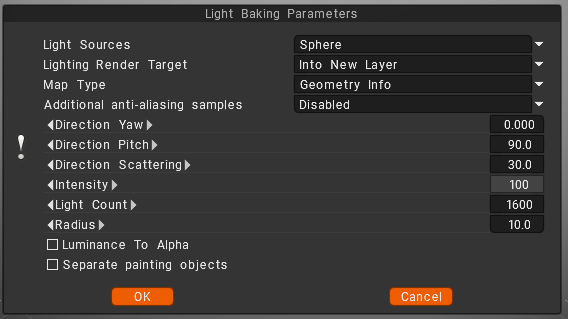
Light sources (distribution of lights)

  • over the hemisphere
  • over the sphere
  • over hemisphere + sphere

Lighting render target

You must choose a layer to which the occlusion calculation is placed. Can choose to add a new layer automatically or overwrite the current layer.
– In the first case, you do not forget to delete a new layer for light calculation. Also, a new color option, “To time,” is installed for a new layer.
– In the case of rendering the former layer, all its color information will be deleted.
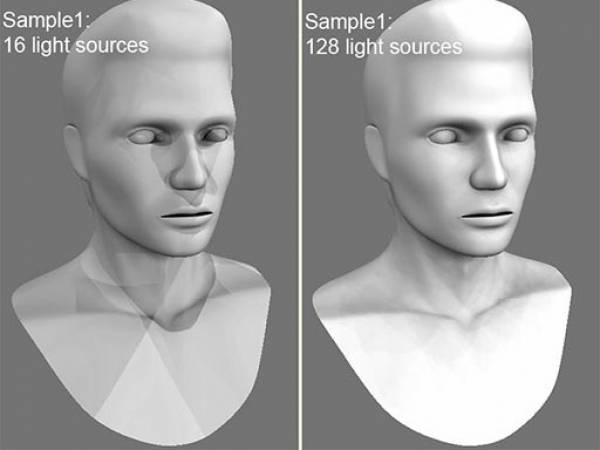
Lights count: The more lights, the longer the calculation. The more light sources there are the better the quality of lighting and the longer its calculation.
The maximum value is 256, and the minimum value is 16.

Additional anti-aliasing samples: Amount of post-smoothing steps after occlusion calculation. The calculation will be used the texture several times bigger. This allows you to get rid of some artifacts if there are too small UV islands or long pixels.
Warning: this function will slow down the calculation and consume more RAM and VRAM.

Direction Yaw: Yaw means turning or rotating an object left or right around a vertical axis (like shaking your head “no”). It defines the compass direction or heading that the front of an object is facing.
Direction Pitch: Pitch is the vertical tilt angle that determines if a direction or object points:

  • Up (positive tilt)
  • Down (negative tilt)
  • Flat/Horizontal (zero degrees)

Direction Scattering: Scattering, waves, light, or particles spread out in a full three-dimensional space (x, y, and z directions) after hitting an object.
Intensity: Intensity means the strength of the signal, light, or reflection returned at a specific 3D point or voxel (3D pixel).
Light count: is the total number of active light sources (like points, spots, or directional lights) illuminating a scene or allowed per object.
Radius: a light’s radius controls source size and falloff distance, which determine shadow softness and the area the light reaches.

Luminance to Alpha: turn the brightness (light and dark parts) of an image into a transparency mask.
Bright white areas become solid, dark black areas become see-through (transparent), and gray areas become partly see-through.
Separate paint objects: Explode the object on parts to avoid wrong AO contact projections.

Was this helpful?

Yes  No
Related Articles
  • Make Joints
  • Texturing with nodes
  • Hollow Box
  • GPU Texturing
  • Math
  • Volumes
Previously
संपादन मेनू
Up Next
Calculate Occlusion
AI:
Hi! How can I help you?
Attention: This is a beta version of AI chat. Some answers may be wrong. See full version of AI chat