• Eesti
  • 3DCoat dokumentatsioon
  • Chapters
    • 3DCoat tutvustus
    • Alustamine
    • Liides ja navigeerimine
    • Brush komponendid
    • Tööruumid Toad
    • Scripting ja Core API
    • Küsimused/Vastused
    • licensing
    • Koolitusõpetused
  • Pilgway
  • Products
    • 3DCoat
    • 3DCoatTextura
    • 3DCoatPrint
    • PBRLibrary
  • Blog Posts
  • Store
  • Eesti Eesti
    • English English
    • Українська Українська
    • Español Español
    • Deutsch Deutsch
    • Français Français
    • 日本語 日本語
    • Русский Русский
    • 한국어 한국어
    • Polski Polski
    • 中文 (中国) 中文 (中国)
    • Português Português
    • Italiano Italiano
    • Suomi Suomi
    • Svenska Svenska
    • 中文 (台灣) 中文 (台灣)
    • Dansk Dansk
    • Slovenčina Slovenčina
    • Türkçe Türkçe
    • Nederlands Nederlands
    • Magyar Magyar
    • ไทย ไทย
    • हिन्दी हिन्दी
    • Ελληνικά Ελληνικά
    • Tiếng Việt Tiếng Việt
    • Lietuviškai Lietuviškai
    • Latviešu valoda Latviešu valoda
    • Čeština Čeština
    • Română Română
    • Norsk Bokmål Norsk Bokmål
  • Creating 3D Character Using 3DCoat
  • 3DCoat dokumentatsioon
  • Chapters
    • 3DCoat tutvustus
    • Alustamine
    • Liides ja navigeerimine
    • Brush komponendid
    • Tööruumid Toad
    • Scripting ja Core API
    • Küsimused/Vastused
    • licensing
    • Koolitusõpetused
  • Pilgway
  • Products
    • 3DCoat
    • 3DCoatTextura
    • 3DCoatPrint
    • PBRLibrary
  • Blog Posts
  • Store
  • Eesti Eesti
    • English English
    • Українська Українська
    • Español Español
    • Deutsch Deutsch
    • Français Français
    • 日本語 日本語
    • Русский Русский
    • 한국어 한국어
    • Polski Polski
    • 中文 (中国) 中文 (中国)
    • Português Português
    • Italiano Italiano
    • Suomi Suomi
    • Svenska Svenska
    • 中文 (台灣) 中文 (台灣)
    • Dansk Dansk
    • Slovenčina Slovenčina
    • Türkçe Türkçe
    • Nederlands Nederlands
    • Magyar Magyar
    • ไทย ไทย
    • हिन्दी हिन्दी
    • Ελληνικά Ελληνικά
    • Tiếng Việt Tiếng Việt
    • Lietuviškai Lietuviškai
    • Latviešu valoda Latviešu valoda
    • Čeština Čeština
    • Română Română
    • Norsk Bokmål Norsk Bokmål
  • Creating 3D Character Using 3DCoat
Expand All Collapse All
  • 3DCoat tutvustus
  • Alustamine
    • System requirements
    • Why 3DCoat is Unique?
    • 3DCoat aktiveerimine
    • Käivitusviga
      • Startup error Mac
    • Color management
    • Upgrading permanent license
    • Linux Setup
      • Linux initial setup per-user installation
      • Linux initial setup for system
      • Tablet setup
      • To GTK3 from GTK2
    • Kaustade struktuur
      • Custom documents folder
    • "Resolutsiooni" erinevad vormid
    • Tablet on Window
    • Import ja Export
    • Applinks 3DCoat
      • Blender rakenduse link
        • Blender with the Applink in Linux
      • Blender 4.2/3/4/5 applink
      • Max Applink
      • Houdini applink
      • Lightwave uplink
  • Navigation
    • Dialoogi avamine (kiirmenüü)
    • Navigeerimispaneel
    • Kaamera ja navigeerimine
      • Customize Navigation as Blender
    • Viewport Navigation Gizmo
    • Left tool panel
    •  Activity Bar
    • Navigeerimine 3DConnexion seadmete abil
      • How to compile Spacenavd on non Ubuntu distro
    • Stylus doesn’t work in sculpting
    • Kiirklahvid
  • Liides ja navigeerimine
    • Menüü Fail
    • Redigeeri menüü
      • Calculate Curvature
      • Calculate Occlusion
      • Light Baking Tool
      • Eelistused
    • Kuva menüü
    • Sümmeetria
    • Textures
    • Calculate
    • Kihtide menüü
    • Menüü külmutamine
    • Hide
    • Bake
    • Kurvid 2022
      • Kurvide menüü
      • Curves Properties RMB
      • Täida võrkkihiga
      • Scale of imported curves
    • Windowsi menüü
      • Vahelehtedega Windowsi hüpikaknapaneelid
      • Liugurid
    • Scripts
    • Addons
    • Capture
    • Abi menüü
    • Kohandamine
    • Muutke või looge uus tuba
  • Brush komponendid
    • Brush ülemine riba
    • Harjad üldkasutatav
      • Looge pintsleid ja kleebiseid
      • Alfa valmistamine praegusest skulptuurist
      • Looge 3D-objektist Brush
      • Create brushes based on Curves
      • Load photoshop .abr brushes
    • Insuldid
      • Curves hüpikmenüü
    • Brush valikud
    • Tingimuste piiraja
    • Ribade paneel
    • Šabloonide paneel
    • Nutikad materjalid
      • Lisage uusi pilte või materjale
      • Kinnitage Smart materjal kihile
      • Import Quixel Material
    • Brush eelseadistuste loomine
  • Tööruumid Toad
    • Painting
      • Tekstuuri Painting ja režiimid
        • Per-Pixel Painting
        • Painting (mikrotipp)
        • Ptex Painting
        • Painting (polüvärvimine)
      • Painting tuppa importimine
        • Initial CC subdivision
        • UV Set smoothing
        • Sharp (hard) edge
        • Lukusta normaalsed
        • Laadige pärast mudeli muudatusi uus UV paigutus
        • DAZ Genesis models into 3DCoat
        • ID map
      • Painting tööruumi menüüd
        • Edit menu
        • Tekstuuride menüü
          • Tekstuuriga Baking tööriistad
        • Peida
        • Bake Paint menüü
        • Värvivalija
      • Ülemine riba Painting jaoks
      • Kihtide paneel
        • Segamispaneel
        • Layer and Clipping Masks
      • Painting tööriistad
      • Läbipaistmatus – läbipaistvus
      • Kohandage tööruumi
        • Tweak Toolset
        • Eksportimine Tweak Roomist
      • Maski/materjali eelvaate paneel
      • Eksport Painting
    • UV tööruum
      • UV ülemine riba
      • UV Vasak tööriistapaneel
      • UV eelvaate paneel
      • UV töövoo näide
      • Importimine UV -ruumi
      • Eksportimine UV ruumist
    • Retopoloogia
      • Importimine Retopo ruumi
      • Retopo võrgumenüü ja küpsetusmenüü
        • Virtuaalne peegelrežiim
      • Bake menu
        • Treat Poly Groups as Paint Objects
        • Baking guide
      • Ülemine riba
        • Valige geomeetria
      • Vasakpoolne tööriistapaneel retopoloogiaruumis
        • Üldine eesmärk ja funktsioon
        • Lisage geomeetria
          • Löökide tööriist retopoloogias
        • Retopo Tweak Tools
        • UV tööriistad
        • Retopoloogia ruumi käsud
      • AUTORETOPO
        • Autopo guide
      • Polügrupid
    • Skulptuur
      • Sculpt Layer
      • Skulptuuripuu
      • Brush valikud
      • Top Bar
      • Brush mootor
      • Geomeetria alammenüü
      • Kujundage "Paremklõpsu" menüü
      • Varjutajad
      • Voxel režiim
        • Puhas Voxel
        • Tihedus ja eraldusvõime
        • Savi mootor
        • Voxel tööriistad
        • Pinnatööriistad vokslitel
        • Voxel Adjustment Tools
        • Volumetriline Painting
        • Voxel Objects Tools
      • Pinnarežiim
        • Pinnapealsed tööriistad
        • Pinna kohandatud tööriistad
        • Pinna reguleerimise tööriistad
        • Painting
        • Pinnaobjektide tööriistad
        • Mitmetasandiline eraldusvõime
          • Multires tools
          • Multires adjust
          • Multires commands
      • Skulptuurid kõverad
        • Spline kõverad
        • Splines model creation
      • Vektori nihe
      • Pinna teisendamise tööriistad
        • Voxel teisendustööriistad
        • Instancer
        • Move
        • Pose
        • Fit
        • Reproject
        • Surface Array
      • Voxel primitiivid ja Import
      • Live Booleanid
      • Sculpti ruumi käsud
      • Import skulptuuriruumi
      • Eksportimine skulptuuriruumist
    • Renderda
      • Comparison of different roughness values
      • Renderduspaneeli funktsioonid
      • Plaadimängija
      • Valgustuse võltsing – mitte PBR–
    • Factures
      • Töövoog
    • Lihtsaim
    • Modelleerimine
      • Mesh Menu
      • Vasakpoolne tööriistapaneel modelleerimisruumis
        • Lisage geomeetria
          • Valitud
        • Näpistada
        • Smart Hybrid
        • UV
          • Käsklused
        • Kogu võrk
      • Loft pinna näide Fluffy poolt
      • Blokeerimine Poeboi poolt
      • Import Zbrush Polygroups for UV mapping
    • Kitbash – kiire 3D-mudelite loomine
      • Create kitbash
      • Left tool panel Kitbash
    • 3DPrint
    • Photogrammetry
      • How to install Reality Capture
      • Reality Capture doesn’t show up ?
    • Võrk NURBS-i ruumi külge
    • Nodes
      • Skulptuuride varjutajad Nodes Library
  • Scripting ja Core API
    • Scripting
    • Core API
    • Pythoni API
  • Tasuta 3DCoatPrint

3DPrint

453 views 1

Written by Carlos
March 21, 2025

3DPrint Room focus exclusively on quick voxel creation of 3D models for 3D printing.

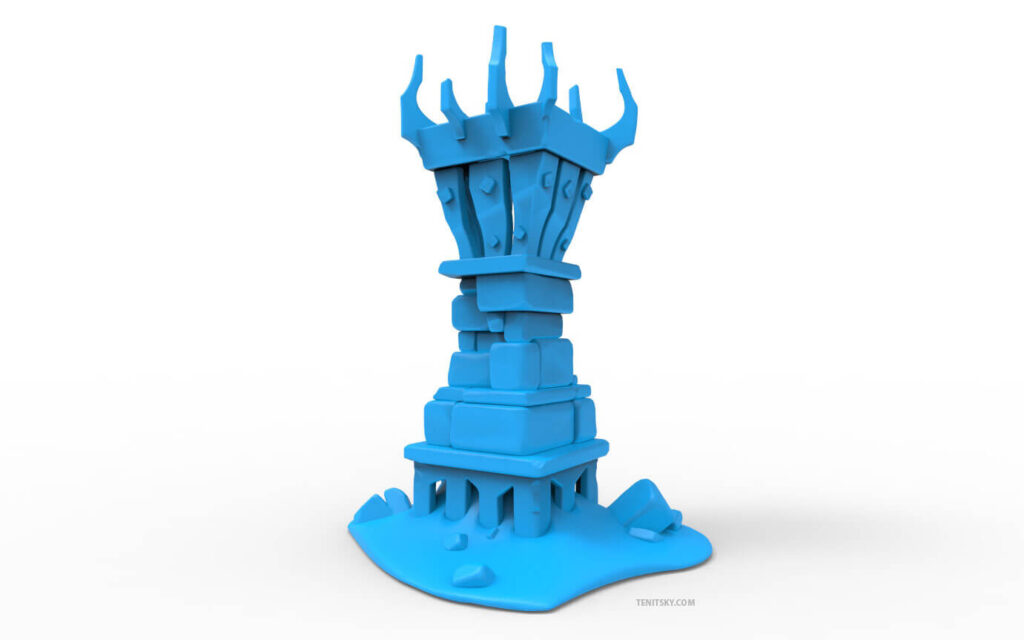
Make your 3D models as easily as possible. Start with simple primitives and go as complex as you like and the mesh is smoothed specifically for 3D-Printing.
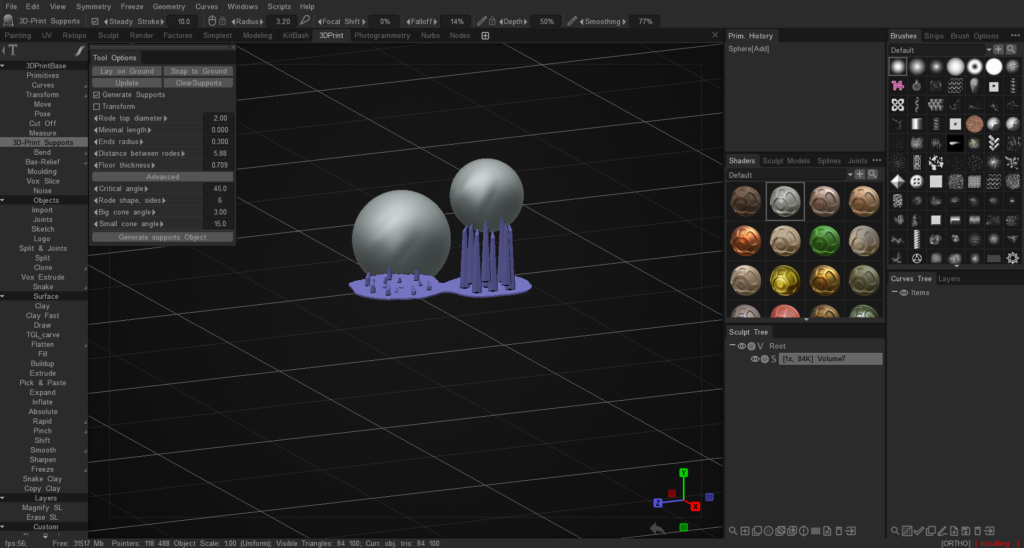
The tools integrated into 3DCoatprint allow the users to perform Voxel Modeling for extremely fast, flexible, and topology-free 3D model construction.

This is an intuitive and easy way of 3D modeling to create models rapidly, without having to piddle all day with the polys, edges and vertices of a traditional polygonal model, nor mess with the UV maps.

Make your 3D model starting from primitives.
Work with digital clay as Plasticine using various brushes.
You can cut off unnecessary parts to quickly get the desired form.
Render still images or movies or turntable sequences with 3DCoat’s default GPU render engine.
Create 3D Print supports for your model.
FEATURES


EASY VOXEL MODELING

  • Voxel modeling with no topological constraints
  • Various primitives for quick-start
  • Clean and compact UI
  • Complex boolean operations with crisp edges
  • Dozens of fast and fluid sculpting brushes
  • Import and view DICOM files (not for medical use). You can change and save the models in .stl format.
  • Splines and Joints – a cool way for fast modeling
  • Adaptive dynamic tesselation

PREPARATION OF THE MODEL FOR 3D PRINTING

  • Customizable Print area
  • Dedicated Export Menu
  • Create 3D Print supports
  • The mesh is smoothed specifically for 3D Printing

RENDERING

  • Physically Based Rendering
  • High Dynamic Range Lighting
  • Screen Space Reflections and Lights
  • Renderman support

Tutorials


Discover 3DCoat Print Learning Materials: On this video series you can watch how 3DCoat tools let you easily create and export your model to be ready for print.

Remove Intersections for 3D Printing: This video demonstrates the usage of a new feature in 3DCoat, largely for the purpose of 3D Printing, where a user specified gap needs to be created between two objects… such as a joint and socket.
This way, once both parts are 3D Printed, one part can properly fit within the other.

Sketch Tool. Create a model by drawing in three projections: This video demonstrates how easy it is to create a model by drawing in three projections with help of the Sketch Tool.
3DCoatPrint – a Completely Free application for fast and easy creation of 3D models ready to be 3D-printed.

Was this helpful?

1 Yes  No
Related Articles
  • Factures
  • ID map
  • Surface Array
  • Top Bar
  • Curves Properties RMB
  • Left tool panel Kitbash
Previously
Left tool panel Kitbash
Up Next
Photogrammetry
AI:
Hi! How can I help you?
Attention: This is a beta version of AI chat. Some answers may be wrong. See full version of AI chat