• Nederlands
  • 3DCoat documentatie
  • Chapters
    • Inleiding tot 3DCoat
    • Aan de slag
    • Interface & Navigatie
    • Brush Componenten
    • Node System
    • GPU Texturing
    • Werkruimten Kamers
    • Scripting en Core API
    • Vragen
    • Licensing
  • Learn
    • Getting Started
    • Painting
    • Sculpt
    • Modeling
    • Retopology
    • UV
    • Smart Materials
    • Nodes
    • Photogrammetry
    • Render
    • Print
    • Learning
    • Trainingshandleidingen
  • Blog
    • 2026 Key Features and Improvements
    • Texturing with nodes
    • Shader Nodes VS. a Material Nodes
    • Multiple UV Tiles/UDIMs to one single UV set ?
    • I want to create geometry only with displacement to be manufactured with a CNC machine
    • Creating 3D Character Using 3DCoat
    • DAZ Genesis models into 3DCoat
    • Cavity and Curvature maps
    • Types of normal maps
    • Texture painting pipeline
    • Load new UV layout After Model Changes
    • Import Zbrush Polygroups for UV mapping
  • Products
    • 3DCoat
    • 3DCoatTextura
    • 3DCoatPrint
    • PBRLibrary
  • Store
  • Pilgway
  • Nederlands Nederlands
    • English English
    • Українська Українська
    • Español Español
    • Deutsch Deutsch
    • Français Français
    • 日本語 日本語
    • Русский Русский
    • 한국어 한국어
    • Polski Polski
    • 中文 (中国) 中文 (中国)
    • Português Português
    • Italiano Italiano
    • Suomi Suomi
    • Svenska Svenska
    • 中文 (台灣) 中文 (台灣)
    • Dansk Dansk
    • Slovenčina Slovenčina
    • Türkçe Türkçe
    • Magyar Magyar
    • ไทย ไทย
    • हिन्दी हिन्दी
    • Ελληνικά Ελληνικά
    • Tiếng Việt Tiếng Việt
    • Lietuviškai Lietuviškai
    • Latviešu valoda Latviešu valoda
    • Eesti Eesti
    • Čeština Čeština
    • Română Română
    • Norsk Bokmål Norsk Bokmål
  • 3DCoat documentatie
  • Chapters
    • Inleiding tot 3DCoat
    • Aan de slag
    • Interface & Navigatie
    • Brush Componenten
    • Node System
    • GPU Texturing
    • Werkruimten Kamers
    • Scripting en Core API
    • Vragen
    • Licensing
  • Learn
    • Getting Started
    • Painting
    • Sculpt
    • Modeling
    • Retopology
    • UV
    • Smart Materials
    • Nodes
    • Photogrammetry
    • Render
    • Print
    • Learning
    • Trainingshandleidingen
  • Blog
    • 2026 Key Features and Improvements
    • Texturing with nodes
    • Shader Nodes VS. a Material Nodes
    • Multiple UV Tiles/UDIMs to one single UV set ?
    • I want to create geometry only with displacement to be manufactured with a CNC machine
    • Creating 3D Character Using 3DCoat
    • DAZ Genesis models into 3DCoat
    • Cavity and Curvature maps
    • Types of normal maps
    • Texture painting pipeline
    • Load new UV layout After Model Changes
    • Import Zbrush Polygroups for UV mapping
  • Products
    • 3DCoat
    • 3DCoatTextura
    • 3DCoatPrint
    • PBRLibrary
  • Store
  • Pilgway
  • Nederlands Nederlands
    • English English
    • Українська Українська
    • Español Español
    • Deutsch Deutsch
    • Français Français
    • 日本語 日本語
    • Русский Русский
    • 한국어 한국어
    • Polski Polski
    • 中文 (中国) 中文 (中国)
    • Português Português
    • Italiano Italiano
    • Suomi Suomi
    • Svenska Svenska
    • 中文 (台灣) 中文 (台灣)
    • Dansk Dansk
    • Slovenčina Slovenčina
    • Türkçe Türkçe
    • Magyar Magyar
    • ไทย ไทย
    • हिन्दी हिन्दी
    • Ελληνικά Ελληνικά
    • Tiếng Việt Tiếng Việt
    • Lietuviškai Lietuviškai
    • Latviešu valoda Latviešu valoda
    • Eesti Eesti
    • Čeština Čeština
    • Română Română
    • Norsk Bokmål Norsk Bokmål
Expand All Collapse All
  • Inleiding tot 3DCoat
  • Aan de slag
    • System requirements
    • Why 3DCoat is Unique?
    • 3DCoat activeren
    • Opstartfout
      • Startup error Mac
    • Color management
    • Upgrading permanent license
    • Linux Setup
      • Linux initial setup per-user installation
      • Linux initial setup for system
      • Tablet setup
      • To GTK3 from GTK2
      • Error libicuuc.so.70
    • Mappen structuur
      • Custom documents folder
    • Verschillende vormen van "oplossing"
    • Tablet on Window
    • Import en Export
    • Applinks in 3DCoat
      • Blender -applink
        • Blender with the Applink in Linux
      • Blender 4.2/3/4/5 applink
      • Max Applink
      • Houdini applink
      • Lightwave uplink
  • Navigation
    • Dialoogvenster openen (snelstartmenu)
    • Navigatiepaneel
    • Camera en navigatie
      • Customize Navigation as Blender
    • Left tool panel
    •  Activity Bar
    • Navigatie met behulp van 3DConnexion-apparaten
      • How to compile Spacenavd on non Ubuntu distro
    • Quick Access Menu
    • Stylus doesn’t work in sculpting
    • Sneltoetsen
  • Interface & Navigatie
    • Bestandsmenu
    • Menu bewerken
      • Bake Geometry Info
      • Calculate Occlusion
      • Calculate Curvature
      • Light Baking Tool
      • Voorkeuren
    • Menu bekijken
    • Symmetrie
    • Textures
    • Calculate
    • Lagen-menu
    • Menu bevriezen
    • Hide
    • Bake
    • Bochten 2022
      • Curven-menu
      • Curves Properties RMB
      • Vul met mesh-laag
      • Scale of imported curves
    • Windows-menu
      • Windows-pop-upvensters met tabbladen
      • Schuifregelaars
    • Scripts
    • Addons
    • Capture
    • Help-menu
    • Maatwerk
    • Wijzig of maak een nieuwe kamer
  • Brush Componenten
    • Brush bovenste balk
    • Borstels algemeen gebruik
      • Borstels en emblemen maken
      • Alfa maken van huidige beeldhouwkunst
      • Maak een Brush van een 3D-object
      • Create brushes based on Curves
      • Load photoshop .abr brushes
    • Beroertes
      • Pop-upmenu Curven
    • Brush opties
    • Voorwaarden Begrenzer
    • Strips-paneel
    • Stencils paneel
    • Slimme materialen
      • Voeg nieuwe afbeeldingen of materialen toe
      • Bevestig een Smart-materiaal aan een laag
      • Import Quixel Megascans
    • Voorinstellingen voor Brush maken
  • Node System
    • Node Editor
    • Node & Object Inspectors
    • Node Graph
    • NodeGraph Language (NGL)
    • GPU Nodes
      • Color
      • GeometryIn
      • In
      • Layer
      • Material
      • Out
      • Pattern
      • Pattern3D
      • ShaderToy
      • Shape
      • Texture
      • Tilable
      • UV
      • Math
    • Filters
    • Masks
    • Materials
    • Modifiers
    • Volumes
  • Gratis 3DCoatPrint
  • GPU Texturing
    • PBM Channels
    • Per-Pixel Painting
  • Werkruimten Kamers
    • Painting
      • Textuur Painting en modi
        • Per-Pixel Painting
        • Verplaatsing Painting (Micro-Vertex)
        • Ptex Painting
        • Oppervlakte Painting (Polypainting)
      • Importeren in de Painting
        • Initial CC subdivision
        • UV Set smoothing
        • Sharp (hard) edge
        • Normalen vergrendelen
        • Laad een nieuwe UV indeling na modelwijzigingen
        • DAZ Genesis models into 3DCoat
        • ID map
      • Menu's van de Painting
        • Edit menu
        • Texturen-menu
          • Textuur Baking
        • Verbergen
        • Menu voor de Bake Paint
        • De kleurkiezer
      • Surface Materials
      • Bovenste balk voor het Painting
      • Het Lagenpaneel
        • Het mengpaneel
        • Layer and Clipping Masks
      • Gereedschap voor het Painting van kamers
      • Dekking - Transparantie
      • Tweak werkruimte
        • Tweak-toolset
        • Exporteren vanuit de Tweak Room
      • Voorbeeldvenster masker/materiaal
      • Exporteren vanuit de Painting
    • UV werkruimte
      • UV bovenbalk
      • UV Linker gereedschapspaneel
      • UV voorbeeldpaneel
      • UV workflow voorbeeld
      • Importeren in de UV kamer
      • Exporteren vanuit de UV kamer
    • Retopologie
      • Importeren in de Retopo Room
      • Retopo Mesh-menu en bakmenu
        • Virtuele spiegelmodus
      • Bake menu
        • Treat Poly Groups as Paint Objects
        • Baking guide
      • Strokes-tool in Retopology
      • Bovenste balk
        • Selecteer geometrie
      • Linker gereedschapspaneel in Retopology-kamer
        • Algemeen doel en functie
        • Geometrie toevoegen
        • Retopo Tweak-tools
        • UV hulpmiddelen
        • Commando's voor Retopologie kamer
      • AUTORETOPO
        • Autopo guide
      • Polygroepen
    • Beeldhouwen
      • Sculpt Layer
      • Boom beeldhouwen
      • Beeldhouwen Brush opties
      • Top Bar
      • Brush
      • Submenu Geometrie
      • Beeldhouwen "Rechtsklik" -menu
      • Schaduwen
      • Voxel modus
        • Pure Voxel -beeldhouwkunst
        • Dichtheid en resolutie
        • Clay-motor
        • Voxel tools
        • Oppervlaktetools op Voxels
        • Voxel aanpassingstools
        • Volumetrisch Painting
        • Hulpmiddelen voor Voxel objecten
      • Oppervlakte-modus
        • Oppervlak gereedschap
        • Oppervlak aangepaste tools
        • Surface Layer
        • Hulpmiddelen voor het aanpassen van oppervlakken
        • Oppervlakte Painting
        • Resolutie op meerdere niveaus
          • Multires tools
          • Multires adjust
          • Multires commands
      • Bochten beeldhouwen
        • Spline-curven
        • Splines model creation
      • Vectorverplaatsing
      • Hulpmiddelen voor oppervlaktetransformatie
        • Hulpmiddelen voor Voxel transformatie
        • Instancer
        • Move
        • Pose
        • Fit
        • Reproject
        • Surface Array
      • Voxel primitieven en Import
        • Hollow Box
      • Levende booleans
      • Opdrachten voor beeldhouwkamer
      • Import naar beeldhouwkamer
      • Exporteren vanuit de beeldhouwkamer
    • Veroorzaken
      • Comparison of different roughness values
      • Paneelfuncties renderen
      • Draaitafel
      • Fakebake de verlichting -niet PBR
    • Factures
      • Werkstroom
    • eenvoudigste
    • Modellering
      • Mesh Menu
      • Linker gereedschapspaneel in de modelleerkamer
        • Geometrie toevoegen
          • Make Joints
          • Geselecteerd
        • Aanpassing
        • Smart Hybrid
        • UV
          • Commando's
        • Geheel gaas
      • Voorbeeld loftoppervlak van Fluffy
      • Blokkade door Poeboi
      • Import Zbrush Polygroups for UV mapping
    • Kitbash - Snelle creatie van 3D-modellen
      • Create kitbash
      • Left tool panel Kitbash
    • 3DPrint
    • Photogrammetry
      • How to install Reality Capture
      • Reality Capture doesn’t show up ?
    • Mesh naar NURBS-kamer
    • Nodes
      • Texturing with nodes
      • Sculpt shaders Nodes-bibliotheek
      • Open PBR
  • Scripting en Core API
    • Core API
    • Python-API
    • Extensions and Addons

Bake Geometry Info

23 views 0

Written by Carlos
August 2, 2026

Geometry baking info is the process of saving 3D surface details like normals, curvature, and ambient occlusion.

Geometry baking info is the process of saving physical shape details from a 3D model, such as surface curves, edges, and high-resolution details, into flat 2D image files called texture maps.
3D surface details like normals, curvature, and ambient occlusion are saved for internal calculations. This baking process is needed when you work using Material nodes.
How Baking Works

  • High and Low Models: You compare a very detailed high-polygon mesh with a simple low-polygon mesh.
  • Ray Casting: Software shoots invisible lines (rays) from the low-poly surface to find where the high-poly surface sits.
  • Data Saving: The captured depth and angle data are saved into maps like normal maps, displacement maps, or ambient occlusion maps

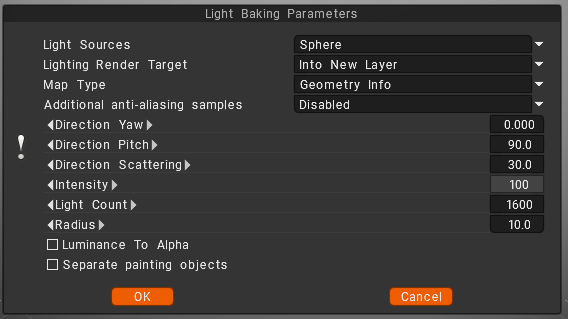
Light sources (distribution of lights)

  • over the hemisphere
  • over the sphere
  • over hemisphere + sphere

Lighting render target

You must choose a layer to which the occlusion calculation is placed. Can choose to add a new layer automatically or overwrite the current layer.
– In the first case, you do not forget to delete a new layer for light calculation. Also, a new color option, “To time,” is installed for a new layer.
– In the case of rendering the former layer, all its color information will be deleted.
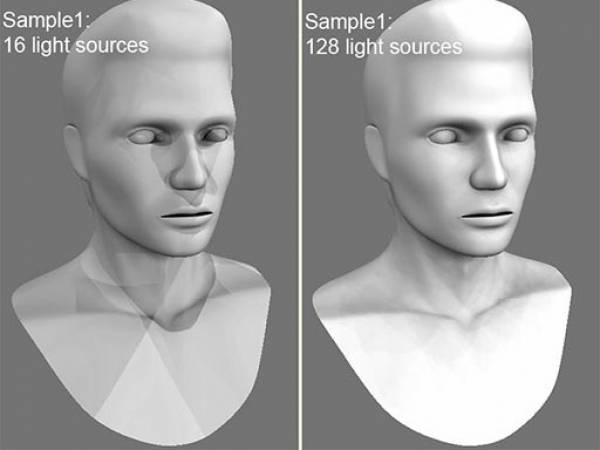
Lights count: The more lights, the longer the calculation. The more light sources there are the better the quality of lighting and the longer its calculation.
The maximum value is 256, and the minimum value is 16.

Additional anti-aliasing samples: Amount of post-smoothing steps after occlusion calculation. The calculation will be used the texture several times bigger. This allows you to get rid of some artifacts if there are too small UV islands or long pixels.
Warning: this function will slow down the calculation and consume more RAM and VRAM.

Direction Yaw: Yaw means turning or rotating an object left or right around a vertical axis (like shaking your head “no”). It defines the compass direction or heading that the front of an object is facing.
Direction Pitch: Pitch is the vertical tilt angle that determines if a direction or object points:

  • Up (positive tilt)
  • Down (negative tilt)
  • Flat/Horizontal (zero degrees)

Direction Scattering: Scattering, waves, light, or particles spread out in a full three-dimensional space (x, y, and z directions) after hitting an object.
Intensity: Intensity means the strength of the signal, light, or reflection returned at a specific 3D point or voxel (3D pixel).
Light count: is the total number of active light sources (like points, spots, or directional lights) illuminating a scene or allowed per object.
Radius: a light’s radius controls source size and falloff distance, which determine shadow softness and the area the light reaches.

Luminance to Alpha: turn the brightness (light and dark parts) of an image into a transparency mask.
Bright white areas become solid, dark black areas become see-through (transparent), and gray areas become partly see-through.
Separate paint objects: Explode the object on parts to avoid wrong AO contact projections.

Was this helpful?

Yes  No
Related Articles
  • Make Joints
  • Texturing with nodes
  • Hollow Box
  • GPU Texturing
  • Math
  • Volumes
Previously
Menu bewerken
Up Next
Calculate Occlusion
AI:
Hi! How can I help you?
Attention: This is a beta version of AI chat. Some answers may be wrong. See full version of AI chat