 Nederlands
  English
 Українська
 Español
 Deutsch
 Français
 日本語
日本語 Русский
 한국어
한국어 Polski
 中文 (中国)
 Português
 Italiano
 Suomi
Suomi Svenska
 中文 (台灣)
 Dansk
Dansk Slovenčina
 Türkçe
 Magyar
 ไทย
ไทย हिन्दी
 Ελληνικά
 Tiếng Việt
 Lietuviškai
 Latviešu valoda
 Eesti
Eesti Čeština
 Română
 Norsk Bokmål
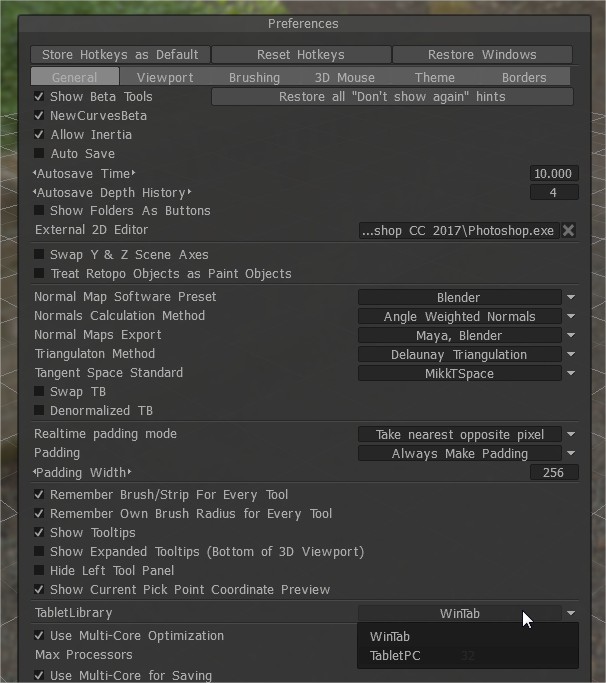
Because of the drastic increase to the of Wacom stylus pressure levels in recent versions of Wacom tablets, an important adjustment needs to be made in the PREFERENCES panel of 3D Coat, regarding the pressure sensitivity.
Go to Preferences >Tablet Library
This option let you select input used by “3DCoat”. Switch between two tablet libraries: “WinTab” and “Tablet PC”.
Currently “3DCoat” uses “WinTab” which will work only if you will install Wacom “WinTab” driver.
When using “Tablet PC” library which should work without additional Wacom “WinTab” driver.
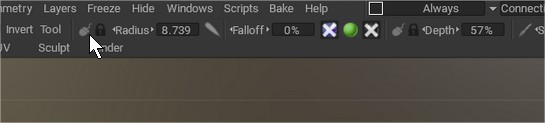
Also remember switching this icon to pen (pressing LMB over the icon)
Tutorial
This old video show how to setup Tablet sensitivity on Preferences