• Türkçe
  • 3DCoat Belgeleri
  • Chapters
    • 3DCoat Giriş
    • Başlarken
    • Arayüz ve Navigasyon
    • Brush Bileşenleri
    • Node System
    • Çalışma Alanları Odalar
    • Scripting ve Core API
    • Sorular
    • licensing
    • Eğitim Öğreticileri
  • Pilgway
  • Products
    • 3DCoat
    • 3DCoatTextura
    • 3DCoatPrint
    • PBRLibrary
  • Blog Posts
    • Creating 3D Character Using 3DCoat
  • Store
  • Türkçe Türkçe
    • English English
    • Українська Українська
    • Español Español
    • Deutsch Deutsch
    • Français Français
    • 日本語 日本語
    • Русский Русский
    • 한국어 한국어
    • Polski Polski
    • 中文 (中国) 中文 (中国)
    • Português Português
    • Italiano Italiano
    • Suomi Suomi
    • Svenska Svenska
    • 中文 (台灣) 中文 (台灣)
    • Dansk Dansk
    • Slovenčina Slovenčina
    • Nederlands Nederlands
    • Magyar Magyar
    • ไทย ไทย
    • हिन्दी हिन्दी
    • Ελληνικά Ελληνικά
    • Tiếng Việt Tiếng Việt
    • Lietuviškai Lietuviškai
    • Latviešu valoda Latviešu valoda
    • Eesti Eesti
    • Čeština Čeština
    • Română Română
    • Norsk Bokmål Norsk Bokmål
  • 3DCoat Belgeleri
  • Chapters
    • 3DCoat Giriş
    • Başlarken
    • Arayüz ve Navigasyon
    • Brush Bileşenleri
    • Node System
    • Çalışma Alanları Odalar
    • Scripting ve Core API
    • Sorular
    • licensing
    • Eğitim Öğreticileri
  • Pilgway
  • Products
    • 3DCoat
    • 3DCoatTextura
    • 3DCoatPrint
    • PBRLibrary
  • Blog Posts
    • Creating 3D Character Using 3DCoat
  • Store
  • Türkçe Türkçe
    • English English
    • Українська Українська
    • Español Español
    • Deutsch Deutsch
    • Français Français
    • 日本語 日本語
    • Русский Русский
    • 한국어 한국어
    • Polski Polski
    • 中文 (中国) 中文 (中国)
    • Português Português
    • Italiano Italiano
    • Suomi Suomi
    • Svenska Svenska
    • 中文 (台灣) 中文 (台灣)
    • Dansk Dansk
    • Slovenčina Slovenčina
    • Nederlands Nederlands
    • Magyar Magyar
    • ไทย ไทย
    • हिन्दी हिन्दी
    • Ελληνικά Ελληνικά
    • Tiếng Việt Tiếng Việt
    • Lietuviškai Lietuviškai
    • Latviešu valoda Latviešu valoda
    • Eesti Eesti
    • Čeština Čeština
    • Română Română
    • Norsk Bokmål Norsk Bokmål
Expand All Collapse All
  • 3DCoat Giriş
  • Başlarken
    • System requirements
    • Why 3DCoat is Unique?
    • 3DCoat Etkinleştirme
    • Başlatma hatası
      • Startup error Mac
    • Color management
    • Upgrading permanent license
    • Linux Setup
      • Linux initial setup per-user installation
      • Linux initial setup for system
      • Tablet setup
      • To GTK3 from GTK2
      • Error libicuuc.so.70
    • Klasör Yapısı
      • Custom documents folder
    • “Çözüm”ün Farklı Biçimleri
    • Tablet on Window
    • Import ve Export
    • 3DCoat Applinks
      • Blender uygulama bağlantısı
        • Blender with the Applink in Linux
      • Blender 4.2/3/4/5 applink
      • Max Applink
      • Houdini applink
      • Lightwave uplink
  • Node System
    • Node Editor
    • Node & Object Inspectors
    • Node Graph
    • NodeGraph Language (NGL)
    • GPU Nodes
      • Color
      • GeometryIn
      • In
      • Layer
      • Material
      • Out
      • Pattern
      • Pattern3D
      • ShaderToy
      • Shape
      • Texture
      • Tilable
      • UV
      • Vector
    • Filters
    • Masks
    • Materials
    • Modifiers
    • Volumes
  • GPU Texturing
    • PBM Channels
    • Per-Pixel Painting
  • Navigation
    • Açılış İletişim Kutusu (Hızlı Başlat Menüsü)
    • Gezinme Paneli
    • Kamera ve Navigasyon
      • Customize Navigation as Blender
    • Viewport Navigation Gizmo
    • Left tool panel
    •  Activity Bar
    • 3DConnexion cihazlarını kullanarak gezinme
      • How to compile Spacenavd on non Ubuntu distro
    • Space Bar Menu
    • Stylus doesn’t work in sculpting
    • kısayol tuşları
  • Arayüz ve Navigasyon
    • Dosya menüsü
    • Düzenle Menüsü
      • Calculate Curvature
      • Calculate Occlusion
      • Light Baking Tool
      • Tercihler
    • Menüyü Görüntüle
    • Simetri
    • Textures
    • Calculate
    • Katmanlar Menüsü
    • Menüyü Dondur
    • Hide
    • Bake
    • Eğriler 2022
      • Eğriler Menüsü
      • Curves Properties RMB
      • Kafes katmanı ile doldurun
      • Scale of imported curves
    • Windows Menüsü
      • Sekmeli Windows Açılır Panelleri
      • Kaydırıcılar
    • Scripts
    • Addons
    • Capture
    • Yardım menüsü
    • özelleştirme
    • Yeni Odayı Değiştirin veya Oluşturun
  • Brush Bileşenleri
    • Brush Üst Çubuğu
    • Fırçalar genel kullanım
      • Fırçalar ve çıkartmalar oluşturun
      • Mevcut heykelden alfa yapma
      • 3B Nesneden Brush Oluşturma
      • Create brushes based on Curves
      • Load photoshop .abr brushes
    • Vuruşlar
      • Eğriler Açılır Menüsü
    • Brush seçenekleri
    • Koşullar Sınırlayıcı
    • Şerit Paneli
    • Şablonlar Paneli
    • Akıllı Malzemeler
      • Yeni görseller veya materyaller ekleyin
      • Akıllı malzemeyi katmana ekleme
      • Import Quixel Megascans
    • Brush için Hazır Ayarlar nasıl oluşturulur?
  • Çalışma Alanları Odalar
    • Painting
      • Doku Painting ve Modlar
        • Per-Pixel Painting
        • Yer Değiştirme Painting (Mikro-Köşe)
        • Ptex Painting
        • Yüzey Painting (Polypainting)
      • Painting Odasına Aktarma
        • Initial CC subdivision
        • UV Set smoothing
        • Sharp (hard) edge
        • Normalleri Kilitle
        • Model Değişikliklerinden Sonra Yeni UV Düzenini Yükle
        • DAZ Genesis models into 3DCoat
        • ID map
      • Painting Çalışma Alanı Menüleri
        • Edit menu
        • Dokular Menüsü
          • Doku Baking Araçları
        • Saklamak
        • Bake Paint Menüsü
        • Renk Seçici
      • Surface Materials
      • Painting için Üst Çubuk
      • Katmanlar Paneli
        • Karıştırma Paneli
        • Layer and Clipping Masks
      • Painting Odası Araçları
      • Opaklık - Şeffaflık
      • Çalışma alanını ince ayarla
        • İnce Ayar Araç Seti
        • İnce Ayar Odasından Dışa Aktarma
      • Maske/Malzeme Önizleme Paneli
      • Painting Odasından Dışa Aktarma
    • UV Çalışma Alanı
      • UV Üst Çubuk
      • UV Sol araç paneli
      • UV Önizleme Paneli
      • UV iş akışı örneği
      • UV Odasına Aktarma
      • UV Odasından Dışarı Aktarma
    • retopoloji
      • Retopo Odasına Aktarma
      • Retopo Mesh Menüsü ve Fırında Pişirme Menüsü
        • Sanal Ayna Modu
      • Bake menu
        • Treat Poly Groups as Paint Objects
        • Baking guide
      • Retopology'deki Vuruşlar aracı
      • Üst Çubuk
        • Geometri seçin
      • Retopology odasında sol araç paneli
        • Genel Amaç ve İşlev
        • Geometri Ekle
        • Retopo İnce Ayar Araçları
        • UV Araçları
        • Retopoloji odası için komutlar
      • OTORETOPO
        • Autopo guide
      • Çoklu Gruplar
    • Şekil vermek
      • Sculpt Layer
      • Heykel Ağacı
      • Şekillendirme Brush seçenekleri
      • Top Bar
      • Brush motoru
      • Geometri Alt Menüsü
      • “Sağ Tıklama” Menüsünü Şekillendirme
      • gölgelendiriciler
      • Voxel modu
        • Saf Voxel Şekillendirme
        • Yoğunluk ve Çözünürlük
        • Kil Motoru
        • Voxel Araçları
        • Voksellerde yüzey araçları
        • Voxel Ayarlama Araçları
        • Hacimsel Painting
        • Voxel Nesneleri Araçları
      • Yüzey modu
        • Yüzey araçları
        • Yüzey özel araçları
        • Surface Layer
        • Yüzey ayarlama araçları
        • Yüzey Painting
        • Yüzey Nesneleri Araçları
        • Çok Seviyeli Çözünürlük
          • Multires tools
          • Multires adjust
          • Multires commands
      • Eğrileri şekillendirin
        • Spline Eğrileri
        • Splines model creation
      • Vektör Yer Değiştirme
      • Yüzey dönüştürme araçları
        • Voxel Dönüştürme Araçları
        • Instancer
        • Move
        • Pose
        • Fit
        • Reproject
        • Surface Array
      • Voxel Primitifleri ve Import Araçları
      • Canlı Boole'lar
      • Şekillendirme odası için komutlar
      • Heykel Odasına Import
      • Heykel Odasından Dışarı Aktarma
    • render
      • Comparison of different roughness values
      • İşleme Paneli İşlevleri
      • pikap
      • Aydınlatmayı sahte olarak pişirin PBR olmayan -
    • Factures
      • iş akışı
    • en basit
    • modelleme
      • Mesh Menu
      • Modelleme odasında sol araç paneli
        • Geometri Ekle
          • Seçildi
        • Çimdik
        • Smart Hybrid
        • UV
          • Komutlar
        • Tüm Mesh
      • Fluffy'den loft yüzey örneği
      • Poeboi tarafından blokaj
      • Import Zbrush Polygroups for UV mapping
    • Kitbash - Hızlı 3D Model Oluşturma
      • Create kitbash
      • Left tool panel Kitbash
    • 3DPrint
    • Photogrammetry
      • How to install Reality Capture
      • Reality Capture doesn’t show up ?
    • NURBS odasına ağ bağlantısı
    • Nodes
      • Şekillendirici gölgelendiriciler Düğüm Kitaplığı
      • Open PBR
  • Scripting ve Core API
    • Core API
    • Python API'si
    • Extensions and Addons
  • Ücretsiz 3DCoatPrint

Node System

133 views 0

Written by Volodymyr Makovetskyi
May 14, 2026

What is the Node System?

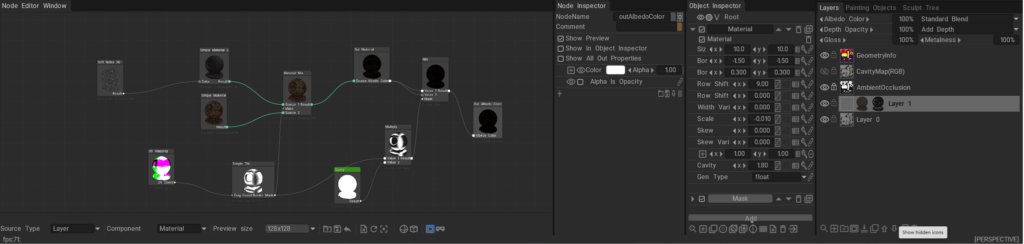
The 3DCoat Node System is a powerful, non-destructive procedural engine designed to create complex materials, masks, geometry deformers, and visual effects without relying on static bitmap textures.

Instead of drawing pixels destructively, you connect mathematical operations, procedural noises, and geometry inputs (nodes) together in a visual graph. Under the hood, these node graphs are dynamically compiled into highly optimized GPU shaders (using NGL – NodeGraph Language), allowing for real-time calculation and rendering. This results in resolution-independent assets that can automatically adapt to the curvature, ambient occlusion, and physical space of your 3D models.
Documentation Index

This directory (docs/) serves as the central repository for all documentation related to the 3DCoat Node System. Below is a guide to what you will find in each file and sub-directory.

Core User Guides

These guides explain the fundamental concepts, interface, and workflows of the Node System.

  • Node System User Guide: The foundational manuals for artists. They explain how to use the Node Editor, connect nodes, work with procedural materials, and understand the overall procedural workflow.
  • Node Editor Documentation: A detailed breakdown of the Node Editor interface itself, including navigation, node management, connection logic, and UI features.
  • Inspectors & Properties Documentation: Explains how to interact with the Node Inspector and Object Inspector. It covers how properties (like 1D curves, color pickers, and sliders) are exposed from the node graph to the user interface for quick artist tweaking.
  • PBM Channels Documentation: Documentation on Physically Based Material channels within the node system, explaining how procedural data flows into Albedo, Gloss, Metalness, and other PBR specific rendering targets.

Node References & Languages

Deep dives into the specific building blocks and the shader language that powers them.

  • GPU Nodes Overview: An introduction to what GPU Nodes are, how they interact with the GPU, and a high-level summary of node categories.

Preset Libraries

Guides on how complete, ready-to-use node graphs are categorized, stored, and applied in the software.

  • NGPresets: Contains documentation for the five main preset windows in 3DCoat that utilize node graphs:
    • NGMasks: Procedural, resolution-independent smart masks.
    • NGMaterials: Full procedural Smart Materials.
    • NGModifiers: Geometry deformers and displacement map generators.
    • NGFilters: Procedural post-processing filters for modifying existing layers.
    • NGVolumes: True 3D volumetric textures (like solid wood or marble) that evaluate in 3D space and ignore UV seams entirely.

Was this helpful?

Yes  No
Related Articles
  • GPU Texturing
  • Vector
  • Volumes
  • Modifiers
  • Materials
  • Masks
Previously
Lightwave uplink
Up Next
Node Editor
AI:
Hi! How can I help you?
Attention: This is a beta version of AI chat. Some answers may be wrong. See full version of AI chat