• Tiếng Việt
  • Tài liệu 3DCoat
  • Chapters
    • Giới thiệu về 3DCoat
    • Bắt đầu
    • Giao diện & Điều hướng
    • Thành phần Brush
    • Node System
    • Phòng làm việc
    • Scripting & Core API
    • Hỏi & Đáp
    • licensing
    • Hướng dẫn đào tạo
  • Pilgway
  • Products
    • 3DCoat
    • 3DCoatTextura
    • 3DCoatPrint
    • PBRLibrary
  • Blog Posts
    • Creating 3D Character Using 3DCoat
  • Store
  • Tiếng Việt Tiếng Việt
    • English English
    • Українська Українська
    • Español Español
    • Deutsch Deutsch
    • Français Français
    • 日本語 日本語
    • Русский Русский
    • 한국어 한국어
    • Polski Polski
    • 中文 (中国) 中文 (中国)
    • Português Português
    • Italiano Italiano
    • Suomi Suomi
    • Svenska Svenska
    • 中文 (台灣) 中文 (台灣)
    • Dansk Dansk
    • Slovenčina Slovenčina
    • Türkçe Türkçe
    • Nederlands Nederlands
    • Magyar Magyar
    • ไทย ไทย
    • हिन्दी हिन्दी
    • Ελληνικά Ελληνικά
    • Lietuviškai Lietuviškai
    • Latviešu valoda Latviešu valoda
    • Eesti Eesti
    • Čeština Čeština
    • Română Română
    • Norsk Bokmål Norsk Bokmål
  • Tài liệu 3DCoat
  • Chapters
    • Giới thiệu về 3DCoat
    • Bắt đầu
    • Giao diện & Điều hướng
    • Thành phần Brush
    • Node System
    • Phòng làm việc
    • Scripting & Core API
    • Hỏi & Đáp
    • licensing
    • Hướng dẫn đào tạo
  • Pilgway
  • Products
    • 3DCoat
    • 3DCoatTextura
    • 3DCoatPrint
    • PBRLibrary
  • Blog Posts
    • Creating 3D Character Using 3DCoat
  • Store
  • Tiếng Việt Tiếng Việt
    • English English
    • Українська Українська
    • Español Español
    • Deutsch Deutsch
    • Français Français
    • 日本語 日本語
    • Русский Русский
    • 한국어 한국어
    • Polski Polski
    • 中文 (中国) 中文 (中国)
    • Português Português
    • Italiano Italiano
    • Suomi Suomi
    • Svenska Svenska
    • 中文 (台灣) 中文 (台灣)
    • Dansk Dansk
    • Slovenčina Slovenčina
    • Türkçe Türkçe
    • Nederlands Nederlands
    • Magyar Magyar
    • ไทย ไทย
    • हिन्दी हिन्दी
    • Ελληνικά Ελληνικά
    • Lietuviškai Lietuviškai
    • Latviešu valoda Latviešu valoda
    • Eesti Eesti
    • Čeština Čeština
    • Română Română
    • Norsk Bokmål Norsk Bokmål
Expand All Collapse All
  • Giới thiệu về 3DCoat
  • Bắt đầu
    • System requirements
    • Why 3DCoat is Unique?
    • Kích hoạt 3DCoat
    • lỗi khởi động
      • Startup error Mac
    • Color management
    • Upgrading permanent license
    • Linux Setup
      • Linux initial setup per-user installation
      • Linux initial setup for system
      • Tablet setup
      • To GTK3 from GTK2
      • Error libicuuc.so.70
    • Cấu trúc thư mục
      • Custom documents folder
    • Các hình thức “Nghị quyết” khác nhau
    • Tablet on Window
    • Import Export
    • Applinks trong 3DCoat
      • Liên kết ứng dụng Blender
        • Blender with the Applink in Linux
      • Blender 4.2/3/4/5 applink
      • Max Applink
      • Houdini applink
      • Lightwave uplink
  • Node System
    • Node Editor
    • Node & Object Inspectors
    • Node Graph
    • NodeGraph Language (NGL)
    • GPU Nodes
      • Color
      • GeometryIn
      • In
      • Layer
      • Material
      • Out
      • Pattern
      • Pattern3D
      • ShaderToy
      • Shape
      • Texture
      • Tilable
      • UV
      • Vector
    • Filters
    • Masks
    • Materials
    • Modifiers
    • Volumes
  • GPU Texturing
    • PBM Channels
    • Per-Pixel Painting
  • Navigation
    • Hộp thoại Mở (Menu Bắt đầu Nhanh)
    • Bảng điều hướng
    • Máy ảnh và Điều hướng
      • Customize Navigation as Blender
    • Viewport Navigation Gizmo
    • Left tool panel
    •  Activity Bar
    • Điều hướng bằng thiết bị 3DConnexion
      • How to compile Spacenavd on non Ubuntu distro
    • Space Bar Menu
    • Stylus doesn’t work in sculpting
    • phím nóng
  • Giao diện & Điều hướng
    • Danh sách dữ liệu
    • Chỉnh sửa Menu
      • Calculate Curvature
      • Calculate Occlusion
      • Light Baking Tool
      • Sở thích
    • Xem thực đơn
    • Đối diện
    • Textures
    • Calculate
    • Menu lớp
    • Menu đóng băng
    • Hide
    • Bake
    • Đường cong 2022
      • thực đơn đường cong
      • Curves Properties RMB
      • Điền vào lớp lưới
      • Scale of imported curves
    • Menu cửa sổ
      • Bảng điều khiển cửa sổ bật lên được gắn thẻ
      • thanh trượt
    • Scripts
    • Addons
    • Capture
    • Danh sách trợ giúp
    • tùy biến
    • Sửa đổi hoặc tạo phòng mới
  • Thành phần Brush
    • Bàn Brush trên cùng
    • Bàn chải sử dụng chung
      • Tạo bàn chải & đề can
      • Tạo alpha từ tác phẩm điêu khắc hiện tại
      • Tạo Brush từ đối tượng 3D
      • Create brushes based on Curves
      • Load photoshop .abr brushes
    • đột quỵ
      • Menu bật lên đường cong
    • tùy chọn Brush
    • Giới hạn điều kiện
    • Bảng điều khiển dải
    • bảng giấy nến
    • Vật liệu thông minh
      • Thêm hình ảnh hoặc tài liệu mới
      • Đính kèm vật liệu thông minh vào một lớp
      • Import Quixel Megascans
    • Cách tạo Presets cho Brush
  • Phòng làm việc
    • Painting
      • Painting kết cấu & Chế độ
        • Per-Pixel Painting
        • Painting dịch chuyển (Micro-Vertex)
        • Painting Ptex
        • Painting bề mặt (Polypainting)
      • Nhập khẩu vào phòng Painting
        • Initial CC subdivision
        • UV Set smoothing
        • Sharp (hard) edge
        • Khóa định mức
        • Tải bố cục UV mới sau khi thay đổi mẫu
        • DAZ Genesis models into 3DCoat
        • ID map
      • Menu của Không gian làm việc Painting
        • Edit menu
        • Menu kết cấu
          • Công cụ Baking kết cấu
        • Trốn
        • Thực đơn cho Bake Paint
        • Bộ chọn màu
      • Surface Materials
      • Thanh trên cùng cho Painting
      • Bảng điều khiển lớp
        • Bảng trộn
        • Layer and Clipping Masks
      • dụng cụ phòng Painting
      • Độ mờ - Độ trong suốt
      • Tinh chỉnh không gian làm việc
        • Bộ công cụ tinh chỉnh
        • Xuất từ Tweak Room
      • Bảng xem trước mặt nạ/vật liệu
      • Xuất khẩu từ phòng Painting
    • Không gian làm việc UV
      • Thanh trên cùng UV
      • Bảng công cụ UV Trái
      • Bảng xem trước UV
      • Ví dụ về quy trình làm việc UV
      • Nhập khẩu vào phòng UV
      • Xuất từ phòng UV
    • tái cấu trúc
      • Nhập vào phòng Retopo
      • Menu Retopo Lưới và Menu Nướng
        • Chế độ gương ảo
      • Bake menu
        • Treat Poly Groups as Paint Objects
        • Baking guide
      • Công cụ Strokes trong Retopology
      • thanh trên cùng
        • Chọn hình học
      • Bảng công cụ bên trái trong phòng Retopology
        • Mục đích & chức năng tổng thể
        • Thêm hình học
        • Công cụ tinh chỉnh Retopo
        • Công cụ UV
        • Lệnh cho phòng Retopology
      • AUTORETOPO
        • Autopo guide
      • Nhóm đa
    • điêu khắc
      • Sculpt Layer
      • cây điêu khắc
      • Tùy chọn Sculpt Brush
      • Top Bar
      • Brush
      • Menu con hình học
      • Menu Sculpt “Nhấp chuột phải”
      • Shader
      • chế độ điểm Voxel
        • Điêu khắc Voxel tinh khiết
        • Mật độ và độ phân giải
        • động cơ đất sét
        • Công cụ Voxel
        • Công cụ bề mặt trên Voxels
        • Công cụ điều chỉnh điểm Voxel
        • Painting thể tích
        • Công cụ Đối tượng Voxel
      • chế độ bề mặt
        • công cụ bề mặt
        • Công cụ tùy chỉnh bề mặt
        • Surface Layer
        • Công cụ điều chỉnh bề mặt
        • Painting bề mặt
        • Công cụ đối tượng bề mặt
        • Độ phân giải đa cấp
          • Multires tools
          • Multires adjust
          • Multires commands
      • điêu khắc đường cong
        • Đường cong Spline
        • Splines model creation
      • Véc tơ dịch chuyển
      • Công cụ biến đổi bề mặt
        • Công cụ chuyển đổi Voxel
        • Instancer
        • Move
        • Pose
        • Fit
        • Reproject
        • Surface Array
      • Voxel Primitives & Công cụ Import
      • Boolean trực tiếp
      • Các lệnh cho phòng Sculpt
      • Import vào phòng điêu khắc
      • Xuất từ phòng điêu khắc
    • kết xuất
      • Comparison of different roughness values
      • Kết xuất các chức năng của bảng điều khiển
      • bàn xoay
      • Fakebake ánh sáng -non PBR-
    • Factures
      • quy trình làm việc
    • đơn giản nhất
    • người mẫu
      • Mesh Menu
      • Bảng công cụ bên trái trong phòng Modeling
        • Thêm hình học
          • Đã chọn
        • Tinh chỉnh
        • Smart Hybrid
        • UV
          • Lệnh
        • Toàn bộ lưới
      • Ví dụ bề mặt gác xép của Fluffy
      • Chặn bởi Poeboi
      • Import Zbrush Polygroups for UV mapping
    • Kitbash - Tạo mô hình 3D nhanh
      • Create kitbash
      • Left tool panel Kitbash
    • 3DPrint
    • Photogrammetry
      • How to install Reality Capture
      • Reality Capture doesn’t show up ?
    • Lưới tới phòng NURBS
    • Nodes
      • Thư viện Nodes shader Sculpt
      • Open PBR
  • Scripting & Core API
    • Core API
    • API Python
    • Extensions and Addons
  • 3DCoatPrint miễn phí

Node System

157 views 0

Written by Volodymyr Makovetskyi
May 14, 2026

What is the Node System?

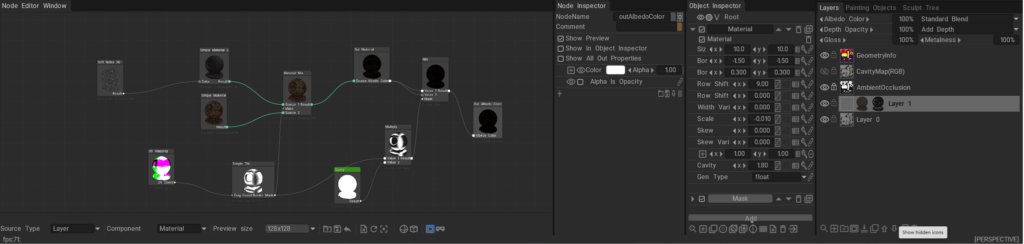
The 3DCoat Node System is a powerful, non-destructive procedural engine designed to create complex materials, masks, geometry deformers, and visual effects without relying on static bitmap textures.

Instead of drawing pixels destructively, you connect mathematical operations, procedural noises, and geometry inputs (nodes) together in a visual graph. Under the hood, these node graphs are dynamically compiled into highly optimized GPU shaders (using NGL – NodeGraph Language), allowing for real-time calculation and rendering. This results in resolution-independent assets that can automatically adapt to the curvature, ambient occlusion, and physical space of your 3D models.
Documentation Index

This directory (docs/) serves as the central repository for all documentation related to the 3DCoat Node System. Below is a guide to what you will find in each file and sub-directory.

Core User Guides

These guides explain the fundamental concepts, interface, and workflows of the Node System.

  • Node System User Guide: The foundational manuals for artists. They explain how to use the Node Editor, connect nodes, work with procedural materials, and understand the overall procedural workflow.
  • Node Editor Documentation: A detailed breakdown of the Node Editor interface itself, including navigation, node management, connection logic, and UI features.
  • Inspectors & Properties Documentation: Explains how to interact with the Node Inspector and Object Inspector. It covers how properties (like 1D curves, color pickers, and sliders) are exposed from the node graph to the user interface for quick artist tweaking.
  • PBM Channels Documentation: Documentation on Physically Based Material channels within the node system, explaining how procedural data flows into Albedo, Gloss, Metalness, and other PBR specific rendering targets.

Node References & Languages

Deep dives into the specific building blocks and the shader language that powers them.

  • GPU Nodes Overview: An introduction to what GPU Nodes are, how they interact with the GPU, and a high-level summary of node categories.

Preset Libraries

Guides on how complete, ready-to-use node graphs are categorized, stored, and applied in the software.

  • NGPresets: Contains documentation for the five main preset windows in 3DCoat that utilize node graphs:
    • NGMasks: Procedural, resolution-independent smart masks.
    • NGMaterials: Full procedural Smart Materials.
    • NGModifiers: Geometry deformers and displacement map generators.
    • NGFilters: Procedural post-processing filters for modifying existing layers.
    • NGVolumes: True 3D volumetric textures (like solid wood or marble) that evaluate in 3D space and ignore UV seams entirely.

Was this helpful?

Yes  No
Related Articles
  • GPU Texturing
  • Vector
  • Volumes
  • Modifiers
  • Materials
  • Masks
Previously
Lightwave uplink
Up Next
Node Editor
AI:
Hi! How can I help you?
Attention: This is a beta version of AI chat. Some answers may be wrong. See full version of AI chat