• Norsk Bokmål
  • 3DCoat dokumentasjon
  • Chapters
    • Introduksjon til 3DCoat
    • Starter
    • Grensesnitt og navigasjon
    • Brush
    • Node System
    • GPU Texturing
    • Arbeidsrom Rom
    • Scripting og Core API
    • Spørsmål og svar
    • Licensing
  • Learn
    • Getting Started
    • Painting
    • Sculpt
    • Modeling
    • Retopology
    • UV
    • Smart Materials
    • Nodes
    • Photogrammetry
    • Render
    • Print
    • Learning
    • Opplæringsveiledninger
  • Blog
    • Creating 3D Character Using 3DCoat
    • DAZ Genesis models into 3DCoat
    • Cavity and Curvature maps
    • Types of normal maps
    • Texture painting pipeline
    • Load new UV layout After Model Changes
    • Import Zbrush Polygroups for UV mapping
  • Products
    • 3DCoat
    • 3DCoatTextura
    • 3DCoatPrint
    • PBRLibrary
  • Store
  • Pilgway
  • Norsk Bokmål Norsk Bokmål
    • English English
    • Українська Українська
    • Español Español
    • Deutsch Deutsch
    • Français Français
    • 日本語 日本語
    • Русский Русский
    • 한국어 한국어
    • Polski Polski
    • 中文 (中国) 中文 (中国)
    • Português Português
    • Italiano Italiano
    • Suomi Suomi
    • Svenska Svenska
    • 中文 (台灣) 中文 (台灣)
    • Dansk Dansk
    • Slovenčina Slovenčina
    • Türkçe Türkçe
    • Nederlands Nederlands
    • Magyar Magyar
    • ไทย ไทย
    • हिन्दी हिन्दी
    • Ελληνικά Ελληνικά
    • Tiếng Việt Tiếng Việt
    • Lietuviškai Lietuviškai
    • Latviešu valoda Latviešu valoda
    • Eesti Eesti
    • Čeština Čeština
    • Română Română
  • 3DCoat dokumentasjon
  • Chapters
    • Introduksjon til 3DCoat
    • Starter
    • Grensesnitt og navigasjon
    • Brush
    • Node System
    • GPU Texturing
    • Arbeidsrom Rom
    • Scripting og Core API
    • Spørsmål og svar
    • Licensing
  • Learn
    • Getting Started
    • Painting
    • Sculpt
    • Modeling
    • Retopology
    • UV
    • Smart Materials
    • Nodes
    • Photogrammetry
    • Render
    • Print
    • Learning
    • Opplæringsveiledninger
  • Blog
    • Creating 3D Character Using 3DCoat
    • DAZ Genesis models into 3DCoat
    • Cavity and Curvature maps
    • Types of normal maps
    • Texture painting pipeline
    • Load new UV layout After Model Changes
    • Import Zbrush Polygroups for UV mapping
  • Products
    • 3DCoat
    • 3DCoatTextura
    • 3DCoatPrint
    • PBRLibrary
  • Store
  • Pilgway
  • Norsk Bokmål Norsk Bokmål
    • English English
    • Українська Українська
    • Español Español
    • Deutsch Deutsch
    • Français Français
    • 日本語 日本語
    • Русский Русский
    • 한국어 한국어
    • Polski Polski
    • 中文 (中国) 中文 (中国)
    • Português Português
    • Italiano Italiano
    • Suomi Suomi
    • Svenska Svenska
    • 中文 (台灣) 中文 (台灣)
    • Dansk Dansk
    • Slovenčina Slovenčina
    • Türkçe Türkçe
    • Nederlands Nederlands
    • Magyar Magyar
    • ไทย ไทย
    • हिन्दी हिन्दी
    • Ελληνικά Ελληνικά
    • Tiếng Việt Tiếng Việt
    • Lietuviškai Lietuviškai
    • Latviešu valoda Latviešu valoda
    • Eesti Eesti
    • Čeština Čeština
    • Română Română
Expand All Collapse All
  • Introduksjon til 3DCoat
  • Starter
    • System requirements
    • Why 3DCoat is Unique?
    • Aktiverer 3DCoat
    • Oppstartsfeil
      • Startup error Mac
    • Color management
    • Upgrading permanent license
    • Linux Setup
      • Linux initial setup per-user installation
      • Linux initial setup for system
      • Tablet setup
      • To GTK3 from GTK2
      • Error libicuuc.so.70
    • Mappestruktur
      • Custom documents folder
    • Ulike former for "oppløsning"
    • Tablet on Window
    • Import og Export
    • Applinks i 3DCoat
      • Blender applink
        • Blender with the Applink in Linux
      • Blender 4.2/3/4/5 applink
      • Max Applink
      • Houdini applink
      • Lightwave uplink
  • Navigation
    • Åpningsdialog (hurtigstartmeny)
    • Navigasjonspanel
    • Kamera og navigasjon
      • Customize Navigation as Blender
    • Viewport Navigation Gizmo
    • Left tool panel
    •  Activity Bar
    • Navigering ved hjelp av 3DConnexion-enheter
      • How to compile Spacenavd on non Ubuntu distro
    • Space Bar Menu
    • Stylus doesn’t work in sculpting
    • Hurtigtaster
  • Grensesnitt og navigasjon
    • Filmeny
    • Rediger meny
      • Calculate Curvature
      • Calculate Occlusion
      • Light Baking Tool
      • Preferanser
    • Vis meny
    • Symmetri
    • Textures
    • Calculate
    • Lagmeny
    • Frys meny
    • Hide
    • Bake
    • Kurver 2022
      • Kurvermeny
      • Curves Properties RMB
      • Fyll med mesh-lag
      • Scale of imported curves
    • Windows-menyen
      • Windows Popup-paneler med faner
      • Skyveknapper
    • Scripts
    • Addons
    • Capture
    • Hjelp-menyen
    • Tilpasning
    • Endre eller opprett nytt rom
  • Brush
    • Brush Top Bar
    • Børster til generell bruk
      • Lag børster og dekaler
      • Å lage alfa fra nåværende skulptur
      • Lag en Brush fra et 3D-objekt
      • Create brushes based on Curves
      • Load photoshop .abr brushes
    • Slag
      • Kurver popup-meny
    • Brush
    • Betingelsesbegrenser
    • Strips Panel
    • Sjablonger panel
    • Smarte materialer
      • Legg til nye bilder eller materialer
      • Fest et Smart-materiale til et lag
      • Import Quixel Megascans
    • Hvordan lage forhåndsinnstillinger for Brush
  • Node System
    • Node Editor
    • Node & Object Inspectors
    • Node Graph
    • NodeGraph Language (NGL)
    • GPU Nodes
      • Color
      • GeometryIn
      • In
      • Layer
      • Material
      • Out
      • Pattern
      • Pattern3D
      • ShaderToy
      • Shape
      • Texture
      • Tilable
      • UV
      • Vector
    • Filters
    • Masks
    • Materials
    • Modifiers
    • Volumes
  • Gratis 3DCoatPrint
  • GPU Texturing
    • PBM Channels
    • Per-Pixel Painting
  • Arbeidsrom Rom
    • Painting
      • Painting og modi
        • Per-Pixel Painting
        • Painting (Micro-Vertex)
        • Ptex Painting
        • Painting (polymaling)
      • Importerer inn i Painting
        • Initial CC subdivision
        • UV Set smoothing
        • Sharp (hard) edge
        • Lås Normaler
        • Last inn ny UV layout etter modellendringer
        • DAZ Genesis models into 3DCoat
        • ID map
      • Menyer for Painting
        • Edit menu
        • Teksturmeny
          • Baking
        • Gjemme seg
        • Meny for Bake Paint
        • Fargevelgeren
      • Surface Materials
      • Toppstang for Painting
      • Lagpanelet
        • Blandingspanelet
        • Layer and Clipping Masks
      • Painting
      • Opasitet - Gjennomsiktighet
      • Juster arbeidsområdet
        • Tweak verktøysett
        • Eksporterer fra Tweak Room
      • Forhåndsvisningspanel for maske/materiale
      • Eksporterer fra Painting
    • UV arbeidsplass
      • UV toppbar
      • UV Venstre verktøypanel
      • UV forhåndsvisningspanel
      • Eksempel på UV arbeidsflyt
      • Importerer inn i UV rommet
      • Eksporterer fra UV rommet
    • Retopologi
      • Importerer til Retopo rommet
      • Retopo Mesh Menu og Bake Menu
        • Virtuelt speilmodus
      • Bake menu
        • Treat Poly Groups as Paint Objects
        • Baking guide
      • Strokes-verktøy i Retopologi
      • Toppbar
        • Velg geometri
      • Venstre verktøypanel i Retopologirom
        • Overordnet formål og funksjon
        • Legg til geometri
        • Retopo Tweak-verktøy
        • UV verktøy
        • Kommandoer for Retopologirom
      • AUTORETOPO
        • Autopo guide
      • Polygrupper
    • Skulptere
      • Sculpt Layer
      • Skulptre
      • Sculpt Brush alternativer
      • Top Bar
      • Brush
      • Geometri Undermeny
      • Skulptér "høyreklikk"-menyen
      • Shaders
      • Voxel modus
        • Ren Voxel skulptur
        • Tetthet og oppløsning
        • Leiremotor
        • Voxel verktøy
        • Overflateverktøy på Voxels
        • Voxel justeringsverktøy
        • Volumetrisk Painting
        • Voxel Objects-verktøy
      • Overflatemodus
        • Overflateverktøy
        • Tilpassede overflateverktøy
        • Surface Layer
        • Overflatejusteringsverktøy
        • Painting
        • Flernivåoppløsning
          • Multires tools
          • Multires adjust
          • Multires commands
      • Skulptere kurver
        • Splinekurver
        • Splines model creation
      • Vektor forskyvning
      • Verktøy for overflatetransformasjon
        • Voxel Transform Tools
        • Instancer
        • Move
        • Pose
        • Fit
        • Reproject
        • Surface Array
      • Voxel Primitives og Import
        • Cardboard Box
      • Levende booleanere
      • Kommandoer for Sculpt-rommet
      • Import til Sculpt Room
      • Eksporterer fra Sculpt Room
    • Gjengi
      • Comparison of different roughness values
      • Gjengi panelfunksjoner
      • Platespiller
      • Fakebake the lighting -ikke PBR-
    • Factures
      • Arbeidsflyt
    • Enkleste
    • Modellering
      • Mesh Menu
      • Venstre verktøypanel i modelleringsrommet
        • Legg til geometri
          • Valgt
        • Tweak
        • Smart Hybrid
        • UV
          • Kommandoer
        • Hele mesh
      • Loft overflate eksempel av Fluffy
      • Blockout av Poeboi
      • Import Zbrush Polygroups for UV mapping
    • Kitbash - Rask oppretting av 3D-modeller
      • Create kitbash
      • Left tool panel Kitbash
    • 3DPrint
    • Photogrammetry
      • How to install Reality Capture
      • Reality Capture doesn’t show up ?
    • Mesh til NURBS-rommet
    • Nodes
      • Sculpt shaders Nodes Library
      • Open PBR
  • Scripting og Core API
    • Core API
    • Python API
    • Extensions and Addons

Cardboard Box

66 views 0

Written by Vitaliy Volokh
June 8, 2026

Cardboard Box — a parametric geometric primitive representing a cardboard box. The generator procedurally generates shape from a set of parameters.
ParameterDescription
WidthExternal box width
HeightExternal box height
LengthExternal box length/depth
Wall ThicknessThickness of the cardboard walls
Edge Bevel (Fillet) RadiusOuter bevel radius, configurable globally, per edge, per axis group (X, Y, Z), or axis combinations. 
Bevel (Fillet) Radius Ratio (0.0–1.0)Defines the bevel radius relative to half of the wall thickness. A value of 0 produces no bevel, while 1 sets the bevel radius equal to one-half of the wall thickness. 
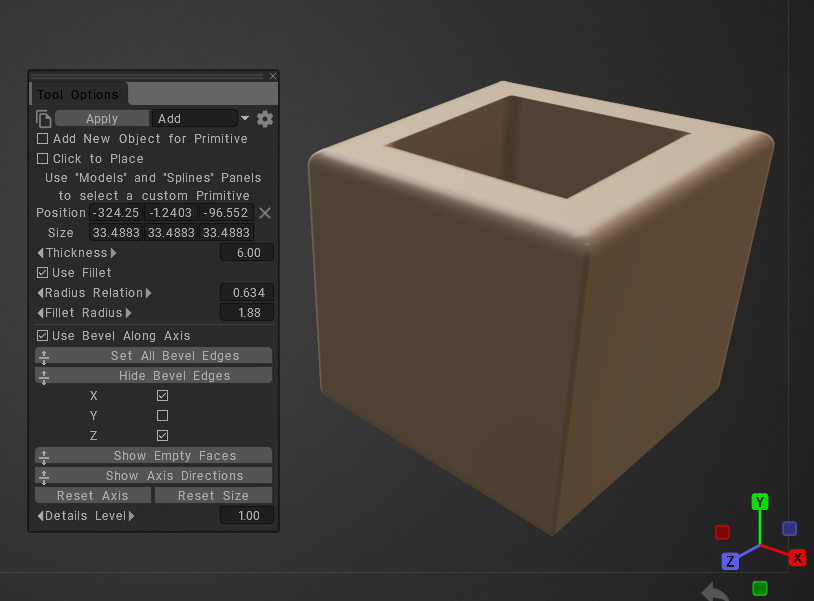
Use Fillet Along Axis Enables fillet generation on edges parallel to the selected axis. Fillet parameters can be specified independently for the X, Y, and Z axis groups, or assigned to predefined axis combinations (X+Y, X+Z, Y+Z, and X+Y+Z). 
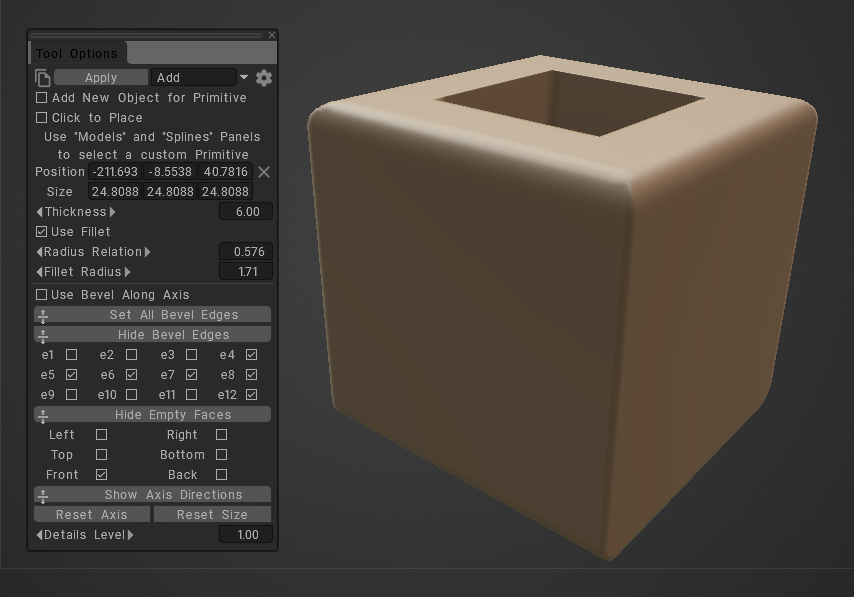
Side Closure State (Solid / Empty Face)Defines whether each side of the box is open or closed

Fillet Applied Along X and Z Axes Example (see picture below).

The generator applies the specified fillet radius to all edges parallel to the X and Z axes. Edges parallel to the Y axis remain unaffected. 
Side Closure Example

You can enable or disable closure independently for each face, allowing any combination of open and closed sides. 
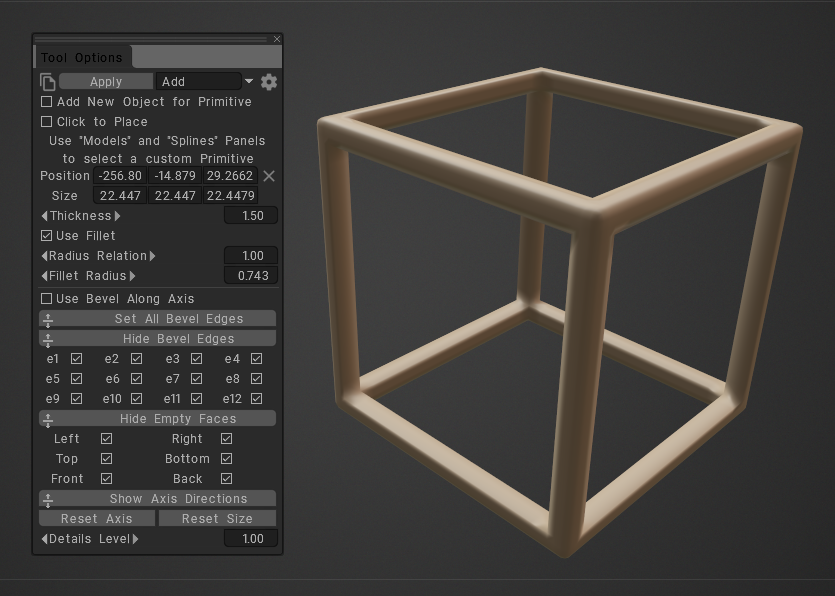
The cardboard box generator supports a wide range of box styles and dimensions.

Furthermore, the generator procedurally creates all geometry from the specified parameters, allowing rapid creation and modification of cardboard box designs without manual mesh editing.

Was this helpful?

Yes  No
Related Articles
  • GPU Texturing
  • Vector
  • Volumes
  • Modifiers
  • Materials
  • Masks
Previously
Voxel Primitives og Import
Up Next
Levende booleanere
AI:
Hi! How can I help you?
Attention: This is a beta version of AI chat. Some answers may be wrong. See full version of AI chat