• Italiano
  • Documentazione 3DCoat
  • Chapters
    • Introduzione a 3DCoat
    • Iniziare
    • Interfaccia e navigazione
    • Componenti Brush
    • Aree di lavoro Stanze
    • Scripting e Core API
    • Domande e risposte
    • licensing
    • Tutorial di formazione
  • Pilgway
  • Products
    • 3DCoat
    • 3DCoatTextura
    • 3DCoatPrint
    • PBRLibrary
  • Blog Posts
  • Store
  • Italiano Italiano
    • English English
    • Українська Українська
    • Español Español
    • Deutsch Deutsch
    • Français Français
    • 日本語 日本語
    • Русский Русский
    • 한국어 한국어
    • Polski Polski
    • 中文 (中国) 中文 (中国)
    • Português Português
    • Suomi Suomi
    • Svenska Svenska
    • 中文 (台灣) 中文 (台灣)
    • Dansk Dansk
    • Slovenčina Slovenčina
    • Türkçe Türkçe
    • Nederlands Nederlands
    • Magyar Magyar
    • ไทย ไทย
    • हिन्दी हिन्दी
    • Ελληνικά Ελληνικά
    • Tiếng Việt Tiếng Việt
    • Lietuviškai Lietuviškai
    • Latviešu valoda Latviešu valoda
    • Eesti Eesti
    • Čeština Čeština
    • Română Română
    • Norsk Bokmål Norsk Bokmål
  • Creating 3D Character Using 3DCoat
  • Documentazione 3DCoat
  • Chapters
    • Introduzione a 3DCoat
    • Iniziare
    • Interfaccia e navigazione
    • Componenti Brush
    • Aree di lavoro Stanze
    • Scripting e Core API
    • Domande e risposte
    • licensing
    • Tutorial di formazione
  • Pilgway
  • Products
    • 3DCoat
    • 3DCoatTextura
    • 3DCoatPrint
    • PBRLibrary
  • Blog Posts
  • Store
  • Italiano Italiano
    • English English
    • Українська Українська
    • Español Español
    • Deutsch Deutsch
    • Français Français
    • 日本語 日本語
    • Русский Русский
    • 한국어 한국어
    • Polski Polski
    • 中文 (中国) 中文 (中国)
    • Português Português
    • Suomi Suomi
    • Svenska Svenska
    • 中文 (台灣) 中文 (台灣)
    • Dansk Dansk
    • Slovenčina Slovenčina
    • Türkçe Türkçe
    • Nederlands Nederlands
    • Magyar Magyar
    • ไทย ไทย
    • हिन्दी हिन्दी
    • Ελληνικά Ελληνικά
    • Tiếng Việt Tiếng Việt
    • Lietuviškai Lietuviškai
    • Latviešu valoda Latviešu valoda
    • Eesti Eesti
    • Čeština Čeština
    • Română Română
    • Norsk Bokmål Norsk Bokmål
  • Creating 3D Character Using 3DCoat
Expand All Collapse All
  • Introduzione a 3DCoat
  • Iniziare
    • System requirements
    • Why 3DCoat is Unique?
    • Attivazione di 3DCoat
    • Errore di avvio
      • Startup error Mac
    • Color management
    • Upgrading permanent license
    • Linux Setup
      • Linux initial setup per-user installation
      • Linux initial setup for system
      • Tablet setup
      • To GTK3 from GTK2
    • Struttura delle cartelle
      • Custom documents folder
    • Diverse forme di "risoluzione"
    • Tablet on Window
    • Import ed Export
    • Applinks in 3DCoat
      • Collegamento all'app Blender
        • Blender with the Applink in Linux
      • Blender 4.2/3/4/5 applink
      • Max Applink
      • Houdini applink
      • Lightwave uplink
  • Navigation
    • Finestra di dialogo di apertura (menu di avvio rapido)
    • Pannello di navigazione
    • Fotocamera e navigazione
      • Customize Navigation as Blender
    • Viewport Navigation Gizmo
    • Left tool panel
    •  Activity Bar
    • Navigazione tramite dispositivi 3DConnexion
      • How to compile Spacenavd on non Ubuntu distro
    • Stylus doesn’t work in sculpting
    • Tasti di scelta rapida
  • Interfaccia e navigazione
    • Menù File
    • Menù Modifica
      • Calculate Curvature
      • Calculate Occlusion
      • Light Baking Tool
      • Preferenze
    • Visualizza Menù
    • Simmetria
    • Textures
    • Calculate
    • Menù Livelli
    • Congela il menu
    • Hide
    • Bake
    • Curve 2022
      • Menù Curve
      • Curves Properties RMB
      • Riempi con uno strato di rete
      • Scale of imported curves
    • Menù di Windows
      • Pannelli popup di Windows a schede
      • Cursori
    • Scripts
    • Addons
    • Capture
    • Menù di aiuto
    • Personalizzazione
    • Modifica o crea una nuova stanza
  • Componenti Brush
    • Brush superiore
    • Spazzole uso generale
      • Crea pennelli e decalcomanie
      • Creare alfa dalla scultura attuale
      • Crea un Brush da un oggetto 3D
      • Create brushes based on Curves
      • Load photoshop .abr brushes
    • Colpi
      • Menu a comparsa Curve
    • Opzioni Brush
    • Limitatore di condizioni
    • Pannello a strisce
    • Pannello degli stampini
    • Materiali intelligenti
      • Aggiungi nuove immagini o materiali
      • Attacca un materiale Smart a un livello
      • Import Quixel Material
    • Come creare i preset per il Brush
  • Aree di lavoro Stanze
    • Painting
      • Texture Painting e modalità
        • Painting Per-Pixel
        • Painting di spostamento (micro-vertice)
        • Painting Ptex
        • Painting superficiale (polipittura)
      • Importazione nella stanza Painting
        • Initial CC subdivision
        • UV Set smoothing
        • Sharp (hard) edge
        • Blocca normali
        • Carica il nuovo layout UV dopo le modifiche al modello
        • DAZ Genesis models into 3DCoat
        • ID map
      • Menu dell'area di lavoro Painting
        • Edit menu
        • Menù Texture
          • Strumenti Baking delle trame
        • Nascondere
        • Menu per il Bake Paint
        • Il selettore di colori
      • Barra superiore per la Painting
      • Il pannello Livelli
        • Il pannello di fusione
        • Layer and Clipping Masks
      • Strumenti della stanza Painting
      • Opacità - Trasparenza
      • Modifica l'area di lavoro
        • Strumenti di modifica
        • Esportazione dalla Tweak Room
      • Pannello anteprima maschera/materiale
      • Esportazione dalla stanza Painting
    • Area di lavoro UV
      • Barra superiore UV
      • Pannello strumenti sinistro UV
      • Pannello di anteprima UV
      • Esempio di flusso di lavoro UV
      • Importazione nella stanza UV
      • Esportazione dalla sala UV
    • Retopologia
      • Importazione nella Sala Retopo
      • Retopo Mesh Menu e Bake Menu
        • Modalità specchio virtuale
      • Bake menu
        • Treat Poly Groups as Paint Objects
        • Baking guide
      • Barra superiore
        • Seleziona la geometria
      • Pannello degli strumenti a sinistra nella stanza Retopology
        • Scopo generale e funzione
        • Aggiungi geometria
          • Strumento Tratti in Retopology
        • Strumenti di modifica Retopo
        • Strumenti UV
        • Comandi per la stanza Retopology
      • AUTORETOPO
        • Autopo guide
      • Poli gruppi
    • Scolpire
      • Sculpt Layer
      • Scolpire l'albero
      • Opzioni Brush scultura
      • Top Bar
      • Motore a Brush
      • Sottomenu Geometria
      • Scolpisci il menu "tasto destro".
      • Shader
      • Modalità Voxel
        • Scultura in puro Voxel
        • Densità e risoluzione
        • Motore di argilla
        • Strumenti Voxel
        • Strumenti di superficie su Voxel
        • Strumenti di regolazione Voxel
        • Painting volumetrica
        • Strumenti per gli oggetti Voxel
      • Modalità superficie
        • Strumenti di superficie
        • Strumenti personalizzati di superficie
        • Strumenti di regolazione della superficie
        • Painting superficiale
        • Strumenti degli oggetti di superficie
        • Risoluzione multilivello
          • Multires tools
          • Multires adjust
          • Multires commands
      • Scolpisci le curve
        • Curve spline
        • Splines model creation
      • Spostamento del vettore
      • Strumenti di trasformazione della superficie
        • Strumenti di trasformazione Voxel
        • Instancer
        • Move
        • Pose
        • Fit
        • Reproject
        • Surface Array
      • Primitive Voxel e strumenti Import
      • Booleani in tempo reale
      • Comandi per la stanza Sculpt
      • Import in Sculpt Room
      • Esportazione dalla Sculpt Room
    • Rendering
      • Comparison of different roughness values
      • Funzioni del pannello di rendering
      • Giradischi
      • Fakebake l'illuminazione -non PBR
    • Factures
      • Flusso di lavoro
    • Più semplice
    • Modellazione
      • Mesh Menu
      • Pannello degli strumenti a sinistra nella stanza Modellazione
        • Aggiungi geometria
          • Selezionato
        • Modificare
        • Smart Hybrid
        • UV
          • Comandi
        • Intera maglia
      • Esempio di superficie loft di Fluffy
      • Blocco di Poeboi
      • Import Zbrush Polygroups for UV mapping
    • Kitbash - Creazione rapida di modelli 3D
      • Create kitbash
      • Left tool panel Kitbash
    • 3DPrint
    • Photogrammetry
      • How to install Reality Capture
      • Reality Capture doesn’t show up ?
    • Mesh nella stanza NURBS
    • Nodes
      • Scolpisci la libreria dei nodi degli shader
  • Scripting e Core API
    • Scripting
    • Core API
    • API Python
  • 3DCoatPrint gratuito

Nodes

468 views 0

Written by Carlos
March 21, 2025

On current development step nodes will only work with sculpted objects.

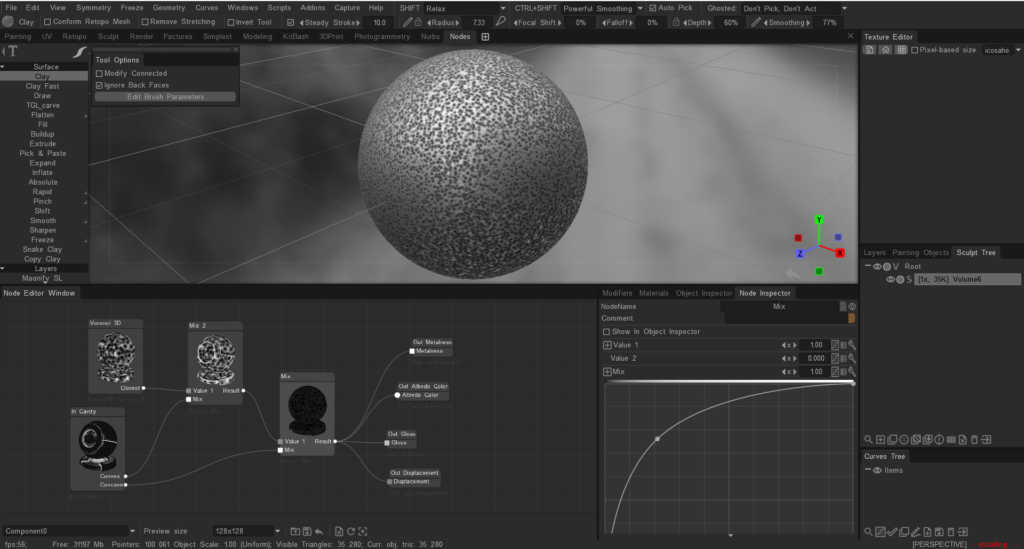
You can use the node system to create voxel displacement (by example) by utilizing the “Nodes” workspace.

Here are the steps:

  • Switch to the “Nodes” workspace.
  • Create a new node graph.
  • Add a “Voxel Displacement” node to your graph.
  • Connect the necessary input nodes, such as texture maps or procedural textures, to define the displacement pattern.
  • Adjust the parameters of the “Voxel Displacement” node to control the intensity and direction of the displacement.
  • Apply the node graph to your voxel object to see the displacement effect. This process allows you to create complex displacement patterns using a visual node-based approach.
The node system for painting is not directly available as it is primarily used for creating shaders and procedural textures.

Painting in 3DCoat is typically done using the tools and features available in the Paint Room, such as brushes, layers, and smart materials.

If you are looking to create complex textures or effects, you can use the existing painting tools and techniques, but the node system is not used for painting directly.

We plan to post a build with a node system for per-pixel texturing on the forum, but it will be a separate .exe file of the beta version, since this is a very big change and it will need to be tested separately.

Was this helpful?

Yes  No
Related Articles
  • Factures
  • ID map
  • Surface Array
  • Top Bar
  • Curves Properties RMB
  • Left tool panel Kitbash
Previously
Mesh nella stanza NURBS
Up Next
Scolpisci la libreria dei nodi degli shader
AI:
Hi! How can I help you?
Attention: This is a beta version of AI chat. Some answers may be wrong. See full version of AI chat