• Español
  • Documentación 3DCoat
  • Chapters
    • Introducción a 3DCoat
    • Empezando
    • Interfaz y Navegación
    • Componentes del Brush
    • Node System
    • Espacios de trabajo Habitaciones
    • Scripting y Core API
    • Preguntas y respuestas
    • licensing
    • Tutoriales de formación
  • Pilgway
  • Products
    • 3DCoat
    • 3DCoatTextura
    • 3DCoatPrint
    • PBRLibrary
  • Blog Posts
    • Creating 3D Character Using 3DCoat
  • Store
  • Español Español
    • English English
    • Українська Українська
    • Deutsch Deutsch
    • Français Français
    • 日本語 日本語
    • Русский Русский
    • 한국어 한국어
    • Polski Polski
    • 中文 (中国) 中文 (中国)
    • Português Português
    • Italiano Italiano
    • Suomi Suomi
    • Svenska Svenska
    • 中文 (台灣) 中文 (台灣)
    • Dansk Dansk
    • Slovenčina Slovenčina
    • Türkçe Türkçe
    • Nederlands Nederlands
    • Magyar Magyar
    • ไทย ไทย
    • हिन्दी हिन्दी
    • Ελληνικά Ελληνικά
    • Tiếng Việt Tiếng Việt
    • Lietuviškai Lietuviškai
    • Latviešu valoda Latviešu valoda
    • Eesti Eesti
    • Čeština Čeština
    • Română Română
    • Norsk Bokmål Norsk Bokmål
  • Documentación 3DCoat
  • Chapters
    • Introducción a 3DCoat
    • Empezando
    • Interfaz y Navegación
    • Componentes del Brush
    • Node System
    • Espacios de trabajo Habitaciones
    • Scripting y Core API
    • Preguntas y respuestas
    • licensing
    • Tutoriales de formación
  • Pilgway
  • Products
    • 3DCoat
    • 3DCoatTextura
    • 3DCoatPrint
    • PBRLibrary
  • Blog Posts
    • Creating 3D Character Using 3DCoat
  • Store
  • Español Español
    • English English
    • Українська Українська
    • Deutsch Deutsch
    • Français Français
    • 日本語 日本語
    • Русский Русский
    • 한국어 한국어
    • Polski Polski
    • 中文 (中国) 中文 (中国)
    • Português Português
    • Italiano Italiano
    • Suomi Suomi
    • Svenska Svenska
    • 中文 (台灣) 中文 (台灣)
    • Dansk Dansk
    • Slovenčina Slovenčina
    • Türkçe Türkçe
    • Nederlands Nederlands
    • Magyar Magyar
    • ไทย ไทย
    • हिन्दी हिन्दी
    • Ελληνικά Ελληνικά
    • Tiếng Việt Tiếng Việt
    • Lietuviškai Lietuviškai
    • Latviešu valoda Latviešu valoda
    • Eesti Eesti
    • Čeština Čeština
    • Română Română
    • Norsk Bokmål Norsk Bokmål
Expand All Collapse All
  • Introducción a 3DCoat
  • Empezando
    • System requirements
    • Why 3DCoat is Unique?
    • Activando 3DCoat
    • error de inicio
      • Startup error Mac
    • Color management
    • Upgrading permanent license
    • Linux Setup
      • Linux initial setup per-user installation
      • Linux initial setup for system
      • Tablet setup
      • To GTK3 from GTK2
      • Error libicuuc.so.70
    • Estructura de carpetas
      • Custom documents folder
    • Diferentes formas de “resolución”
    • Tablet on Window
    • Import y Export
    • Applinks en 3DCoat
      • Enlace de aplicación Blender
        • Blender with the Applink in Linux
      • Blender 4.2/3/4/5 applink
      • Max Applink
      • Houdini applink
      • Lightwave uplink
  • Node System
    • PBM Channels
    • Node Editor
    • Node & Object Inspectors
    • Per-Pixel Painting
    • Node Graph
    • NodeGraph Language (NGL)
    • GPU Nodes
      • Color
      • GeometryIn
      • In
      • Layer
      • Material
      • Out
      • Pattern
      • Pattern3D
      • ShaderToy
      • Shape
      • Texture
      • Tilable
      • UV
      • Vector
    • Filters
    • Masks
    • Materials
    • Modifiers
    • Volumes
  • Navigation
    • Diálogo de apertura (menú de inicio rápido)
    • Panel de navegación
    • Cámara y Navegación
      • Customize Navigation as Blender
    • Viewport Navigation Gizmo
    • Left tool panel
    •  Activity Bar
    • Navegación con dispositivos 3DConnexion
      • How to compile Spacenavd on non Ubuntu distro
    • Space Bar Menu
    • Stylus doesn’t work in sculpting
    • Teclas de acceso directo
  • Interfaz y Navegación
    • Menú Archivo
    • Menú de edición
      • Calculate Curvature
      • Calculate Occlusion
      • Light Baking Tool
      • preferencias
    • Ver menú
    • Simetría
    • Textures
    • Calculate
    • Menú de capas
    • Menú de congelación
    • Hide
    • Bake
    • Curvas 2022
      • Menú Curvas
      • Curves Properties RMB
      • Rellenar con capa de malla
      • Scale of imported curves
    • Menú de ventanas
      • Paneles emergentes de Windows con pestañas
      • Controles deslizantes
    • Scripts
    • Addons
    • Capture
    • Menú de ayuda
    • personalización
    • Modificar o Crear nueva Sala
  • Componentes del Brush
    • Barra superior de Brush
    • Cepillos uso general
      • Crear pinceles y calcomanías
      • Hacer alfa a partir de la escultura actual
      • Crear un Brush a partir de un objeto 3D
      • Create brushes based on Curves
      • Load photoshop .abr brushes
    • trazos
      • Menú emergente de curvas
    • Opciones de Brush
    • Limitador de condiciones
    • Panel de tiras
    • Panel de plantillas
    • Materiales inteligentes
      • Agregar nuevas imágenes o materiales
      • Adjuntar un material inteligente a una capa
      • Import Quixel Megascans
    • Cómo crear ajustes preestablecidos para Brush
  • Espacios de trabajo Habitaciones
    • Painting
      • Painting de texturas y modos
        • Painting Per-Pixel
        • Painting de desplazamiento (Micro-Vertex)
        • Painting Ptex
        • Painting de Superficies (Polipintura)
      • Importación a la sala de Painting
        • Initial CC subdivision
        • UV Set smoothing
        • Sharp (hard) edge
        • Bloquear normales
        • Cargar nuevo diseño UV después de cambios de modelo
        • DAZ Genesis models into 3DCoat
        • ID map
      • Menús del espacio de trabajo de Painting
        • Edit menu
        • Menú Texturas
          • Herramientas Baking texturas
        • Esconder
        • Menú para la Bake Paint
        • El selector de color
      • Surface Materials
      • Barra superior para la Painting
      • El panel de capas
        • El panel de fusión
        • Layer and Clipping Masks
      • Herramientas de la sala de Painting
      • Opacidad - Transparencia
      • Ajustar el espacio de trabajo
        • Conjunto de herramientas de ajuste
        • Exportación desde Tweak Room
      • Panel de vista previa de máscara/material
      • Exportación desde la sala de Painting
    • Espacio de trabajo UV
      • Barra superior UV
      • Panel de herramientas izquierdo UV
      • Panel de vista previa UV
      • Ejemplo de flujo de trabajo UV
      • Importación a la sala UV
      • Exportando desde la Sala UV
    • Retopología
      • Importando a la Sala Retopo
      • Menú Malla Retopo y Menú Hornear
        • Modo espejo virtual
      • Bake menu
        • Treat Poly Groups as Paint Objects
        • Baking guide
      • Herramienta Trazos en Retopología
      • Barra superior
        • Seleccionar geometría
      • Panel de herramientas izquierdo en la sala de Retopología
        • Propósito general y función
        • Agregar Geometría
        • Herramientas de ajuste Retopo
        • Herramientas UV
        • Comandos para sala de Retopología
      • AUTORETOPO
        • Autopo guide
      • Grupos polivinílicos
    • Esculpir
      • Sculpt Layer
      • Esculpir árbol
      • Opciones de Brush para esculpir
      • Top Bar
      • motor de Brush
      • Submenú Geometría
      • Esculpir menú de "clic derecho"
      • sombreadores
      • modo Voxel
        • Escultura pura de Voxel
        • Densidad y Resolución
        • Motor de arcilla
        • Herramientas de Voxel
        • Herramientas de superficie en Voxels
        • Herramientas de ajuste de Voxel
        • Painting volumétrica
        • Herramientas de objetos de Voxel
      • modo de superficie
        • Herramientas de superficie
        • Herramientas personalizadas de superficie
        • Surface Layer
        • Herramientas de ajuste de superficie
        • Painting de superficies
        • Herramientas de objetos de superficie
        • Resolución multinivel
          • Multires tools
          • Multires adjust
          • Multires commands
      • Esculpir curvas
        • Curvas Spline
        • Splines model creation
      • Desplazamiento vectorial
      • Herramientas de transformación de superficies
        • Herramientas de transformación de Voxel
        • Instancer
        • Move
        • Pose
        • Fit
        • Reproject
        • Surface Array
      • Primitivas de Voxel y herramientas de Import
      • Booleanos en vivo
      • Comandos para la sala Sculpt
      • Import a Sculpt Room
      • Exportación desde Sculpt Room
    • Prestar
      • Comparison of different roughness values
      • Funciones del panel de procesamiento
      • Placa giratoria
      • Fakebake la iluminación -sin PBR-
    • Factures
      • flujo de trabajo
    • más simple
    • Modelado
      • Mesh Menu
      • Panel de herramientas izquierdo en la sala de modelado
        • Agregar geometría
          • Seleccionado
        • Retocar
        • Smart Hybrid
        • UV
          • Comandos
        • Malla entera
      • Ejemplo de superficie loft de Fluffy
      • Bloqueo por Poeboi
      • Import Zbrush Polygroups for UV mapping
    • Kitbash - Creación rápida de modelos 3D
      • Create kitbash
      • Left tool panel Kitbash
    • 3DPrint
    • Photogrammetry
      • How to install Reality Capture
      • Reality Capture doesn’t show up ?
    • Malla a habitación NURBS
    • Nodes
      • Sculpt shaders Biblioteca de nodos
      • Open PBR
  • Scripting y Core API
    • Core API
    • API de Python
    • Extensions and Addons
  • 3DCoatPrint gratis

Node System

122 views 0

Written by Volodymyr Makovetskyi
May 14, 2026

What is the Node System?

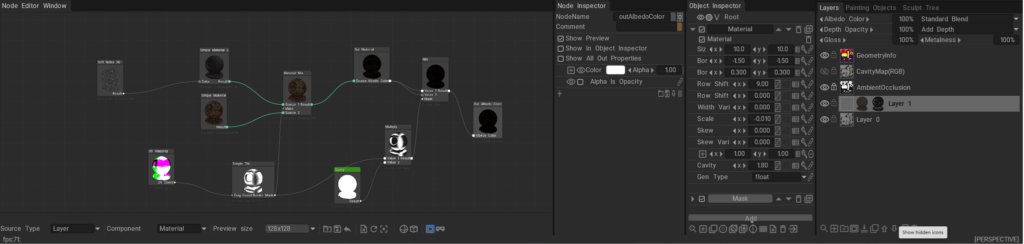
The 3DCoat Node System is a powerful, non-destructive procedural engine designed to create complex materials, masks, geometry deformers, and visual effects without relying on static bitmap textures.

Instead of drawing pixels destructively, you connect mathematical operations, procedural noises, and geometry inputs (nodes) together in a visual graph. Under the hood, these node graphs are dynamically compiled into highly optimized GPU shaders (using NGL – NodeGraph Language), allowing for real-time calculation and rendering. This results in resolution-independent assets that can automatically adapt to the curvature, ambient occlusion, and physical space of your 3D models.
Documentation Index

This directory (docs/) serves as the central repository for all documentation related to the 3DCoat Node System. Below is a guide to what you will find in each file and sub-directory.

Core User Guides

These guides explain the fundamental concepts, interface, and workflows of the Node System.

  • Node System User Guide: The foundational manuals for artists. They explain how to use the Node Editor, connect nodes, work with procedural materials, and understand the overall procedural workflow.
  • Node Editor Documentation: A detailed breakdown of the Node Editor interface itself, including navigation, node management, connection logic, and UI features.
  • Inspectors & Properties Documentation: Explains how to interact with the Node Inspector and Object Inspector. It covers how properties (like 1D curves, color pickers, and sliders) are exposed from the node graph to the user interface for quick artist tweaking.
  • PBM Channels Documentation: Documentation on Physically Based Material channels within the node system, explaining how procedural data flows into Albedo, Gloss, Metalness, and other PBR specific rendering targets.

Node References & Languages

Deep dives into the specific building blocks and the shader language that powers them.

  • GPU Nodes Overview: An introduction to what GPU Nodes are, how they interact with the GPU, and a high-level summary of node categories.

Preset Libraries

Guides on how complete, ready-to-use node graphs are categorized, stored, and applied in the software.

  • NGPresets: Contains documentation for the five main preset windows in 3DCoat that utilize node graphs:
    • NGMasks: Procedural, resolution-independent smart masks.
    • NGMaterials: Full procedural Smart Materials.
    • NGModifiers: Geometry deformers and displacement map generators.
    • NGFilters: Procedural post-processing filters for modifying existing layers.
    • NGVolumes: True 3D volumetric textures (like solid wood or marble) that evaluate in 3D space and ignore UV seams entirely.

Was this helpful?

Yes  No
Related Articles
  • Vector
  • Volumes
  • Modifiers
  • Materials
  • Masks
  • Filters
Previously
Lightwave uplink
Up Next
PBM Channels
AI:
Hi! How can I help you?
Attention: This is a beta version of AI chat. Some answers may be wrong. See full version of AI chat